i don't know what you guys did

but nothing works anymore. online billers. broken. web connect for all my accounts? broken. at this point i have a digital sketchpad where i have to manually input everything. it looks pretty, but all the features i paid for no longer work. i keep getting this banner that you switched to more reliable system. In my experience, its just been reliably failing. I know I can count on that. I used to be able to get my finances done every day in a matter of minutes, Now I find myself endlessly searching forums for tips and tricks to do the simplest of things that used to work.
Comments
-
Hello @producerflie,
Thank you for reaching out! I'm sorry to hear you're encountering so many issues. So that we can better assist, please provide more details exactly what problems you're encountering. What is happening with your online billers? Are they unable to connect, no longer supported, or is something else happening? Are you seeing any specific error messages? If not, what are you seeing?
What connection issues are you encountering when trying to update your accounts? When I checked our internal tools, it looks like you've been seeing a CC-506 error with Bank of Oklahoma N.A. and an invalid/expired token error with Capital One Card Services. Is that what you are seeing on your end?
If it is, then to troubleshoot the CC-506 error with Bank of Oklahoma N.A., please backup your Quicken file, then follow these steps from our article on CC-506 errors:
Refresh your account information
- From your account register, select the Actions gear icon at the very top of your register (Ctrl + Shift + N).
- Then select Update Now.
- Follow the on-screen instructions to complete the update.
- If the problem persists, continue with the procedures below.
Deactivate all accounts for this financial institution, then force Quicken to "discover" all available accounts:
- Open the Account List in Quicken (Tools > Account List OR Ctrl + A).
- If present, select the Show Hidden Accounts checkbox at the bottom of the Account List.
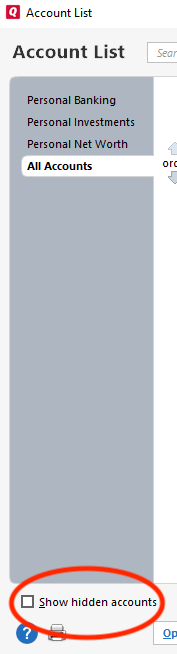
- Edit each account with this financial institution to Deactivate (or Remove From One Step Update) on the Online Services tab.
- When finished, close the Account List.
- Close, then re-open Quicken.
- Click the Add Account button at the bottom of the Account Bar on your main view.
- Walk through this process as if you were going to add a new account, providing the login credentials and answering any security questions/processes presented, UNTIL you reach the screen where Quicken displays the Accounts Discovered at the financial institution.
- Very carefully LINK each of the found accounts to the appropriate account you already have set up in Quicken.
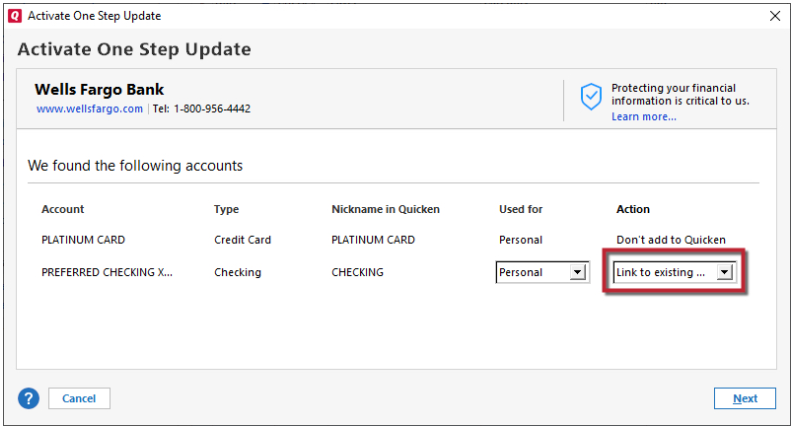
If the account was closed, deactivate it from future online updates
- Choose Tools menu > Account List.
- Click the Edit button next to the account you want to deactivate.
- In the Account Details dialog, click the Online Services tab.
- Click Deactivate to stop downloading transactions for this account.
For the invalid/expired token issue, please follow these steps from our article on CC-901/902/903 errors:
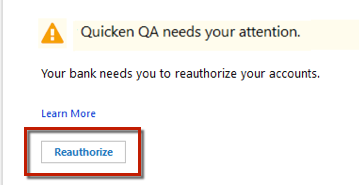
If you are getting a Reauthorize prompt, please follow these steps:
- Click Reauthorize.
- On the next dialog, click Sign In.
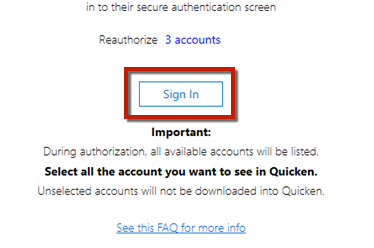
- Enter your bank username and password and click Sign In.
- Select the accounts you want to authorize to connect and click Authorize.
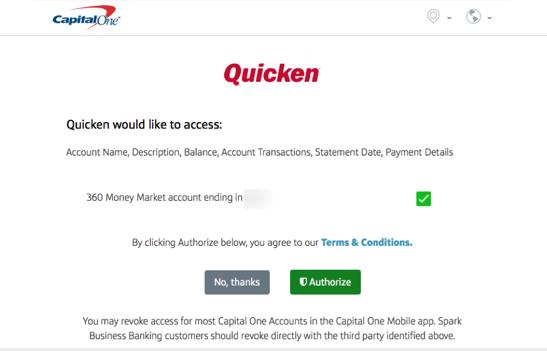
- When complete, you will see the Success message.
If you are not getting a reauthorize prompt, or the steps above do not resolve the issue, then please deactivate and reactivate the problem account(s) to resolve the issue. For instructions on how to do this, please use the article linked below:
I look forward to your reply!
Quicken Kristina
Make sure to sign up for the email digest to see a round up of your top posts.
1 -
Hello @producerflie,
There is now a Community Alert for the CC-506 errors with Bank of Oklahoma. To be notified of any updates, once available, and know when the issue is resolved, please bookmark the Community Alert linked below:
Thank you!
Quicken Kristina
Make sure to sign up for the email digest to see a round up of your top posts.
0

Categories
- All Categories
- 16 Product Ideas
- 34 Announcements
- 248 Alerts, Online Banking & Known Product Issues
- 20 Product Alerts
- 517 Welcome to the Community!
- 682 Before you Buy
- 1.5K Product Ideas
- 55.6K Quicken Classic for Windows
- 16.8K Quicken Classic for Mac
- 1K Quicken Mobile
- 834 Quicken on the Web
- 126 Quicken LifeHub