7 Accounts throwing CC-501 errors

Yesterday OSU was working fine. Today, I have 7 accounts throwing CC-501 errors. Also, the "Report a problem" link at the top right of the OSU summary screen is now a broken link and hasn't worked for a couple of weeks now. So, I can't even report the issues to you. These constant issues with CC-501 errors occur ALL THE TIME. One day everything updates and the next dayOSU crashes. You really need to spend some time addressing the instability of these software issues. In addition, the system is so slow now when moving from one task/entry/link to another it takes forever to get things done. I'm a 30+ year customer and the state of the software has gotten completely ridiculous over the past 5+ years. [Removed - Disruptive]
Comments
-
Hello @Lisamar,
Thank you for sharing your experience. The CC-501 error generally occurs when Quicken is unable to connect to your bank accounts to download recent transactions.
The recommended approach is to wait 24 hours and then try again. If the issue persists beyond that, please contact Quicken Support directly so our support agents can review your logs and escalate if needed.
For full context and guidance, please refer to this support article.
Thank you!
-Quicken Anja
Make sure to sign up for the email digest to see a round up of your top posts.0 -
I don't think that is the issue. All the downloaded transactions from the last OSU were accepted. Everything was fine. It just seems some days it works and other days it doesn't. More often than not, there are issues with one or more accounts connecting. I've tried shutting it down and reopening and running OSU but the problem persists. I've tried waiting one, two, three days, weeks, etc., but seem to run into these errors regularly no matter the circumstances. And as always, the system itselft is just brutally slow. As I said, these are systemic issues that appear regularly.
0 -
@Lisamar Thank you for following up and providing those additional details—I understand how frustrating it can be when these errors keep happening.
Since you’re experiencing these multiple and erratic issues with One Step Update, I recommend signing out of your Quicken data file completely and then signing back in to refresh the registration token for your Online Connected Services. Before doing this, please make sure you save a backup of your file first.
Then follow these steps:
- Go to File > Validate and Repair File
- Check the Validate file box and click OK
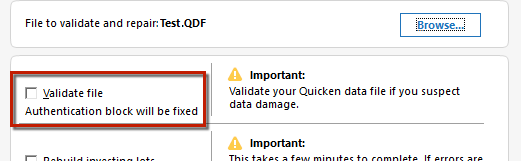
- Navigate to Edit > Preferences > Quicken ID & Cloud accounts
- Click Sign in as a different user (or it might say Sign in using a different Quicken ID)
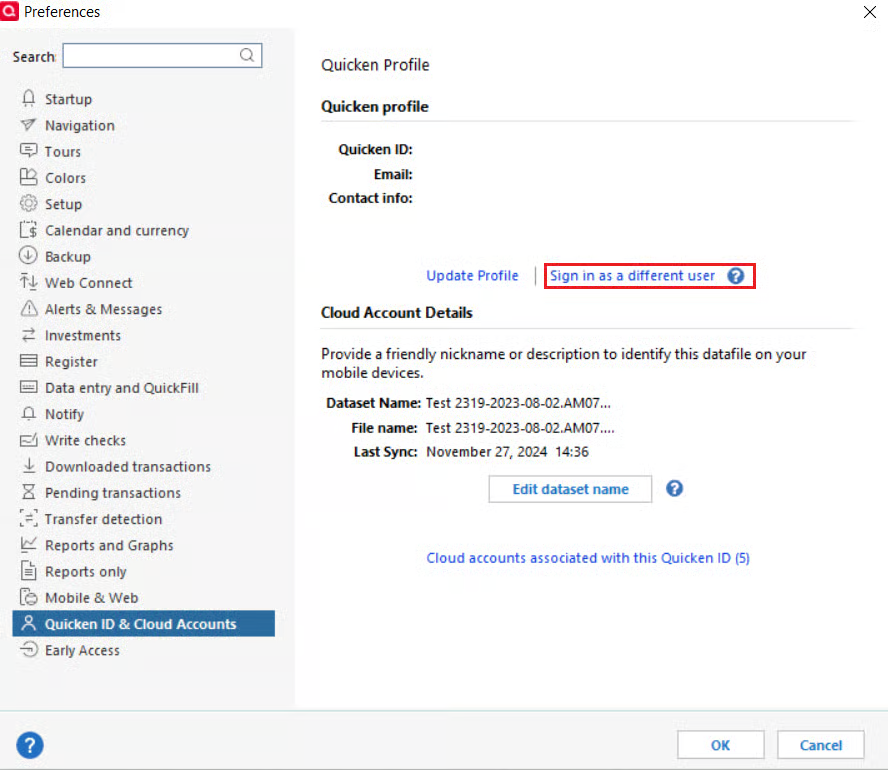
- Follow the prompts to Sign out
- Sign back in using your Quicken ID (email) and password
If the issue continues even after completing these steps, please let us know, and we can pursue further troubleshooting.
Thank you!
-Quicken Anja
Make sure to sign up for the email digest to see a round up of your top posts.0 -
I am also experiencing these same issues. Seeing nearly all my accounts returning CC-501 errors even though transactions actually download. What appears to mess up is the bill fetching function as all the bills for these account show a "fix it" button. Bills has been completely a mess since the recent software updates. I've yet to see it work consistently even though I have reset all accounts, validated and super validated my file many times. The issue doesn't rectify. I also experience an incredible hang in trying to do most functions, from switching accounts to entering transactions. But especially brutal, trying to do anything on the bills screen. Forget about that, just trying to bring up a dialog box takes a minute or more. Try to enter something and the program hangs for 2-5 minutes each attempt. Also a long time user of the product, 25+ years, though possibly mu last one as the product has done nothing but degrade for many years now.
0
