problem categorizing transactions

I have 2 bank accounts and 2 credit cards all with the same bank. quicken frequently applies the incorrect category to transactions (e.g. applying an automatic credit card payment to the incorrect bank account). Quicken lists the Payee as the same for the accounts. Sometimes quicken categorizes an automatic payment as "Bills & Utilities:Credit Card Payment" and does not enter a corresponding entry in the checking account.
Things I tried:
- Memorized payee list. didn't work (because the payee is the same for each bank account?)
- Renaming rules
- calling customer service
Is there a way to fix this so I don't have to manually each transaction?
Answers
-
The only way I can think of is by making sure that each transfer transaction pair (e.g., ABank Checking to ABank Card) has a Payee Name that is unique and distinct from the other transfer transaction pair, e.g., "ABank Card Payment".
Then, when credit card payment transactions become due, manually record each before the due date and before you download transactions from each account containing the payment confirmation.
When the confirmations download, you already have a correctly named and categorized pair of transfer transactions. Upon download, Quicken will be able to match the just downloaded transaction to the one that already exists in your register and not cause any problems.Waiting for Quicken to try to make sense of downloaded transfer transactions using conflicting payee names … that's not going to work. Even an AI would have problems with that. Manually (or with scheduled reminders) recording these transfers works best, IMHO. That's what I've been doing for many years, without problems.
0 -
Whereas I agree with @UKR that pre-entering the transfers is probably the best method I have found something that works for me given the new features for the Memorized Payees.
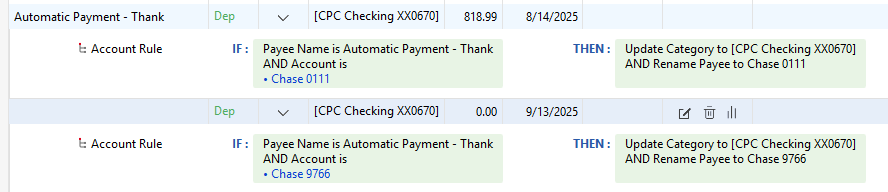
Note that for me the transactions always hit the credit card accounts a day or so before the checking account and I download daily so that these rules kick in before the transaction hits the checking account, and as such is just a match to the existing transfer transaction that the above rule creates.
If you need a reminder for the budget or projected balances, then it would probably just be better to use the reminder and change the transaction to the right amount when it is known like @UKR does.
Signature:
This is my website (ImportQIF is free to use):0


Categories
- All Categories
- 49 Product Ideas
- 34 Announcements
- 244 Alerts, Online Banking & Known Product Issues
- 22 Product Alerts
- 514 Welcome to the Community!
- 679 Before you Buy
- 1.4K Product Ideas
- 55.5K Quicken Classic for Windows
- 16.8K Quicken Classic for Mac
- 1K Quicken Mobile
- 829 Quicken on the Web
- 125 Quicken LifeHub