zzz-Fidelity Updates
Comments
-
Windows 11
Quicken Classic Premier Version R64.30 Build 27.1.64.30 I've been a Quicken user for years with a number of Fidelity accounts as well as other accounts. My download experiences have been spotty but overall, the software has worked fairly well for me.
However ——-
I attempted to update my Fidelity accounts using Direct Connect yesterday (10/10/2025). I received an error message (OL-297-A) Quicken is Unable to Establish an Internet Connection. (All NON-Fidelity accounts were updated properly)
I attempted to update again today and received the same error message. (And all other NON-Fidelity accounts were updated as usual)
I then assumed that I would need to move to the new Update methodology. I have now tried that twice this morning and after logging into my account (as requested) I'm receiving an error message that the service is not available.
Aside from maintaining a current backup (which I have done), I'm not sure what my next action should be.
0 -
@Bob. On your last point for Qwin: I resolve it by deleting EWC+ created "Deposit Long-term Cap Gain" line, replacing it by correct CGLong accounting:

Under EWC+, this happens for all Capital Gains transaction downloads (short, medium, long) and has been part of regularly required maintenance since July mentioned earlier. Compared to this relatively minor issue, the Fidelity Netbenefits 401(k)/403(b) transaction issues are noticeably larger, though.
0 -
Is CGLONG in the drop-down? That is what is showing as Action for my Long Term Cap Gains
Deluxe R66.23, Windows 11 Pro
0 -
It is not. Is it in drop down for you @leishirsute ?
0 -
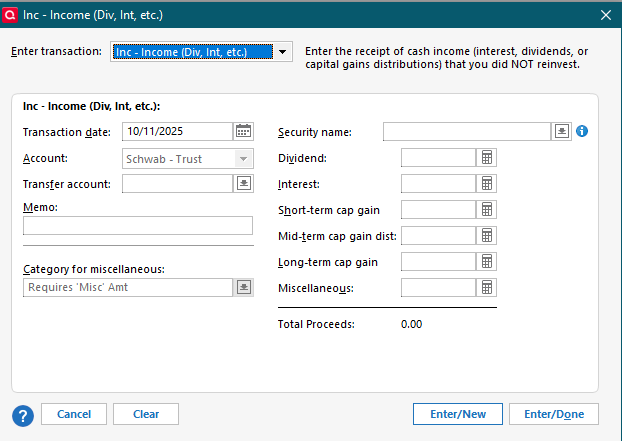
@Bob. In order to get access to Quicken Capital Gains accounting lines, you first have to delete the downloaded Deposit transaction from your register and manually create a completely new account line, which inter alia will provide you with the following options:

As you mentioned, you won't see capital gains options under the Deposit drop down. I hope this is of help!
1 -
Thanks. Will give it a go. Can I add a new line before deleting the old in case I make a mistake somewhow? Will try.
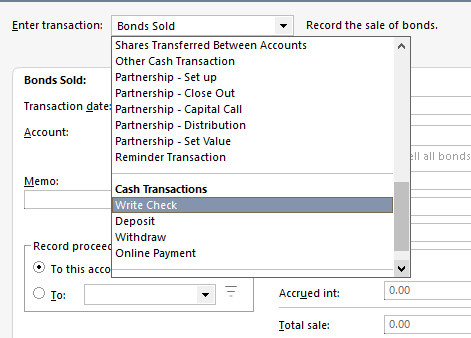
For the record, these are my choices to replace "deposit" Odd CGLONG would not be there!


 0
0 -
In Windows, don't click on the dropdown in the Transaction List (Register) to edit the Deposit transaction. Right click on the transaction and select Edit, or select the transaction then click on the Edit button at the right. Depending on your column widths, you may need to scroll to the right to see the Edit button.
Then scroll up in the selections to "Inc - Income" and make the changes there.
QWin Premier subscription0 -
@Bob. Yes, you can add the new manual CGlong transaction first, no problem. Just make sure to delete the EWC+ created Deposit line in the process. And yes, as mentioned the Deposit drop down does not include Capital Gains transaction options, as mentioned above. Best of luck!
0 -
FWIW, I am still able to use DC for all all of my Fidelity accounts, including retirement as of October 11. My intention is to continue to do so. It seems like EWC+ still has problems with both regular brokerage and retirement accounts, and I don't have the time or capacity to make manual corrections (I like Quicken because it does/did this automatically!). I'll continue to wait until more people identify it as fixed.
I truly appreciate everyone that tries EWC+. If it weren't for your efforts, the rest of us would have lost the ability to track Fidelity accounts, which would be especially troubling given the market movements in the past 60 days.
For Quicken, I really hope they make some real changes to their operations so that these issues don't happen again.
1 -
OK @HKB Thanks!!
I did have to delete and recreate by hand from scratch. It did work. But what a kludge and how would anyone ever know to do that??
In Mac, BTW, only had to edit the "deposit" drop down and it all fell into place. Much cleaner.
But @quicken folks, this has to be a bug that should be dealt with on both platforms.
1 -
@Bob. I agree. You are very welcome! You also can follow the process suggested by @Jim_Harman and edit. I personally find it quicker to simply replace it, either way will work.
0 -
Thanks Jim. Done now, but would have been nice to try that to see CGLONG pop-up. Next time :) I'm sure there will be a next time!
0 -
OK, now if I could only clear that Placeholder I could have almost 2 days of Quicken working properly :)
0 -
Thanks. I found that after testing"edit" rather than trying the inline drop downs.
0 -
@Bob. Here is some background on Placeholders in QWin. Please post back with specific questions if needed.
To make Placeholders visible, go to Edit > Preferences > Investments and make sure the “Show hidden transactions” box is checked.
Placeholders will have a gray background in the account’s transaction list (register) even if they are not selected, and will have “Entry” in the Action column.
Placeholders compensate for missing, duplicate, or incorrect investing transactions by forcing Quicken’s share balance for a security to match a specified value on the date of the Placeholder. This is usually the share count downloaded from your financial institution (FI).
Because earlier transactions are missing or incorrect, Quicken will not be able to compute the cost basis or performance for the affected securities. You will see asterisks in the Portfolio views for this data.
Often Placeholders are due to rounding errors in the downloaded data, so for example you will see a Placeholder that adjusts the share balance by .0013 share following a dividend reinvestment. In this case you can adjust the number of shares in the Reinvest transaction so that the Placeholder is zero, then delete the Placeholder.
Placeholders also prevent new transactions like Div, Bought and Sold prior to the security’s Placeholder date from affecting the account’s cash balance. This shows up as N/A in the Cash Amt column of the transaction list. Quicken does this by creating a linked Cash Balance Adjustment just before the affected transaction. Deleting one of the transactions will delete them both.
To allow the cash balance to change when entering or editing missing transactions that affect the cash balance, you must first delete all the Placeholders in the account for this security that have later dates than the transaction you are entering. Because of this, if you are entering or editing a series of missing transactions it will be easiest to work in reverse chronological order.
Always back up your data file before changing historical transactions.
For more information on resolving placeholders, please see this FAQ:
QWin Premier subscription0 -
Thanks @Jim_Harman. I actually have read all that and more. Nothing makes sense or works for me.
Here is what I believe. And again just need to say Quicken Mac got this right :) Unsure where the difference would be.
Somewhere in 2018, before I knew that there were core accounts or sweep accounts, I had SPAXX as a security. I later made sure it was my Cash Account and all good until this EWC+ changeover.
This placeholder correctly shows I hold 0 shares in Government Money Market and my Cash Balance is accurate. If I delete the placeholder, it adds back holdings in GMM. Nothing i try to edit removes the placeholder and keep cash and holdings accurate.
Helpful?
0 -
Similar to user @ciarmer my three (3) zzz-Fidelity Investments DC update accounts stopped working today (Saturday 10/11/25) and had worked perfectly as recently as yesterday morning. I receive the OL-297a "Can't connect" error message. Other Fidelity accounts on the other update method seem to be working fine. Any thoughts or suggestions truly appreciated.
I'm a decades-long Quicken for Windows "Premier" user R53.32 version, build 27.1.53.32, running on Windows 10 home if any of that is useful.
0 -
If I delete the placeholder, it adds back holdings in GMM. Nothing i try to edit removes the placeholder and keep cash and holdings accurate.
@Bob. What that means is that as of the Placeholder date, Quicken was showing XXX shares of GMM but Fidelity was reporting zero shares. You can see this by clicking on Holdings in the account and setting the As of date to the day before the Placeholder. The Placeholder forces the shares in Quicken to zero. You will probably also see a Cash Balance Adjustment (an XIn from the account back to itself) of $XXX around that same date. This sets the cash balance in Quicken to the same as the number of shares that were previously reported.
To make the account balance, you should delete both the Placeholder and the self-transfer, then enter a Sold for the XXX shares of GMM at $1.00 for the same date as the Placeholder.
This will leave the cash in GMM up to the date of the Placeholder you deleted and Cash after that.
Be sure to back up your file first, in case something goes wrong.
QWin Premier subscription0 -
My advice (my opinion anyway), for @berryjt and anyone else still battling download issues after all this time:
Quicken Version - Get on the latest Quicken version available to you … R53.32 that @berryjt indicates seems pretty far behind the R64.30 I'm running, which is the latest available, or so says my Quicken Windows Classic Premier / Help / Check for Updates
Windows Version - After October 14, 2025, Microsoft will no longer provide free software updates from Windows Update, technical assistance, or security fixes for Windows 10. Your PC will still work, but Windows 11 offers a modern and efficient experience designed to meet current demands for heightened security. If that means a new PC for you, get the maximum RAM that you can. Quicken and other relevant software have a fighting chance of running smoothly if you provide enough resources.
Just Do It - Continuing the resistance to accepting EWC+ with Fidelity will only compound your work. This thread has more than ample evidence of the futility of that resistance. Clean up the mess of duplicate transactions, or whatever complication emerges when you transition and move on. Waiting and hoping Quicken and/or Fidelity are going to fix this for you is futile.
Continuous Quicken user since ~1990, but growing increasingly weary of the fiddling and futzing necessary to keep it useful.
1 -
Interesting @Jim_Harman. I think you are correct. Since the transfer is a different amount that the placeholder shares, I think it will not quite match. Will try.
OK. you are right. However after deleting both and trying to create a sold, no amount I put in for shares works as I suspected! Either the Cash Balance is off or the total holdings is off. I tried both numbers below the XIN and Placeholder and not balancing to Fidelity.
I reverted back to this:

Appreciate you helping me through this.
0 -
Just thinking, perhaps needs two corrections? The sold for amount of placeholder and _____________?
0 -
Ok, tried your suggestions again.
Deleted the XIN and Placeholder. Did a Sold for 3127.93 shares at $1.
Now cash balance AND Total Holdings both low by $166.92. What king of entry do I need to make? Deposit Cash? Other?
0 -
This is a long-time issue (years long) with Quicken that also occurs with DC. It is not a Quicken issue because this is how Fidelity downloads the data.
I see you have 3 different transactions in your register for this security:
- Long-term capital gains distribution
- Dividend
- Bought
I have this same issue with 2 securities. This was downloaded via EWC+ this morning. (DC was getting a OL-293-A error code and Update Now did not resolve that issue so I'll need to wait and try OSU again later. This error code often comes up with the FI is doing some sort of system maintenance so when Update Now does not work it means we just have to be patient and try again later.)
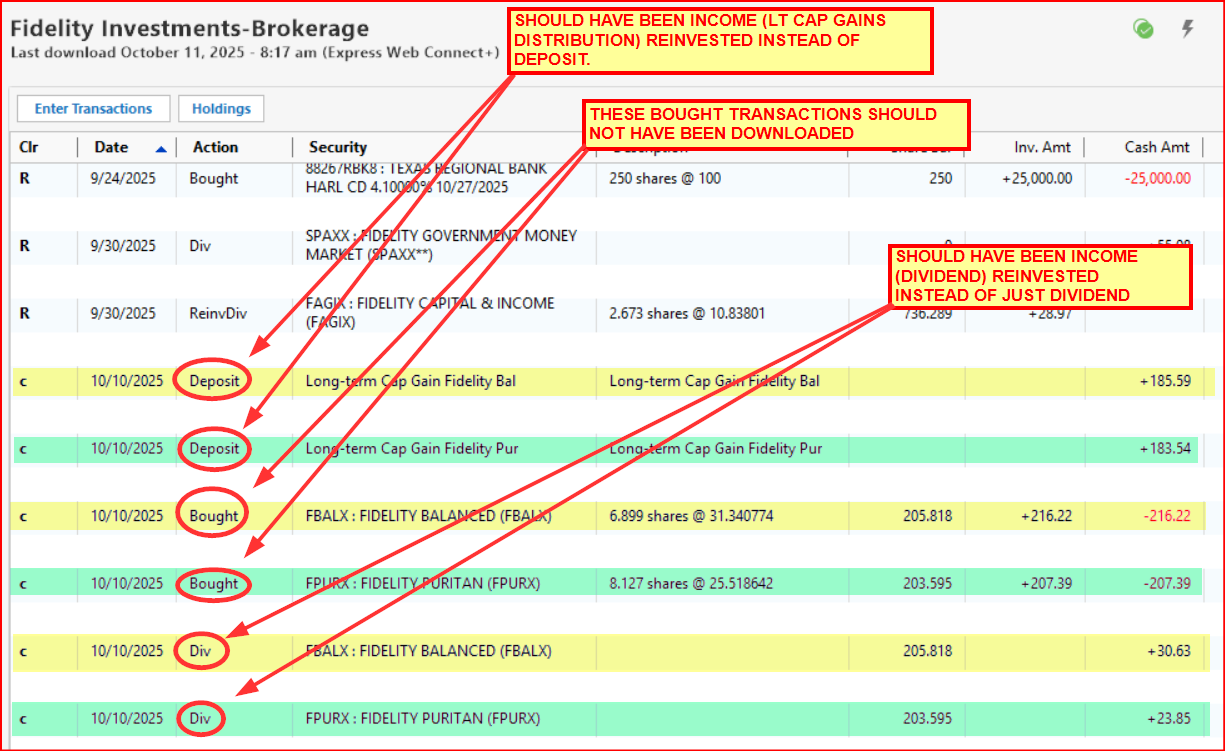
The only way to fix this that I know of:
- Backup the data file.
- Change the Bought transaction to an Income - Reinvest (Income) transaction.
- Enter the Long-term Cap Gain Distribution shares into that transaction.
- Enter the Dividend distribution shares into that transaction.
- Enter the bought price for both into that transaction.
- Delete the Deposit and Div transactions.
Alternatively you can do the following but it can be more difficult to know how to split up the shares of the Bought transaction between the Long-term Cap Gains Distribution transaction and the Div transaction.:
- Delete the Bought transaction (but make note of the bought price and shares).
- Change the Long-term Cap Gains Distribution transaction from Deposit to Income - Reinvest (Income).
- Change the Div transaction from Deposit to Income - Reinvest (Income).
IMO, the 1st option is the easiest way to do this but it is a personal choice matter.
Quicken Classic Premier (US) Subscription: R66.23 on Windows 11 Home
0 -
I did a MiscIncome and it made everything appear correct. Unsure why it needed this, but if its oks, then everything should balance from here on out.
And once again, how would anyone ever know what and how to do all this?
I hope its not a monthly issue.
0 -
Thanks @Boatnmaniac . The odd thing is, this is the FIRST time for me this has happened. Never before and there have been similar transactions and they always were entered properly and no issue.
Today, and forgive me as things moving quickly. I believe all I needed to do is change Deposit to LTCG and it was good to go.

So unless something else looks incorrect to you, this appears to have fixed the issue.
0 -
I haven't gotten many Capital Gains Distributions over the years. I think I have only gotten them maybe once every couple of years. They are generally only given out by mutual funds when they have sold some of their holdings and then decide to pay it directly to their share holders.
Cap Gains Distribs should not be confused with the Cap Gains that we get when we sell our own held securities. Cap Gains Distribs are capital gains that mutual funds realize when they liquidate some of their holdings and decide to distribute that directly to their existing shareholders. When we file our tax returns we will need to declare them as Cap Gains even through they are not our Cap Gains. (I think they do it this way because the MF does not want to incur the Cap Gains tax itself and instead push it to the shareholders. But I'm not sure about this.)
Quicken Classic Premier (US) Subscription: R66.23 on Windows 11 Home
0 -
Cap Gains Distributions follow the same IRS tax code rates as our normal Cap Gains follow so there a tax advantage for LT Cap Gains Distributions that Misc Income is not privy to. Using Misc Income might make the Account balance out OK but it will not be properly captured in the Tax Reports and in Tax Planner. Using one of the two methods I suggested earlier will classify them properly.
I would be really surprised if this were to become a monthly issue because typically MFs don't do these kinds of distributions very often at all.
Quicken Classic Premier (US) Subscription: R66.23 on Windows 11 Home
0