Changes to your connected services in Quicken ... Article ID: GEN00618

What Quicken fails to mention in the "Fix your Fidelity connection in two minutes" email rec'd vs. article GEN00618 ... are countless weeks, (even months depending on your historical data) it will take to restore your data.
I use (add) Tags, Categories, Memo/Notes, Attachments with my Fidelity Financial data AFTER download. Because of your connected services change and the fix …. you to create a ”New" account for each then, download fresh data per account/institution. Result 1) only get the past 3 years of fresh data and 2) there is NO migration of used Tags, Categories, Memo/Notes, Attachments entries from my 5+ years of 'local' historical data. I.e. ALL of my Tags, Categories, Memo/Notes, Attachments are GONE per transaction, AND no longer avail. … unacceptible!
Also, why did article GEN00618 NOT cover this broken functionality?
Also, when I compare one of the same account/institution data (incl. total amt) vs. QFM new account (incl. fresh downloaded data) … are significant gaps (in missing data transactions) and, I’m seeing approx. $250K difference in the total amt between QFM register vs. the institution.
Next Step:
Does Quicken have a solution/work-around to address this broken function in QFM for my 5+ years of historical data?
Comments
-
Hello @PaulVonasek,
Thank you for sharing your experience. To assist with this, please provide more information. You should be able to link the accounts to the existing accounts in your Quicken after going through the authorization process on Fidelity's website. Was there something preventing you from linking your accounts?
I look forward to your response!
Quicken Kristina
Make sure to sign up for the email digest to see a round up of your top posts.
0 -
Kristina, THX for the reply/info.
After performing a fresh download for each of my accounts/institution I have two accts (of the same name only) in my register:
1) Original incl. Fidelity data + add'l Tags, Categories, Memo/Notes, Attachments/pointers added via QFM per transaction spanning 5+ years (see below pic) and,
2) New account/institution following the "Fix your Fidelity connection in two minutes" email (fresh data incl's past 2 years only, that does NOT include any QFM Tags, Categories, Memo/Notes, Attachments/pointers …
Attached png file shows (red colored arrows) columns and data added locally, not incl. with data download from Fidelity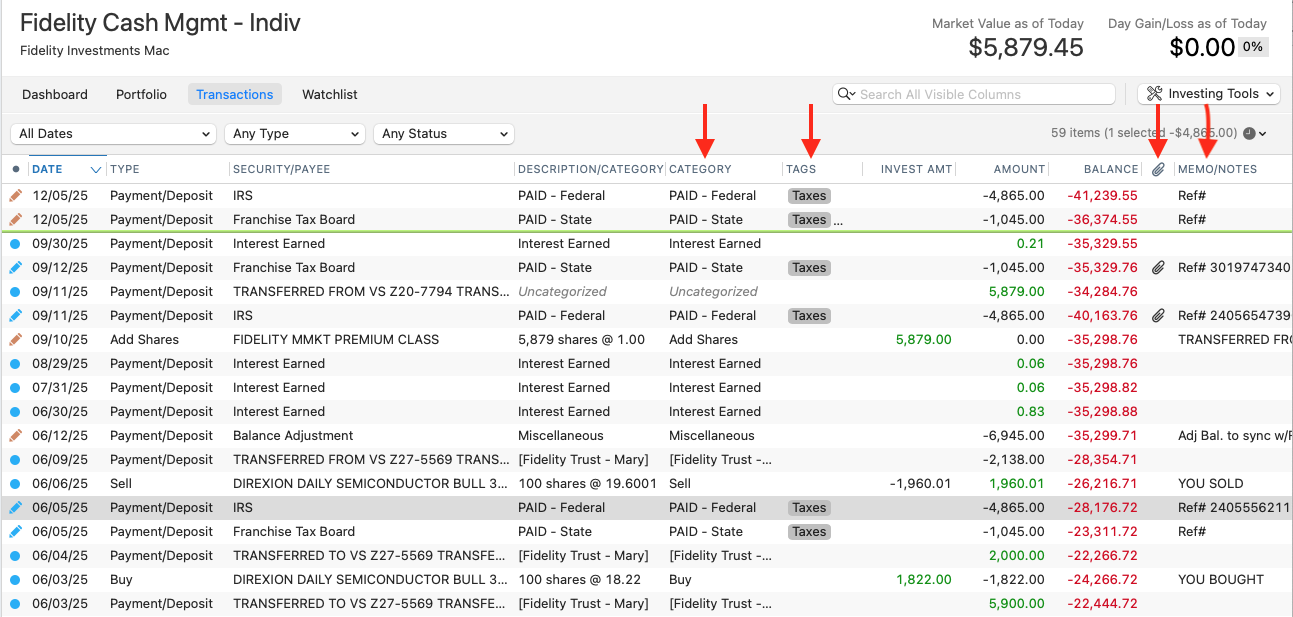
You state above "You should be able to link the accounts to the existing accounts in your Quicken after going through the authorization process" Please share as I need more context where can I read and understand how to re-sync my accts, esp. for Quick data added per transaction locally, and NOT included with fresh download data from Fidelity.
Thank you,
Paul S. Vonasek0 -
Thank you for your reply,
Assuming that you currently have the original and the new/duplicate account in your register for your Fidelity accounts, to resolve this issue, first, backup your Quicken file. Then, delete those duplicate accounts. Once you have confirmed that the duplicates are gone and you have the original accounts still in your file, then deactivate your Fidelity accounts.
Once the accounts are deactivated, navigate to Accounts>Add Account… and follow the prompts. Once you finish authorizing on Fidelity's website, it should bring you back to the Add/Link screen in Quicken. Carefully review that screen to make sure that Quicken is seeing the correct existing account to link to and is not trying to add the account as new. If you see any that are incorrect, click the dropdown to correct it.

I hope this helps!
Quicken Kristina
Make sure to sign up for the email digest to see a round up of your top posts.
0
