Update tries to reauthorize a long closed Fidelity account after EWC+ cut over

After allowing Quicken to reauthorize my Fidelity accounts and cleaning up the 200+ duplicate transactions that did not correctly match (using Quicken Windows Classic R64.30), I now have a clean and accurate data file that validates cleanly.
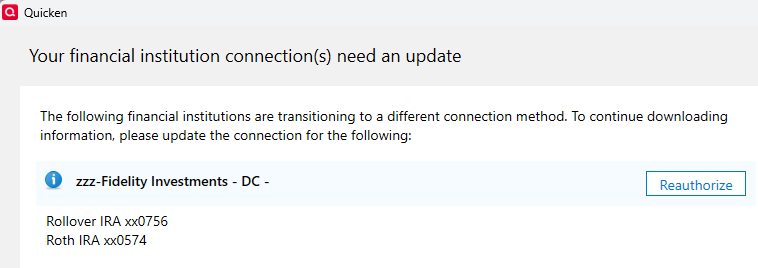
BUT, when I do subsequent updates, Quicken asks to reauthorize two Fidelity accounts that were closed long ago.
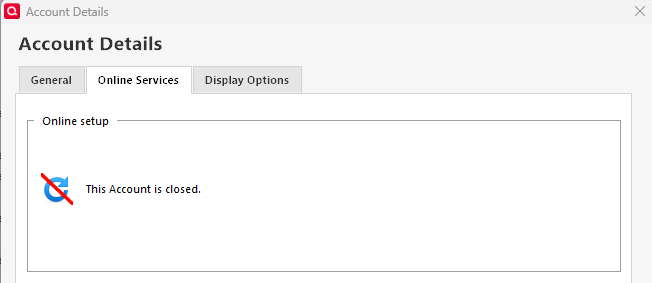
Account Details→Online services only says "Account is closed". No deactivate option
Account Details→General shows the zzz-Fidelity Investments-DC as the Financial institution
But, if I clear the financial institution field, the update still tries to reauthorize the account
AND if I run through the reauthorization process again, nothing changes since that account was closed long ago, so the loop continues.
Suggestions?
[Edited-Readability]
Comments
-
Hello @ct89,
Thank you for posing this question and sharing your experience.
I can definitely see why you would be confused by this behavior; it is strange indeed.
I think we should start off by validating your file, and then we can go from there if the issue persists.
To do this:
- Go to File.
- Select Validate and Repair file… from the menu options.
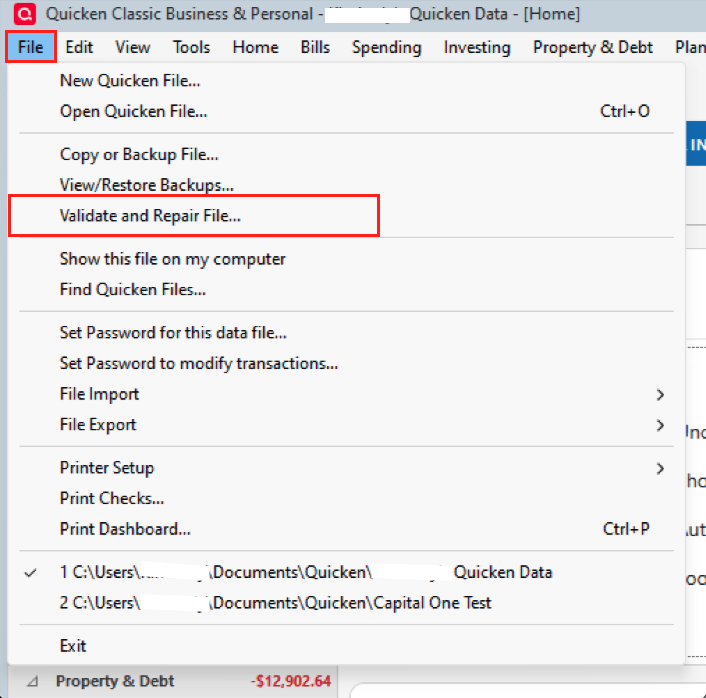
- Check the first box for Validate file.
- Click Ok.
I would then exit Quicken by going to File>Exit. Leave it closed for 30 seconds or so, reopen it, and try your update again. Let me know if you are still prompted to reauthorize those old/closed accounts.
Thank you!
Quicken Alyssa
Make sure to sign up for the email digest to see a round up of your top posts.
0 -
As I mentioned initially, the validate is clean.
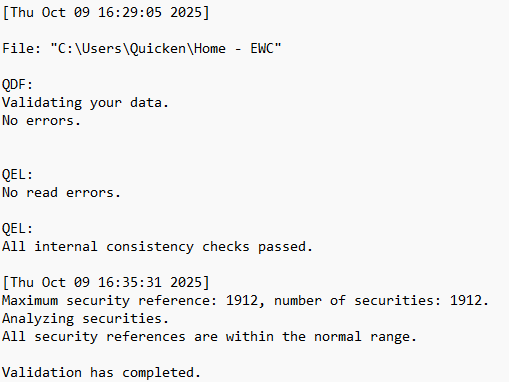
After closing, waiting and re-opening, Quicken continues to wish to reauthorize these long closed accounts…
Fin kept suggesting I deactivate the account but as you can see, there is no deactivate option in the online services tab.
Thanks
0 -
Hello @ct89,
Thank you for following up with those additional details.
Please follow the steps outlined in this Support Article for advanced troubleshooting. Let me know how it goes, and we can go from there.
Thank you!
Quicken Alyssa
Make sure to sign up for the email digest to see a round up of your top posts.
0 -
You can mark this as RESOLVED.
I followed the flow to copy, validate, reconnect and the problem has disappeared.
It was somewhat painful as I needed to delete about 600 duplicate transactions that were re-downloaded but failed to match when I reconnected the accounts but the error trying to reauthorize the long ago closed accounts did disappear.
Thank you.
0 -
Hello @ct89,
Thank you for trying the recommended steps and letting us know that your issue has been resolved.
I am sorry the process was a little painful, but I am happy to hear you are no longer being prompted to reauthorize those old accounts. If you need more help in the future, don't hesitate to reach out!
Thanks again!
Quicken Alyssa
Make sure to sign up for the email digest to see a round up of your top posts.
0 -
For anyone who finds this post… The directions provided above may or may not work. They did not for me, but I finally found something that will.
- Export the problem account to a QIF.
- Delete the account—you will be warned about the dangers; accept them. This will remove the "Xfer Acct" on the other side of the transaction. Do not worry about it!
- Recreate the account using the same name with a 0 balance.
- Import the QIF into that account—it will relink the transfers and the reauthorization problem goes away.
I hope that this helps others.
0 -
Thank you for updating the thread to let us know what worked for you.
This information could be useful to others.
Thanks again!
Quicken Alyssa
Make sure to sign up for the email digest to see a round up of your top posts.
0
