Fidelity - Downloads work, transactions not matching

I've been having an issue with all of my Fidelity accounts for several weeks. I believe it started when I was forced to re-set the connection. My accounts are connected and transactions are downloading. However, when I enter a transaction future dated, when the transaction does download, it is not matched.
For example, if I set a Fidelity bill payment to pay my American Express card in October 10, I enter that payment in my fidelity account to pay Amex with corresponding transfer to Amex. On or about 10/10, the payment to Amex will download and match the existing entry, the debit from Fidelity will come down and hit my register as a duplicate transaction.
Anyone else have this issue?
I called in about two weeks ago and worked with a tech who engaged the 2nd line team. I sent in a number of screen shots, logs, etc. Case number : 11935913.
I haven't had time to call in again and have been manually matching the transactions by draging and dropping. Annoying.
Comments
-
Hello @mk0,
Thank you for following up and for sharing those details. I did check on your case, and I see that our support team had started some troubleshooting steps with you and requested screenshots/examples, but the call ended before the escalation could be completed.
Since this type of issue requires hands-on troubleshooting and gathering additional details, the best next step will be to contact Quicken Support again when you have a chance so they can continue the escalation that was already opened. Be sure to provide your ticket number 11935913 (Escalation ticket #: 11936164) so the agent can pick up right where things left off.
Thank you!
-Quicken Anja
Make sure to sign up for the email digest to see a round up of your top posts.0 -
I called back and spent quite a bit of time on the phone. I received mixed messages regarding this issue. The last person I spoke to indicated that this is a known issue and relates to the ongoing work regarding Quicken and Fidelity Downloads. Can you confirm that is in fact the case?
The last case number I was given for this was 11957658.
0 -
@mk0 I have sent you a direct message, please navigate to the inbox in the top right-hand corner of the Community page and check your inbox.

Thank you!
-Quicken Anja
Make sure to sign up for the email digest to see a round up of your top posts.0 -
Thanks I saw your note, but I was last told that my issue needs no additional information and is being worked as part of the ongoing work with Fidelity. Is that true?
Are other’s experiencing similar issues with Fidelity accounts?0 -
@mk0 I checked the ticket notes for your case, and I need to clarify—what you were previously told wasn’t accurate, and I apologize for the misinformation.
At this time, we haven’t seen this reported as a widespread issue with Fidelity accounts. That doesn’t necessarily mean it isn’t connected, but based on the escalation ticket, the more likely cause is the following:
"Per the collected screenshots, the manually entered transactions that aren’t matching to downloaded transactions have differences in dates and/or payee information significant enough that Quicken can’t reliably recognize them as the same transaction. The notes also showed that several transactions were matching correctly, which suggests it isn’t affecting all entries."
The current recommendation is to manually match any transactions that remain unmatched and adjust how manual transactions are entered so they more closely align with what downloads from Fidelity. This will help improve matching going forward.
Thanks for your patience while I did some digging to get you the correct information—I know how frustrating it can be to feel like you’re not getting a straight answer.
-Quicken Anja
Make sure to sign up for the email digest to see a round up of your top posts.0 -
I have been dragging and dropping transactions to get rid of the dupes. It’s a workaround.
- This always worked. If the amount was the same, and the dates within a day or two, my downloads matched 99.9% of the time in all my fidelity accounts. BTW, for years.
- None of the data I started from my Fidelity specific accounts shows downloaded transactions auto matching to one that I had previously entered.
- On all of my accounts, here are often transactions that download and are new. I don’t future date many transactions, just future paid credit cards / bills.
- After all the troubleshooting I’ve done, removing the connection, re-establishing (several times), sharing data, etc. It’s hard to imagine this is unique to me.
- I do similar with Chase checking accounts and several credit cards. No issues with downloaded data matching to a pre-entered transaction.
1 -
mk0 - you are not alone.
1 -
I am also having this same issue since updating the Fidelity connection. Downloaded transactions are not being matched to manually entered transactions. The downloaded transactions are appearing as new transactions alongside the same manually entered transacations.
0 -
Hello All,
Thank you for taking the time to report this issue!
I went ahead and forwarded this issue to the proper channels to have this further investigated. However, we request that you please navigate to Help > Report a problem within your Quicken program and submit a problem report with log files and screenshots attached in order to contribute to the investigation.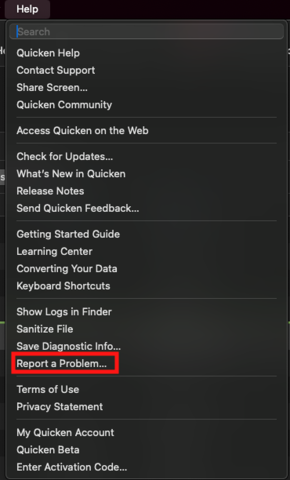
It would also aid the investigation to include a sanitized file when submitting the problem report. A sanitized file is a data file that removes personally identifiable information so you can comfortably share this file with the Quicken team.
While you will not receive a response through this submission, these reports will help our teams in further investigating the issue. The more problem reports we receive, the better.
We apologize for any inconvenience in the meantime! Thank you.
(CBT-832/CTP-15035)-Quicken Anja
Make sure to sign up for the email digest to see a round up of your top posts.0 -
Since I was prompted to accept the new connection type for Fidelity Downloads, none of my downloaded transactions are matching existing transactions automatically. This is super frustrating and annoying. I have been a user of Quicken on Mac for at least the last 10 years. This is extremely frustrating. I have tried disconnecting and resetting the connection for all Fidelity Accounts - this did not resolve the problem. Furthermore, when I try to do a reconciliation, the online balance from Quicken says "$0 and seems to not have any information in terms of balance coming from Fidelity.
I called Quicken Support, and while the support member acknowledged "there have been some issues with Fidelity" he could not help me with any more specific information. Come on Quicken team - this is a pretty glaring issue. Please advise when there will be a fix or specifically what I need to do to fix this issue.
Thank you,
John
0 -
Hello All,
Thank you for continuing to share your experiences and feedback.
In order for our teams to continue investigating this issue and keep the ticket open, we still need additional log files to be submitted. So far, we’ve only received one set of logs.
If you haven’t done so already, please refer to my previous response for detailed instructions on how to submit your logs and a sanitized file through Help > Report a problem within Quicken. Once you’ve submitted your report, please let us know here so we can ensure your files are added to the escalation ticket.
The more submissions we receive, the better as this gives an indication of how widespread the issue is.
We sincerely appreciate everyone’s cooperation and patience while our teams work to resolve this.
Thank you!
(CBT-832/CTP-15035)-Quicken Anja
Make sure to sign up for the email digest to see a round up of your top posts.0 -
That's concerning. I've opened multiple ticket numbers and sent multiple files. Here are the three I made note of: 11935913, escalation ticket 11936164. and then 11957658. I've referenced these tickets in the notes section when I've sent logs. I just did another upload with a sanitized data file.
When I've called, the first line folks have told me that dates have to match, descriptions, etc. and that I should manually drang and drop the transactions on each other to match them. That's a workaround, not a solution.
This worked perfectly for years until the problem was intruduced a few weeks ago. It's concernting this is taking so long to investigate and remediate.0 -
@mk0 Thank you for providing the details and for submitting the latest sanitized file—we really appreciate your effort!
At this time, you’re the only user we’ve been able to collect and attach logs from for this issue. We still need additional submissions from other affected users in this thread.
If others haven’t yet submitted their logs, we encourage them to please follow the instructions in Help > Report a Problem, and include log files, a sanitized file, and screenshots if possible. Once those are submitted, we can get them added to the escalation ticket as well.
We sincerely appreciate your patience and cooperation while our teams work on this.
-Quicken Anja
Make sure to sign up for the email digest to see a round up of your top posts.0 -
I am also having the exact same issue now with my Fidelity accounts and will create a ticket.
0 -
Hello @jimvanzino,
Thanks for chiming in and submitting a problem report! Your details and files have been added to the ticket.
Thank you!
-Quicken Anja
Make sure to sign up for the email digest to see a round up of your top posts.0 -
I'm also having the same issue and will Report a Problem (again).
Quicken Mac Subscription, Quicken user since 20050 -
While I don't pre-enter Fidelity transactions (and I don't use Fidelity Bill Pay), what seems notable in this discussion is that the other side of @mk0's transaction - the Amex side - is matching. Since that side was pre-entered using the same date as the other side of the transaction in the Fidelity account, and it matches when downloaded, it doesn't seem likely that the date is so far off that it prevents matching.
I wonder if the Inspector would show something helpful. Maybe look at the downloaded details before doing the drag-merge. See what the downloaded payee name is, and maybe start using that name when you pre-enter, and see if that helps.0 -
I am still manually matching all downloaded Fidelity transactions. In almost all cases, the manually entered payee name is nearly identical to the downloaded payee name and the amount is always the same. In a couple of cases, manually entered checks with numbers in the check number field, didn't match downloaded checks with the same number in the payee field (Fidelity only uses the payee "Check Paid ###" for manually written checks).
Again, this only started after the Fidelity changeover.
Quicken Mac Subscription, Quicken user since 20051 -
Hello All,
A fix for this issue is in the works and set to be released in an upcoming update release, though we do not have an ETA available at this time. We appreciate your patience while this is being worked on.
Thank you!
-Quicken Anja
Make sure to sign up for the email digest to see a round up of your top posts.0 -
I have been having this exact issue for the last 4 months. It is driving me insane. Quicken support has not been consistent in their response or help for the issue. Very frustrating. This is definitely ruining the Quicken experience for me.
0 -
Hello @jmbergland,
I completely understand how frustrating this has been—especially since it’s been ongoing for a while. I just want to reassure you that our teams are actively working on a fix, which is already in development and planned for an upcoming release.
Thank you for hanging in there with us while we work toward resolving this.
-Quicken Anja
Make sure to sign up for the email digest to see a round up of your top posts.0 -
With QMac v 8.3.3 this issue has been resolved for me.
Quicken Mac Subscription, Quicken user since 20050 -
@compusol Thanks for the update! Glad to hear this issue has been resolved for you with the latest release.
——
Can others in the thread also please confirm whether or not the issue is resolved after installing latest update release (8.3.3)?
Thank you!
-Quicken Anja
Make sure to sign up for the email digest to see a round up of your top posts.0 -
Updated to 8.3.3. Fresh set of data from Fidelity downloaded this morning, appears to have matched OK. I will continue to moniotor and report status.
0 -
@mk0 Glad to hear it, and we appreciate you providing an update to confirm!
-Quicken Anja
Make sure to sign up for the email digest to see a round up of your top posts.0
