cannot enter in "Bills Income & Transfers"

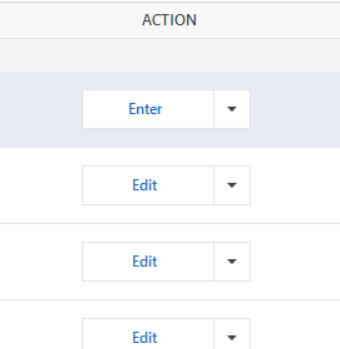
This is the first time this is happening to me. Over the weekend I setup my paycheck in the PLANNING> Tax Center section for the first time. I back dated it to the first pay of 2025 so naturally it created a series of Bills & Income entries. I finished a few of them during the weekend and they worked as expected. When I pressed Enter, the Paycheck schedule would pop up instantly and let me edit numbers.
Today I want to continue finishing them, but when hitting the "Enter" button, nothing happens. I've tried many times. Tried waiting for a while to see if anything would pop up but nothing (when I did it on the weekend it was instant). I tried restarting Quicken, I tried restarting my PC, I tried to update Quicken (it was already up to date).
I tried one entry down, by hitting the little downward arrow and choose Enter, same nothing.
Anyone has any ideas? I find this quite odd because it's never happened to me since 2023 when I started using Quicken.
I did just subscribe to the Online Backup from Quicken, would that have anything to do with it? I can't think of anything else different between the weekend and tonight. Only other things I've done is update transactions like I would most days.
Comments
-
Hello @Adience,
Thank you for sharing so much detail about your experience. It's definitely confusing when bill reminders don't act the way they are designed to.
To answer your question about the Online Backup, no, I don't think that would have anything to do with this issue. I do have some follow-up questions, if that's ok.
- Where is your data file located?
- Is your file being synced by any third-party cloud services like iCloud, OneDrive, or Dropbox?
- Have you tried restoring a backup? It might be worth restoring back to the weekend when this was working.
Let's start with these and go from there.
Looking forward to your response!
Quicken Alyssa
Make sure to sign up for the email digest to see a round up of your top posts.
0 -
@Adience you may want to have a look at this discussion:
Quicken user since Q1999. Currently using QW2017.
Questions? Check out the Quicken Windows FAQ list0 -
hi thanks @mshiggins , I will give the “turning off mobile sync” a try. I never used it in the past, but turned it on recently.
Hopefully that alone can solve the issue before moving on the @Quicken Alyssa ’s suggestion, because I had done a number of investment edits so I would not like to revert back to the weekend backup if I don’t have to.
Will report back.
0 -
Hello @Adience,
Thank you for following up!
If restoring a backup isn't feasible, that's ok, it's just one option. Do check your files' location and whether or not it's being synced, and let us know what you find.
Looking forward to your response when you are ready.
Thanks again!
Quicken Alyssa
Make sure to sign up for the email digest to see a round up of your top posts.
0 -
ok, I followed the post from @mshiggins , and a user @Michael Jones 's steps:
- find a uncorrupted version that I can still press Enter on reminders.
- unlink all accounts in Web Sync, turn Web Sync off
- do a One Step Update
- reminder "Enter" still works.
and also @Quicken Alyssa yes my Quicken main file is on my local harddrive.
Looks like my issue is resolved for now, just need to update whatever I had done the last few days.
My observation from reading the other post Web Sync feature seems to cause a lot of issues for. Why does the company still keep it available? Do people use it a lot? seems to do more harm because you never know when it will happen, and it affects many users, especially the less savvy users who don't frequent the forum, they might have a hard time find out what had gone wrong because it's such an obscure cause of issue.
1 -
Hello @Adience,
Thank you for following up and letting us know you were able to resolve the issue.
As for the Web Sync feature, issues can occur with it just like with anything else. I don't think it is more problem-prone or causing huge issues for most people.
I would say yes, people do use it a lot, as it allows you to use Quicken on the go, and it is the safest way to use Quicken from more than one computer.
I do agree that it can be difficult to determine the root cause of an issue sometimes, especially for less savvy users, as you said. Hopefully, in those cases, they can find one of our lines of support so we can help.
Thanks again!
Quicken Alyssa
Make sure to sign up for the email digest to see a round up of your top posts.
0

