Trying to authorize Fidelity accounts, but they keep getting deactivated

Comments
-
I was in the reauthorize loop with Fidelity Investments, so I followed the above steps. I have two Fidelity accounts: a Boeing 401K and a rollover accounts with several CD's and a cash balance.
I deactivated the 401K and deleted the rollover account in quicken. I revoked third party access at Fidelity. I exited Quicken & restarted because why not…
So I added my Fidelity rollover as a new account in Quicken, successfully reauthorizing it and downloading "my" transactions. I see my new Q account with an absolutely insanely high balance, and zero cash balance. The 401K account did not update.
And I am still in the reauthorization loop when I try again to update the 401K account.
HELP!
PTArtist.com0 -
I made one more attempt to proceed, and found that my 401K showed as deactivated for online services even though I selected it in the "successful" authorization. When I chose only the 401K in activating it, authorization "succeeded" but both the 401K and my Rollover account are now both deactivated!
I certainly hope there will be fix for this in the coming week.PTArtist.com0 -
Hello @SandraStowell,
Thank you for letting us know you're seeing this issue. To troubleshoot this, first, I recommend that you backup your Quicken file and navigate to Tools>Account List. In the Account List window, if you see an option to Show hidden accounts at the lower left, select that box.
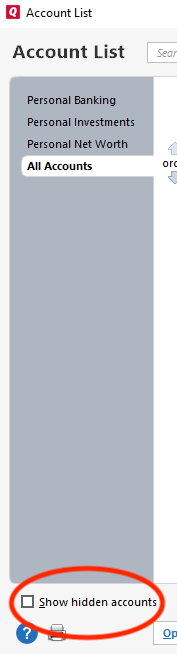
Review the account list for any duplicate Fidelity accounts. Delete any unneeded duplicate accounts, then deactivate all of your Fidelity accounts. Once that is done, navigate to Tools>Add Account and follow the prompts. Once you get to the Add/Link screen in Quicken, make sure to carefully link your accounts to the correct nickname in Quicken.
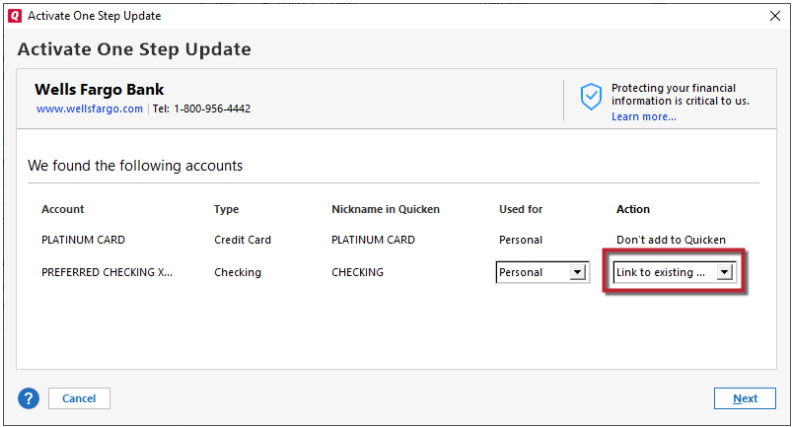
That should stop the reauthorization loop.
Please let me know how it goes!
Quicken Kristina
Make sure to sign up for the email digest to see a round up of your top posts.
0

