zzz-fidelity issue

Went through the process required to update account connections, but 2 of my accounts were still showing the zzz-fidelity institution. So, I went through those steps, and deactivated the accounts. Went through add account instructions, but after reauthorizing with fidelity, when those accounts come up they just say do not add account and it is grayed out so I can't change it. When I look at the account details, it still says not activated. This has been an issue since the last update and is very frustrating.
Comments
-
Hello @cfe,
Thank you for reaching out! When the Add/Link screen shows Don't add to Quicken, and offers no option to switch it, that means Quicken sees the account as already connected. It should tell you the account name Quicken sees the account connected to in the Nickname in Quicken column.
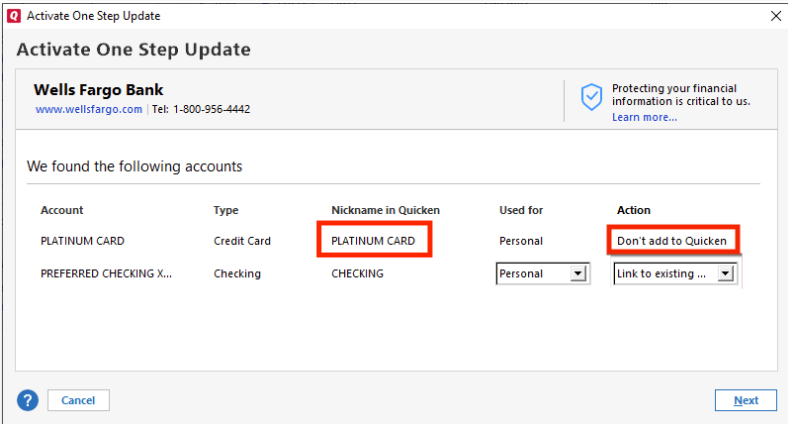
Take note of the nickname shown there, then backup your Quicken file and navigate to Tools>Account List to locate the accounts with that name. Once you find them, check to see if they are duplicates, or accounts that incorrectly got linked. If they are duplicates, delete them. Otherwise, deactivate them. Once those accounts are deleted or deactivated as appropriate, you should be able reconnect your accounts.
I hope this helps!
Quicken Kristina
Make sure to sign up for the email digest to see a round up of your top posts.
0
