Can't connect 1 of many Fidelity accounts for download

Everything was working fine before the transition to the new connection protocol for Fidelity.
When prompted to transition to the Express Web Connect protocol, most of my accounts (11 of 12) transitioned without issue.
One, my Roth IRA, remained stuck on the Direct Connect (I think) protocol. I attempted the transition several times without luck. I thought, "no problem, I'll just disable the download and reconnect it with the right protocol." I tried various ways to do this (can provide painful detail if needed), but once I disconnected the account, nothing I do to reenable the downloads works.
The connection to Fidelity works; the authorization works; the Roth IRA shows up in the list of accounts to allow from the Fidelity side. When handed back to Quicken, Quicken seems to think that account at Fidelity is already associated with an account in Quicken. As a result, I cannot "link to existing account."
No matter what I try, that account remains unconfigured for download.
Any ideas what else I can try?
—Mike
Comments
-
Hello @Mike129,
Thank you for letting us know you're having this problem. To help troubleshoot, please provide more information. You mentioned that Quicken seems to think the account is already connected. Does that mean that when you go through the process to authorize and connect the account, the Add/Link screen in Quicken shows "Don't add to Quicken" for that account?
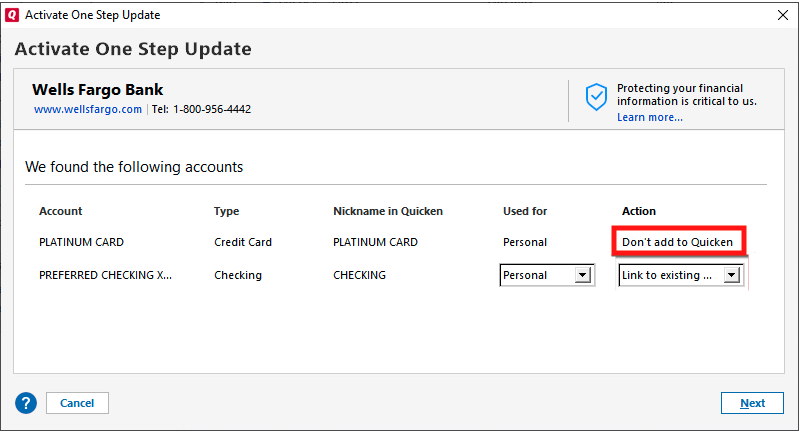
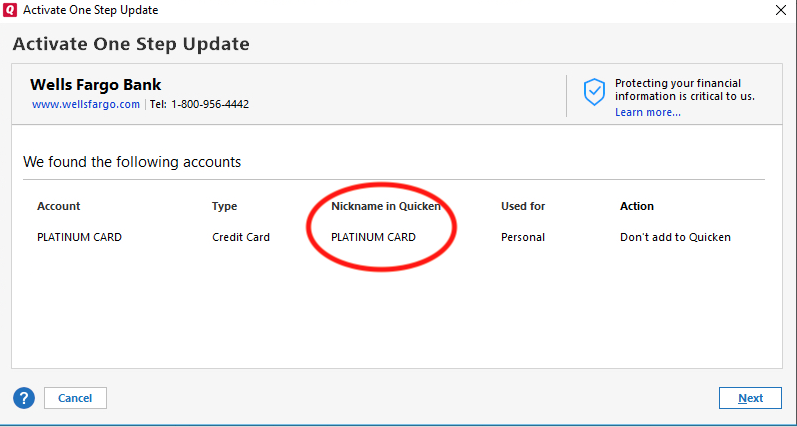
If that is what is happening, check the "Nickname in Quicken" column. That should tell you the account that Quicken thinks it's connected to.
Once you know the name of the account you're looking for, backup your Quicken file, then navigate to Tools>Account List. If there is a Show hidden accounts option at the lower left of the account list window, select it.
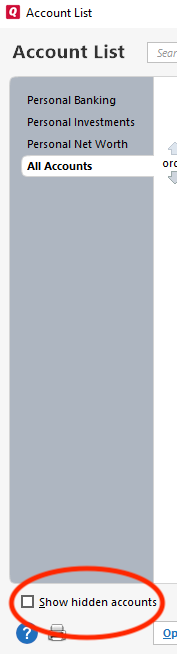
Then, review the account list to locate the account that Quicken thinks the problem account is connected to. Once you find the account, deactivate it. That should allow you to navigate to Tools>Add Account, follow the prompts, and successfully link the account.
I hope this helps!
Quicken Kristina
Make sure to sign up for the email digest to see a round up of your top posts.
1 -
Apologies for not following up sooner. I did not see this update for some reason.
To the first question, yes, it is listed as "Don't add to Quicken" with no option to do otherwise.
And it turns out the Roth IRA was linked to an account I had not used in over 15 years. I don't know how I missed that. The problem is now fixed.
Thank you!!!
2 -
Thank you for the follow-up,
I'm glad to hear that the issue is resolved, and thank you for sharing the solution you found!
If you need further assistance, please feel free to reach out!
Quicken Kristina
Make sure to sign up for the email digest to see a round up of your top posts.
0
