trying tax planner for the first time

I am trying to use the Tax Planning tool for the first time.
I have to say after 30 minutes of playing around I am lost as to what I need to do to get started.
I see that for 2025, the tool has already gather some info based on my transaction / investment entries YTD.
In the Help popped up, it recommended me to update my Turbotax ".tax" file for 2024 to make things "easier". So I did that.
Now the "projected tax" section shows my 2024 info, except it's not correct. It actually suggest me to project for the rest of "2024" because we are only in October. I tried to update the information comparing to my 2024 return, but found it impossible to replicate my 2024 actual return filing.
(1) does leaving the imported 2024 information affect my subsequent year numbers?
(2) what should I do next? Can I remove whatever I imported for 2024 and just start anew for 2025? To do this, I need to enter all of my 2025 paystubs since so far I've only entered net pays as a starting point.
Comments
-
(1) The 2024 TurboTax data will not interfere with the Tax Planner's projections for 2025 if you have it set up correctly.
(2) Before diving into the Tax Planner, I suggest you go to Planning > Tax Center and click on Add Paycheck, selecting the Gross amount option. This creates a special Reminder for your paycheck that includes your gross pay and deductions. You can set the date to start with your first paycheck this year and enter the details from your pay stubs for each of the past pay periods. You will have to delete any manual entries you made that overlap with the paycheck entries.
Then go to Reports > Tax > Tax Schedule and review the entries to make sure they are recorded correctly.
Once you have the YTD entries recorded correctly, you will be able to make more sense of the Tax Planner. At the top, make sure the tax year is set to 2025 and you have selected the correct marital status. Note that when you select one of the detail lines in the Planner, it opens a section at the bottom of the page where you can choose what data the Planner uses for its projections. This is where you select whether it uses the TurboTax data, a user entered amount, or your Quicken data.
If you are using the Quicken data, it will use the YTD amount plus a Projected amount and an optional manually entered adjustment. For the projected amount, you can have it use your scheduled bills and deposits, i.e. Reminders such as the Paycheck you created, an amount based on your YTD average, or zero.
QWin Premier subscription0 -
thanks @Jim_Harman I will try the steps you suggested in (2) this weekend.
do you recommend me restore from a backup so the 2024 data does not exist? I played around with what it imported from Turbotax, so now the numbers are all a mess….
0 -
@Jim_Harman Happy to report I just finished setting up all the back dated paychecks! Next step is to figure out how to use all the tax planner tools…..
Wish me luck! (by that I mean I will definitely have more questions!) 😅
1 -
I have found Tax Planner to be useful over the years. However, you must always be aware it does not get into the details the way a tax preparation package such as TurboTax does. Tax Planner projections must always be viewed as ESTIMATES, which for me have generally been accurate within +/- 3% or so. My experience is that Tax Planner errs on the conservative side, that is, it tends to over-estimate my actual tax liability as computed in the spring with TurboTax. Your mileage may vary.
If you have added income or spending categories in Quicken that impact your taxes, you can map them into Tax Planner line items using Tools > Category List.
Tax Planner has some operational problems with its year-end projections which have been extensively discussed in this forum. I'm not going to repeat them in this note.
1 -
@Ray Cosner when I first started using Quicken in 2023, I had not expected I would eventually use any of the tax planning features. I think I removed many pre-populated Categories, which now I see have pre-links to tax lines.
I don't know where to start to reenter these info? Should I check my last year's return?
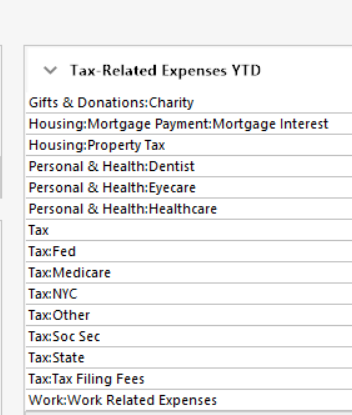
for example, I see that it's taking all my medical / work expenses, but I don't think any of these will actually impact my tax. so what do I do with these?
 0
0 -
From my personal experience, importing the TurboTax data created a mess and confusion in some of the tax planner screens. I restored from a pre-TT backup and will not do that ever again.
- Q Win Deluxe user since 2010, US Subscription
- I don't use Cloud Sync, Mobile & Web, Bill Pay0 -
@Adience - when you say it won't impact your taxes, I assume you're referring to your deductible expenses falling short of covering the standard deduction. TP will recognize that and use the standard deduction.
0 -
@Adience Because you are using non-standard Categories for some of your Paycheck entries, you will have to add the appropriate Tax line items to those Categories in order for them to be included in the Tax Planner, the Tax reports, and the Tax related expenses YTD list that you have shown above.
To do that, look at your Paycheck setup to see what Categories are being used. Then go to Tools > Category List and for each of those Categories, check to make sure that the correct Tax Line item is used. If not, right click on the Category to edit it. On the Tax Reporting tab, select the appropriate line item.
If in doubt about the correct Tax line item to use, go to the Tax Planner and select the detail line - Wages and Salaries - Self for example. This will show the tax line items that drive the line in the Tax Planner and the Categories that use them.
QWin Premier subscription1 -
@Jim_Harman I think you meant Tools | Category List as the place to assign tax line items to categories. Maybe a bit more ☕️?
Quicken user since Q1999. Currently using QW2017.
Questions? Check out the Quicken Windows FAQ list0 -
Yes, thanks, I meant Category List. I have corrected the original.
QWin Premier subscription1 -
@Adience - In re-reading this thread, I have some additional comments.
In the 2017 tax code overhaul, the standard deduction was increased substantially. As a result, for many people itemized deductions became moot. Prior to 2017, common medical expenses, medical insurance premiums, financial advisor and transaction fees, and a number of other expenses were important to itemize in the interest of reducing your tax burden legally. Not having a crystal ball to predict the future, I do keep track of such expenses since the 2017 tax overhaul law in fact has an expiration date (which so far has been extended twice).
Re importing prior year data from TurboTax — As a user option for each TP line item, you can choose (or not) to use the numbers from prior year's TurboTax. I find that information to be useful for comparison, and to use for tax estimates in the in the first few months of the present year when you don't have enough transactions in various categories to allow for high-confidence projections to the end of the calendar year.
My most significant use of TP is in setting the amount of quarterly estimated tax to pay to Uncle Sam. Particularly in quarters when I've had significant event-driven income such as selling securities with a mix of long-term and short-term gains or losses. TP also tracks losses which carry over to the next year to offset future gains.
1



