Issues with Splits and Memorized Transactions.

I just noticed tonight that I can't do a control S and enter a split transaction — it will not open the split.
I've noticed that when I went to pay a bill with a memorized payee to print a check - it came up fine, but it showed the transaction as CLEARED when it brought up the name of the payee, amount, memo, etc.
One of my checking accounts will not show the downloaded transactions and bill reminders at the bottom of the page, like all the rest of my checking accounts do. This started yesterday. This account also says I have a reminder in it, but when I look, it's for a different checking account!
What's going on? Are others having these problems??
I'm a seasoned user of Windows Quicken (20+ years), and these issues seemed to have just come up. on R64.30.
Baffled
[Edited-Readability]
Answers
-
Hello @Rick Milton,
Thank you for sharing your experience and providing those details.
I do have some follow-up questions for you.
- Where is your file located?
- Is your file being synced or backed up by any third-party services like Carbonite, OneDrive, Norton, or Dropbox?
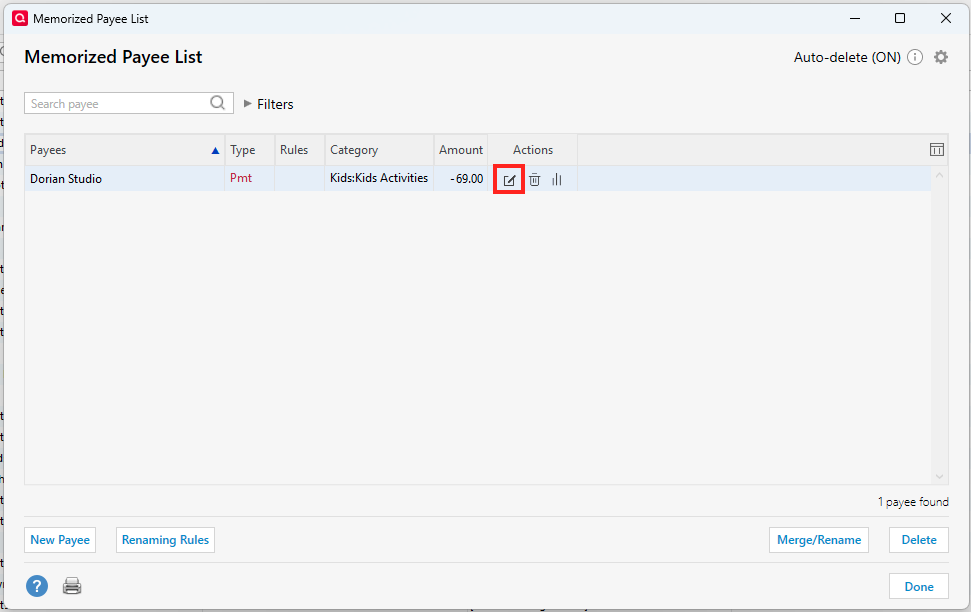
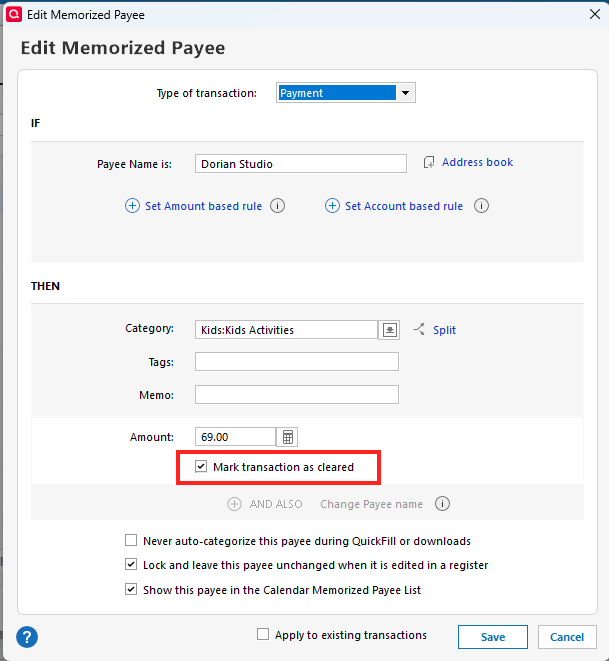
- Have you checked your Memorized Payee List in regard to the transactions being marked as cleared?
- To do this, go to Tools>Memorized Payee List.
- Locate the memorized payee in question and click the edit button.
- Uncheck "Mark transaction as cleared" if it is checked off.
Looking forward to your response.
Quicken Alyssa
Make sure to sign up for the email digest to see a round up of your top posts.
0 -
I believe the issue with the memorized payee is now ok, with your help — the "marked transaction as cleared" was on for the payee. THANK YOU.
My files are located on the c: drive, but I back up to dropbox.
Rick
0 -
Also — when I use cntrl/s again — the splits open tonight! I couldn't make that work last night, no way, no how!
I still have this issue:
One of my checking accounts will not show the downloaded transactions and bill reminders at the bottom of the page, like all the rest of my checking accounts do. This started yesterday. This account also says I have a reminder in it, but when I look, it's for a different checking account!
0 -
Thank you for following up, and I am so glad to hear that you were able to resolve some of the issues you were having.
As for the last one, which is still lingering, let's try validating your file.
To do this:
- Go to File.
- Select Validate and Repair file…

- Check the first box for Validate file.
- Click Ok.
Once that is done, go to File>Exit. Wait about 30 seconds, and reopen Quicken. Check to see if you can now see that section at the bottom of your register.
There is a setting you can turn off/on to make the downloaded transactions portion show/not show. But as far as I can tell, the Bill & Income Reminders tab is always there, so I think it's a strange file behavior we are seeing. If so, hopefully the validation will clear it up.
Let me know how it goes!
Quicken Alyssa
Make sure to sign up for the email digest to see a round up of your top posts.
0 -
Thanks — I tried that last night and it didn't work, but did it again tonight and waited the minute before reopening, but it still didn't work. It is the ONLY one of my bank accounts that does not have the bills and reminders at the bottom!
Rick
0 -
Helo @Rick Milton,
Thank you for trying the steps and following up. I'm sorry that didn't resolve the issues.
Please take a look at this Support Article for advanced troubleshooting and follow the steps therein.
Note: After performing these steps, you will have to reconnect all of your accounts. If anything goes wrong during this process, you will have your original file to revert back to.
Once you're in the new file, check to see if you now have the missing tabs at the bottom of that register.
Let me know how it goes!
Quicken Alyssa
Make sure to sign up for the email digest to see a round up of your top posts.
0
