Has anyone found the correct account name to connect to new Sun Country Airlines Synchrony cc?

I can't find the correct FL to connect my new Sun Country Credit Card/Synchrony. Synchrony told me to use Synchrony Bank Credit Card and I got the error that something is wrong. I know that my login and password are correct.
Answers
-
Hello @Welchgal,
Thank you for sharing your experience and posing this question.
Synchrony can be a tricky one, because it seems like it's never a one-size-fits-all scenario. Many people find success using the Guitar Center Credit Card instance, so it's worth giving that one a try.
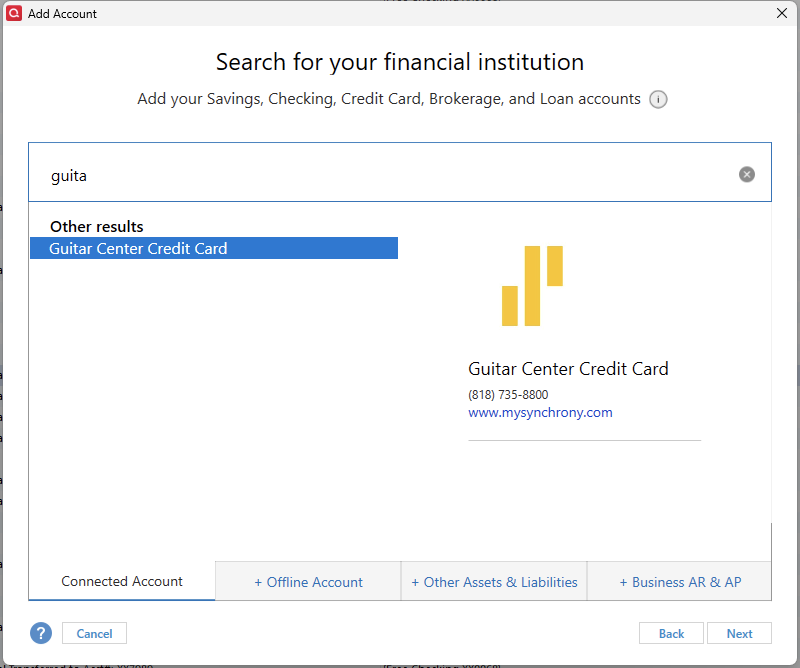
However, to have a new instance for this specific card added to Quicken, you will need to reach back out to Synchrony.
In order for a financial institution to support downloads to Quicken and to be added to our bank list, the request to be added would need to be made and submitted by the financial institution to our service providers.
Hope this helps!
Quicken Alyssa
Make sure to sign up for the email digest to see a round up of your top posts.
1 -
I have spoken with customer support for both Quicken and Synchrony. Both claim it's the other's fault. When I spoke with Quicken Customer Support, they said that Synchrony hasn't filled the proper request to authorize their customers access via the Quicken download. When I spoke with Synchrony, they said they have a long standing relationship with Quicken and have submitted the request.
To me, it feels like something has fallen through the cracks and neither side is particularly motivated to do anything about it.
0 -
When all else fails, a letter or email to Synchrony's Office of the President may get some action.
0 -
Hello @BobKierski,
Thank you for contacting Synchrony and reporting back to let us all know.
Both scenarios that you were given can be true at the same time. If Synchrony has in fact done its part, it's not an instantaneous change that happens. It can take time for the new instance to be integrated into Quicken.
I do hope that it is added soon!
Quicken Alyssa
Make sure to sign up for the email digest to see a round up of your top posts.
0 -
Hi Everyone,
I just got my "Synchrony" store branded credit cards connected in Quicken. I used the "GE Money Bank Credit Card" as the FI. The trick is to make sure it uses the "www.mysynchrony.com" website to connect. This will connect anything that you have on your "Synchrony Dashboard". Mine works for:
Park West Gallery
Lovesac
Mavis (Car Care)
Synchrony Home (their generic teal card)0 -
Hello @elockshine,
Thank you for sharing what worked for you, as I am sure others will find this information useful.
Your contribution is appreciated!
Quicken Alyssa
Make sure to sign up for the email digest to see a round up of your top posts.
0 -
I just tried "GE Money Bank Credit Card" for my Sun Country Vista, and no it does not work. I get the same "CC-503" "Oops. Did you mistype your login?" error.
0 -
Thank you for the update, though I am sorry what you tried did not work to get you connected.
I do hope the instance you need gets added soon!
Thanks again!
Quicken Alyssa
Make sure to sign up for the email digest to see a round up of your top posts.
0 -
I had yet another opportunity to chat with the support group at Synchrony yesterday. This time, it was because I was looking for a way to download my transactions in a CSV format. As far as I could see, there wasn't anything anywhere on their web site that would allow me to download my transactions in any form. Nor could I download my statements, in any form. So I chatted with the customer support people. It turns out that unless you are signed up for "paperless documents", you can't download anything. You can't download your statements, and you can't download your transactions.
This seems like a unfriendly way to force you to select paperless documents as it's an all or nothing choice. And even after you've selected the paperless option, you can't go back and download your older statements and transactions. Only statements and transactions that occur after you've selected paperless will be available. This seems like an even more unfriendly choice made by someone at Synchrony.
At the end of my chat session, I asked the person if I needed to opt into the paperless documents in order to download my transactions with Quicken. She said that I do. Meaning… if you haven't enabled paperless documents, it doesn't matter which of the Quicken institutions you select, you will not be able to download your transactions into Quicken.
I can't say that is the cause of my problem. The customer support person said that it could take a few days before my "paperless" choice was registered with their system. And I still haven't been able to connect a Quicken account to my Synchrony Sun Country Vista account. But… it makes sense (in a very perverse way) that this might be yet another hoop you have to go through.
0 -
Thank you for following up and letting us know what progress you made at the bank, as this may help others.
Do let us know if this resolves the issue.
Thanks again!
Quicken Alyssa
Make sure to sign up for the email digest to see a round up of your top posts.
0 -
@BobKierski I too have tried to chat with Synchrony and they seemed clueless to me that they even acquired the Sun Country Card. In quicken I have tried to connect using ALL of the possible Synchrony options and none have worked. To "plus one" someone else that indicated that they need to match the web address, I looked at the web address that we connect to our online accounts and none of the Synchrony choices match that address (https://id.synchrony.com/idp/en) for the Sun Country Card Account.
It's really frustrating becasue it took so long for me to figure out how to get connected (using the FBNO) prior to the switch to Synchrony (a much larger bank). Thought it would've been WAY easier. It's been 2 months now and if Synchrony did indeed fill out the paperwork needed to get connected does it really take this long?
0 -
Hello @bryanbcorny,
Thank you for adding to this discussion, though I am sorry a new connection has not yet been added to Quicken for this. And thank you for reaching out to Synchrony in an attempt to provide further insight.
I am unable to see if the bank actually submitted the request, and therefore, I don't know the status of it. I apologize that I do not have more information to provide, but I do hope you all are able to connect soon!
Thanks again!
Quicken Alyssa
Make sure to sign up for the email digest to see a round up of your top posts.
0 -
I got an email from someone claiming to be from Quicken offering to help troubleshoot this issue with the "script team" who are not US based. As this is a public forum and discussion, I expect anyone with a little skill could put together an email that looks like it comes from Quicken offering to help troubleshoot with a non-US based group. Is there a way to authenticate a person is actually from Quicken before I give any sort of personal and sensitive information?
0 -
Thank you for sharing this with us and asking this question. Always better to be safe than sorry!
I searched and found that you have an open escalation for this issue [CTP-15315]. The last note on that ticket was two days ago, and states that they have emailed you.
It appears they are trying to schedule a callback with you to gather more information. Please respond to the email to proceed with the escalation process.
Thanks again!
Quicken Alyssa
Make sure to sign up for the email digest to see a round up of your top posts.
0 -
@Quicken Alyssa , thanks for that message. The issue tracking number given by @crysta.lang in her email didn't match the issue tracking number that I have. But, the tracking number you used above is the number she referenced in her email. So… you have just given me enough information to make me feel comfortable with her offer to help. I had responded to her email but with guarded optimism.
Thanks!
1 -
Thank you for following up on this.
I am happy that I could put your mind at ease or provide some reassurance. I do hope they can help to get this issue resolved quickly for you.
Let us know how it goes!
Quicken Alyssa
Make sure to sign up for the email digest to see a round up of your top posts.
0 -
I also have tried the Amazon.com Store Card - Synchrony since that one works for my Amazon account. Does NOT work for the Sun Country Airlines Synchrony. I've tried Guitar Center, GE Money Bank sign ons as well but those direct you to "mysynchrony.com" where with the Sun Country sign on - we need the synchrony.com option. The Synchrony Bank Credit Cards option is to synchronybank.com. Other options from Quicken are synchronycredit.com, mastercard.syf.com. None of these options work for me for the Sun Country card. It appears that Synchrony has multiple sign on options with Quicken just not synchrony.com.
0 -
Hello @HMcKFitz,
Thank you for sharing your experience. I can see that you got a FDP-103 (invalid credentials) error when attempting to use those other connection options. It's quite possible that Sun County Airlines isn't currently supported. Have you reached out to Synchrony about this?
Thank you!
Quicken Kristina
Make sure to sign up for the email digest to see a round up of your top posts.
0 -
I am getting conflicting answers from the Synchrony customer support. The last couple of times I called, they indicated that I needed to opt into paperless statements in order to download transactions. Then they said that I needed to wait until an e-statement was generated for my account in order to download transactions. Then they said that I had to wait 24 hours after the e-statement was generated in order to download transactions. Today they've told me that the Sun Country Signature Visa card does not allow downloading transactions at all.
While this is the most definitive answer I've gotten from them, it doesn't make sense. I'm able to download transactions for all of my other credit cards, bank accounts, and brokerage accounts. Synchrony does have download capabilities with other credit cards they service. Why would the Sun Country Signature Visa card be so unique that they wouldn't allow downloading transactions?
1


