Is there a report that shows an account's minimum balance within a specific date range?

I would like to see a report that shows me the minimum balance in my checking account over a certain period of time into the future. This helps me plan how much excess cash or shortage I am looking at in the next 30-45 days.
Best Answers
-
No, there's no such report. If you can't pretty quickly spot your low balance scrolling through the register, here's a way to get the result you're looking for in less than 30 seconds:
- Select the range of transactions for the period you want.
- Do File > Export > Register Transactions to CSV file
- Open the CSV file in your spreadsheet of choice (Excel, Numbers, Google Sheets, LibreOffice, etc.)
- Pick any empty cell and create a formula "MIN(first transaction's balance, last transaction's balance)"
- The result will be your minimum balance for that range of transactions.
Quicken Mac Subscription • Quicken user since 19930 -
When I used to manage my accounts in a (rather sophisticated) Google Sheets workbook, all I had to do was highlight a range of values in the balance column and Sheets would show me the low value ("Min: [value]") in the lower right corner of the screen. Very simple. Very handy. I was just wondering if there was a similar handy solution. Yes, scanning the values is indeed an option. I am looking at no more than a screen's worth of values into the future. Thanks!!
0

Answers
-
No, there's no such report. If you can't pretty quickly spot your low balance scrolling through the register, here's a way to get the result you're looking for in less than 30 seconds:
- Select the range of transactions for the period you want.
- Do File > Export > Register Transactions to CSV file
- Open the CSV file in your spreadsheet of choice (Excel, Numbers, Google Sheets, LibreOffice, etc.)
- Pick any empty cell and create a formula "MIN(first transaction's balance, last transaction's balance)"
- The result will be your minimum balance for that range of transactions.
Quicken Mac Subscription • Quicken user since 19930 -
I don't quite understand the question. Why can't the OP simply look at the single account register and identify the lowest balance?
That's how I know when I need to take more of my RMD and transfer money from my IRA into my taxable checking account.
Q user since February, 1990. DOS Version 4
Now running Quicken Windows Subscription, Business & Personal
Retired "Certified Information Systems Auditor" & Bank Audit VP0 -
I don't quite understand the question. Why can't the OP simply look at the single account register and identify the lowest balance?
@NotACPA I didn't really understand the need for a report to identify the lowest balance in an account, but I guess if you want to know the lowest balance in the past year and you have a lot of transactions, it could be a little tedious to scroll through to identify the lowest balance? Maybe @DrWhy can add some more information about their original question. But I provided what I think is a pretty fast and easy way to get the desired result exporting to a temporary spreadsheet, which should do the trick.
Quicken Mac Subscription • Quicken user since 19930 -
When I used to manage my accounts in a (rather sophisticated) Google Sheets workbook, all I had to do was highlight a range of values in the balance column and Sheets would show me the low value ("Min: [value]") in the lower right corner of the screen. Very simple. Very handy. I was just wondering if there was a similar handy solution. Yes, scanning the values is indeed an option. I am looking at no more than a screen's worth of values into the future. Thanks!!
0 -
As a Quicken for Windows user, I'd just use the Projected Balances View, customized to show reminders in the registers I'm interested in, for the next 30 or 90 days.
Are you saying, there's nothing similar in Q Mac?And/or there's no way in Q Mac to Show reminders in a register for the next 30 or 90 days into the future as if they were real register transactions already?
0 -
I, too, am a bit confused by your question.
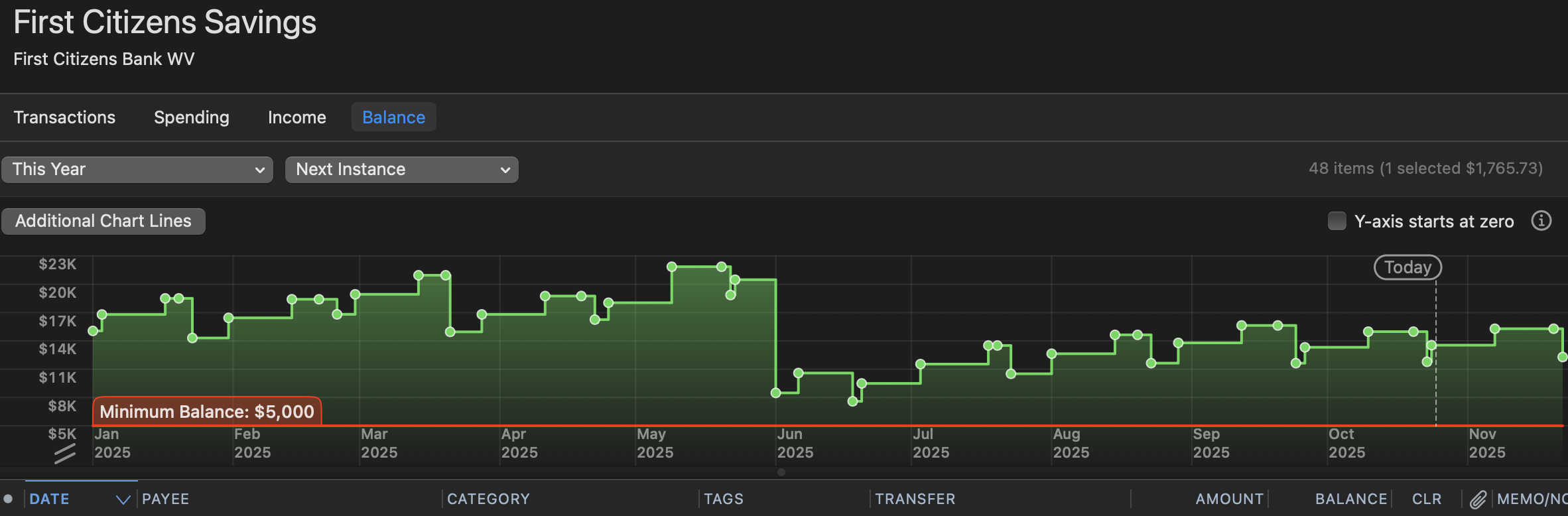
While "Projected Balances" makes sense for scheduled transactions, have you looked at the "Balance" view when in your register? It's a button on the top header.
That shows a graph of your account transactions and resulting balance over time which you can adjust. You can also "add additional lines" to set, say a minimum balance requirement should your bank have one.
Perhaps that would help-and I suspect that is mostly you are looking for. You can go spelunking in that graph as well to click on low point.
 0
0


