CC-501 on OLD GLORY bank for MobileWeb updates

I have accounts with OLD GLORY bank; the transactions update daily on my Quicken Desktop, but consistently fail to sync to MOBILE/WEB, with CC-501 error reported.
I have gone into the OLD GLORY accounts and clicked CTRL-ALT-U. The accounts are updated instantly.
When I immediately go to ACCOUNTS FOR MOBILE & WEB and UPDATE ACCOUNTS, the OLD GLORY accounts fail with CC-501.
All of my many other accounts sync correctly to Mobile. The password for Old Glory has been confirmed, and the account update works on the desktop; however, I am unable to update the mobile app.
Thanks for your assistance.
Best Answers
-
Thank you for your reply,
Since the steps above did not correct the issue, backup your Quicken file, then follow these steps from our article on troubleshooting online banking issues with Quicken Mobile and Quicken on the Web:
Deactivate the affected accounts in the desktop program:
- Select the Tools menu and select Account List.
- In the Account List, select the account for which you want to deactivate online services, and then click Edit.
- In the Account Details window, click the Online Services tab.
- Click Deactivate next to the service you want to disable.
- Click Yes to the message asking if you want to disable this service. Note: If you do not receive this message, additional information is available below
- Direct Connect users: If you are deactivating a Direct Connect account, you may see an additional prompt advising you to contact your bank to cancel the Direct Connect service. This is only recommended if you intend to deactivate an account permanently and need to contact the bank to stop any related fees.
- Click OK to the confirmation message.
If you have an investment account that is linked to a cash account, you need to deactivate the online services from the investment account which will automatically deactivate the linked cash account.
Then, Reactivate the account(s):
- Open the Account List (Ctrl + A).
- Click the Edit button on the account you want to reactivate.
- Go to the Online Services tab and click the Set up Now button.
- Type in the financial institution name and walk through the wizard.
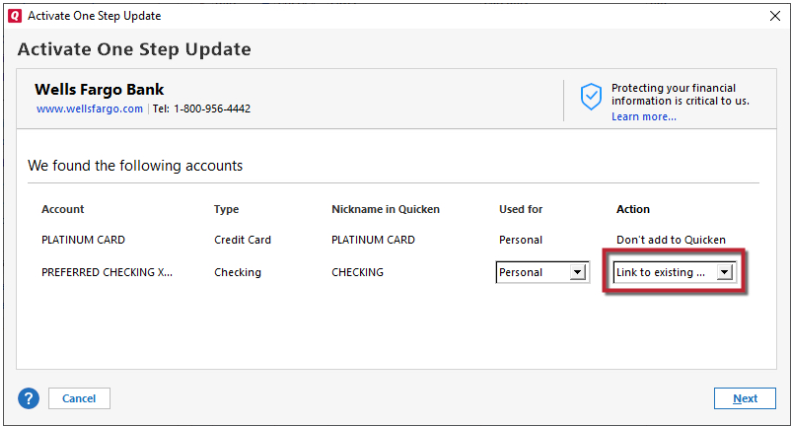
- Choose LINK on the screen displayed after Quicken finds the available accounts at the financial institution for your login credentials and carefully link to your existing Quicken account(s).
I hope this helps!
Quicken Kristina
Make sure to sign up for the email digest to see a round up of your top posts.
0 -
Thank you for the follow up,
I'm glad to hear it's working now!
If you need further assistance, please feel free to reach out!
Quicken Kristina
Make sure to sign up for the email digest to see a round up of your top posts.
1

Answers
-
Hello @PoconoChuck,
Thank you for reaching out! To troubleshoot this issue, please follow these steps from our article on troubleshooting online banking issues in Quicken Mobile/Web:
Try removing the account from Mobile/Web sync then syncing it again
In the desktop program:
- Go to the Mobile & Web tab.
- Click the # Accounts synced successfully link in the Accounts card to edit your account settings.
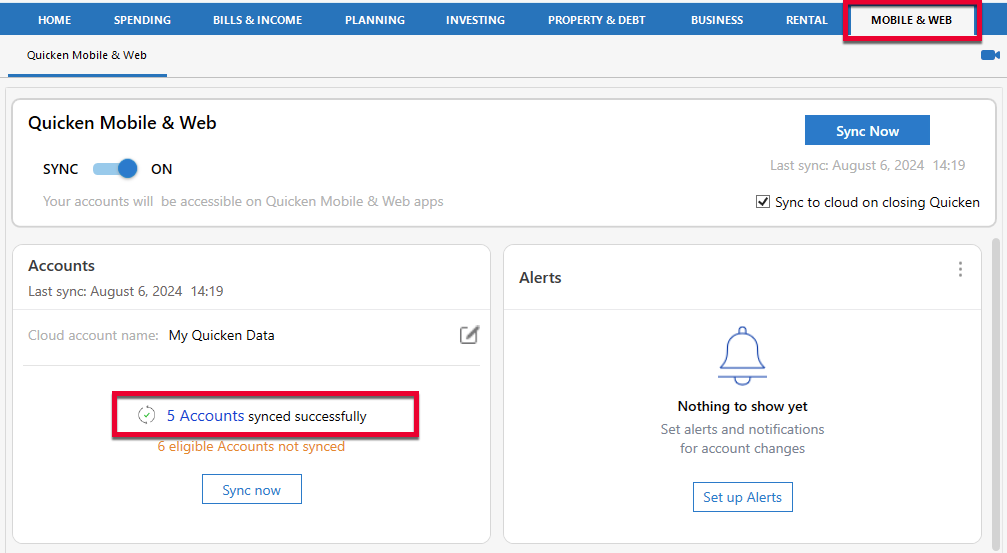
- Uncheck the account(s) that are not syncing correctly.
- Click Update Accounts.
- Close and re-open the Accounts for Mobile & Web window.
- Re-check the accounts and click Update Accounts to sync again.
Please let me know how it goes!
Quicken Kristina
Make sure to sign up for the email digest to see a round up of your top posts.
0 -
I followed your steps several times, over several days. Old Glory is not syncing to the web while all of my other accounts do. Further, Old Glory reports correctly in the Quicken Desktop app., so that confirms the password is correct.
What should I try next?
Thanks0 -
Thank you for your reply,
Since the steps above did not correct the issue, backup your Quicken file, then follow these steps from our article on troubleshooting online banking issues with Quicken Mobile and Quicken on the Web:
Deactivate the affected accounts in the desktop program:
- Select the Tools menu and select Account List.
- In the Account List, select the account for which you want to deactivate online services, and then click Edit.
- In the Account Details window, click the Online Services tab.
- Click Deactivate next to the service you want to disable.
- Click Yes to the message asking if you want to disable this service. Note: If you do not receive this message, additional information is available below
- Direct Connect users: If you are deactivating a Direct Connect account, you may see an additional prompt advising you to contact your bank to cancel the Direct Connect service. This is only recommended if you intend to deactivate an account permanently and need to contact the bank to stop any related fees.
- Click OK to the confirmation message.
If you have an investment account that is linked to a cash account, you need to deactivate the online services from the investment account which will automatically deactivate the linked cash account.
Then, Reactivate the account(s):
- Open the Account List (Ctrl + A).
- Click the Edit button on the account you want to reactivate.
- Go to the Online Services tab and click the Set up Now button.
- Type in the financial institution name and walk through the wizard.
- Choose LINK on the screen displayed after Quicken finds the available accounts at the financial institution for your login credentials and carefully link to your existing Quicken account(s).
I hope this helps!
Quicken Kristina
Make sure to sign up for the email digest to see a round up of your top posts.
0 -
Thank you, Kristina. I am certain I did this previously, but it worked today. Thanks for the assistance.
0 -
Thank you for the follow up,
I'm glad to hear it's working now!
If you need further assistance, please feel free to reach out!
Quicken Kristina
Make sure to sign up for the email digest to see a round up of your top posts.
1