Bill and Income Reminders

The Bill and Income Reminders does not work consistently.
Edits to the Bills and Income are not stored. They are no longer there when I open Quicken Classic.
When Bills are moved to the register and Quicken is closed, the bills are deleted from the register and put back in as reminders.
This started several weeks ago and I have submitted problem reports
Comments
-
Hello @edwhalon,
Thank you for letting us know you're seeing this issue. To help troubleshoot, please provide more information. Do you recall a more specific timeframe/date for when this issue started? Do you recall which version of Quicken you were using when it started? Was there anything that happened around the same time, such as a computer/program update or an unexpected computer/program shutdown? Do you store your Quicken file directly on your local hard drive? Is it synced with any cloud service, such as OneDrive, iCloud, or Dropbox?
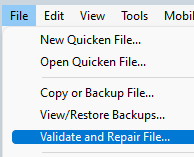
Since the issue sounds like a file-specific problem, I suggest that you try validating your data file. Please save a backup file prior to performing these steps.
Validate:
- File
- Validate and Repair File...
- Validate File
- Click OK
- Close the Data Log
- Close Quicken (leave it closed for at least 5 secs)
- Reopen Quicken and see if the issue persists.
Please let me know how it goes!
Quicken Kristina
Make sure to sign up for the email digest to see a round up of your top posts.
0 -
My Bills & Income reminders are moving to the next month. In other words, the October ones are being changed to November dates. I reset all the "Edit this instance and all future instances" back to October and it worked but then at some point (possibly when I reopened Quicken but not sure) they reverted back to November. This has worked forever but stopped working recently similar to @edwhalon.
David
0 -
R64.30 27.164.30 Bill and income reminders are advancing to future dates when no activity has been posted. I suspected online biller updates have been advancing bill reminders but it is not consistent. Some income reminders are advancing to future dates with no online updates involved. When changing the reminders to the correct dates, a message that I cannot change to a date earlier than my last payment, yet the reminder date DOES in fact change.
I can really no longer depend on QUICKEN to help me stay on top of bills and income after more than 25 years as a user.
0 -
I have the same issue and reported to customer service. User of 31 years.
I assume they will fix this in the next software upgrade - the last one was almost a month ago. But who knows - there are so many issues with the recent software update.
David
0 -
Hello @davidmarketing,
Thank you for reaching out! To help troubleshoot, please provide more information. Is this happening with online billers, manual reminders, or both? Is this impacting all of your reminders, or only some? When did the issue first start?
I look forward to your reply!
Quicken Kristina
Make sure to sign up for the email digest to see a round up of your top posts.
0 -
Manual reminders. Actually, it could be both - Online Billers is now saying Current Bill is"6 Dec" but what about the November bills? I haven't played with the Online Billers enough since I don't think it's working yet. Well, it's probably the same problem causing it not to work so I gave up on it.
It started maybe with the latest software update. There is also another discussion on the same topic…
Bill and Income reminders are advancing a month at a time — Quicken
David
0 -
@davidmarketing For you online billers, do you have them linked to a manual reminder. I was seeing issues like this for some online billers linked to manual reminders.
0 -
No. I have manual reminders as bills (Verizon, PSEG, etc). And the online billers are my credit cards. None of my bills are in the online billers anymore.
0 -
Thank you for your replies,
Do you have the problem reminders set to remind you 30 days in advance? If you do, there is a known issue with that, where it's causing the reminders to show as skipped (QWIN-25325).
Thank you!
Quicken Kristina
Make sure to sign up for the email digest to see a round up of your top posts.
0 -
3 and 5 days before. I thought maybe it was when I closed Quicken and reopened Quicken that it would skip a month. But it happens when Quicken is still open.
David
[Edited - Readability]
0 -
Thank you for your reply,
If it's happening while the program is open, have you identified anything that seems to trigger it, such as running One Step Update, syncing to the Cloud, etc.?
Thank you!
Quicken Kristina
Make sure to sign up for the email digest to see a round up of your top posts.
0 -
I tested with One Step Update and it did reset it to the next month so that is one trigger. Not sure about others.
David
1 -
Thank you for your reply,
If you haven't already done so, to check for possible file issues causing the problem, I suggest that you try validating your data file. Please save a backup file prior to performing these steps.
Validate:
- File
- Validate and Repair File...
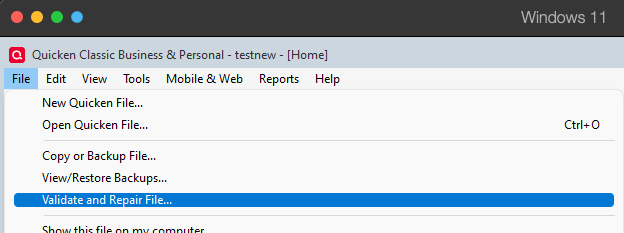
- Validate File
- Click OK
- Close the Data Log
- Close Quicken (leave it closed for at least 5 secs)
- Reopen Quicken and see if the issue persists.
Please let me know how it goes!
Quicken Kristina
Make sure to sign up for the email digest to see a round up of your top posts.
0 -
That does a lot of changes to my file - mostly related to stock splits and missing transactions which makes no sense since all my accounts tie. I have no idea what changes it make so I never use the validated file. I always revert back to a saved one.
But, given there are so many issues with the latest software version and with many users, I am going to believe it's the software and not my data file.
David
0 -
Thank you for your reply,
If the validation is finding issues and making changes, that indicates that the program is seeing data integrity problems in the file. Have you tried restoring a backup from before the issue started, or are you waiting for the next program update first?
Thank you!
Quicken Kristina
Make sure to sign up for the email digest to see a round up of your top posts.
0 -
I am waiting for the next program update.
I assume the data integrity issues occurred in the 90s back when new software updates were done with floppy disks and they did data conversions. One of these days, I will take time to go through it but I don't think that has any impact on current issues as stock splits and missing transactions shouldn't impact online billers.
I notice today that not all the reminders are doing this. I can try to delete the individual reminders and recreate them to see if that works.
David
0 -
I deleted one of the bill reminders and recreated it and it seems to be ok after two One Step updates. So, I will wait a few days to check and then update the others. This seems easier than Validating and Repairing.
Thanks,
David
0 -
Thank you for the update,
I'm glad to hear deleting and recreating seems to have corrected the issue with that one reminder. Hopefully, it'll help with the other reminders also.
Please let me know how it goes!
Quicken Kristina
Make sure to sign up for the email digest to see a round up of your top posts.
0 -
One seems to be working. But I have another reminder that is still forwarding to the following month. Am I the only one having this issue?
I can try removing them all and then adding them back again.
David
0 -
You are NOT the only one with the issue.
The entire Billers tab has several issues.
If it's manual reminders, just delete it and recreate with a different name and it should work.
If it's a reminder that is or ever was linked to an online Biller, delete it and recreate with new name, (the advancing to next month is common error.) At this point, I would NOT link a reminder to an online Biller.
0 -
Thanks. Yeah, I am doing that - it's not that challenging to recreate them. It's just an odd software failure especially for something that worked for as long as they offered this feature.
0

