Quicken download via Bank of America

Well, from what I'm reading from our chats, a lot of people (myself included) have been using Quicken for 20-30 years!
I have never had such difficulty working with Quicken! The download issue may be caused by Bank of America, but I expect Quicken to find a fix where all downloads are simple and transparent!
I have spent days and numerous hours each day to resolve the issue on my own! Well, I am not a programmer, etc! As such, I am only going in circles! I have had to manually key in and confirm entries.. Hours of wasted time!!
I can not believe that Quicken’s parent company has not fixed the problem! I even purchased a new Quicken Classic Business and Personal edition again, hoping that it would fix the problem! Before I installed the new Quicken, I confirmed that I did have the most recent edition of Quicken Classic Business and Personal version!!
I am at wits' end! This is solely Quickens' problem to solve and not to blame Bank of America. I am using Windows 11!
I hope I get some response from Quicken and not just from the Quicken community!!
George McK!!!
[Edited-Readability]
Comments
-
Hello @George McK,
Thank you for sharing your experience, though I am sorry for the frustrations.
After reviewing your connections internally, I am not seeing anything obviously wrong that stands out. Can you please provide some more information about what exactly you are running into from your end?
- Are you seeing error messages?
- Are you not able to set up your Bank of America accounts in Quicken?
- Are you not getting downloaded transactions?
- How long has this issue been happening?
Let's start there. Additionally, screenshots of what you are seeing may be helpful. If needed, please refer to this Community FAQ for instructions on how to attach a screenshot. Alternatively, you can also drag and drop screenshots to your response if you are not given the option to add attachments.
Thank you!
Quicken Alyssa
Make sure to sign up for the email digest to see a round up of your top posts.
0 -
Private Bank of America is not allowing download of QFX files as previously allowed. B of A says that it is working on its access but it wont be ready until December 1. Only B of A could have cut off QFX file download so the responsibility for the failure is shared. I have told my private banker I would have to close all my accounts if not fixed. It seems that they could allow download through ML as it works and all the accounts have common access. Richard Dees
1 -
Hello @Rsesdees,
Thank you for adding to this discussion with this information.
Your participation is appreciated, and this information could be useful for others.
Thanks again!
Quicken Alyssa
Make sure to sign up for the email digest to see a round up of your top posts.
0 -
I am also having issues with Bank of America Private Bank transaction downloads. As others have said the .qfx file method, while cumbersome has worked for many years (decades!). Now it has been discontinued and the Express Web Connect+ method is very broken. Initially, it was forcing the Quicken account into "Simplified" view instead of "Complete" view, which is totally unacceptable. So, I went to a backup file and proceeded manually. I tried again on Thursday and the conversion to Simplified did not occurthis time, so that was initially encouraging. However, there are so many errors in the downloaded transactions it is virtually useless:
- Dividend transactions are reported as MiscInc without a category, so don't track as dividends.
- I did get 4 proper Dividend transactions reported for the next day (!). These dividends were not visible on the online website reports. The next day the same dividends were reported as MiscInc (incorrectly and duplicating the other ones) and also showed up on the website reports. So the prediction of the future was correct.
- Mutual fund purchases of fractional shares are rounded to 2 decimal digits instead of 3 so the total share count ends up wrong
- Add security transactions do not import a Cost Basis date
- Multiple money market transactions are missing from the 2 built-in funds Bank of America Temporary Overnight Fund and Federated Hermes Government Obligations. So, the downloaded balances don't match with Quicken after everything is imported.
- A new security Unsettled Cash was created, but no transactions were downloaded into it. So, it contains quantity zero and this was reported as a mismatched balance with the online holding. I don't know what this security is supposed to be. The cash balance of the account? It doesn't match that either.
- The monthly cash withdrawal of fees was downloaded over the weekend with Monday's date. This transaction is also not yet visible on the website. This thing is clairvoyant.
There are likely other problems too. I fixed so many things over the weekend. I have manually created all the missing transactions for them, and verified everything visible on the website reports are present and no extraneous transactions exist. But, the share balances still don't match with Quicken.
It is going to be very tedious working all this out. Sadly, the Bank of America tech help desk states that all the data sent to Quicken is correct. I disagree.
1 -
Hello @ChrisP.,
Thank you for sharing your detailed experience, and thank you for reaching out to Bank of America to see if they could provide any insights as well.
Due to the nature of this issue, it is recommended that you contact Quicken Support directly for further assistance, as they can walk you through troubleshooting steps in real-time and escalate the situation as needed.
The Quicken Support phone number can be found through this link here. Phone support is available from 5:00 am PT to 5:00 pm PT, Monday through Friday. I apologize that I could not be of more assistance!
Thanks again.
Quicken Alyssa
Make sure to sign up for the email digest to see a round up of your top posts.
0 -
I also cannot download from Bank of America to Quicken. Perhaps I just don't know how. Is there a:
STEP BY STEP set of instructions?
I have gotten confirmation from both BA and Quicken that I am ready to download, but I don't know how anymore. I've been using this for many years. I could have manually entered every single transaction in the time I have wasted trying to figure this out.
My choices to download from BA now include ONLY
—Web Connect,
—Microsoft
—Spreadsheet Tab, Pipe or Space
—Printable
NO QIF, QFX or any other choices that I know nothing about.
Also, just as a side note, I am 80 years old and I really don't need this stress right now!
Gail
0 -
Hello @Gail S,
Thank you for adding to this discussion, though I'm sorry you are having trouble downloading transactions from Bank of America into Quicken.
Bank of America has discontinued Web Connect, which is the QFX file you mentioned. You can read more about this in this Community Announcement.
You can add your Bank of America accounts and use the One Step Update to bring in the transactions for you. Here is a Support Article on adding accounts to Quicken.
- First, save a backup.
- Before adding the accounts, you will want to disconnect them from Web Connect.
- I will say that sometimes when you switch to a different connection method, duplicate transactions can occur. To avoid this, you can turn automatic entry off for these accounts.
To do this:
- Go to Tools.
- Select Account List from the menu options.
- Click the Edit button next to the account in question.
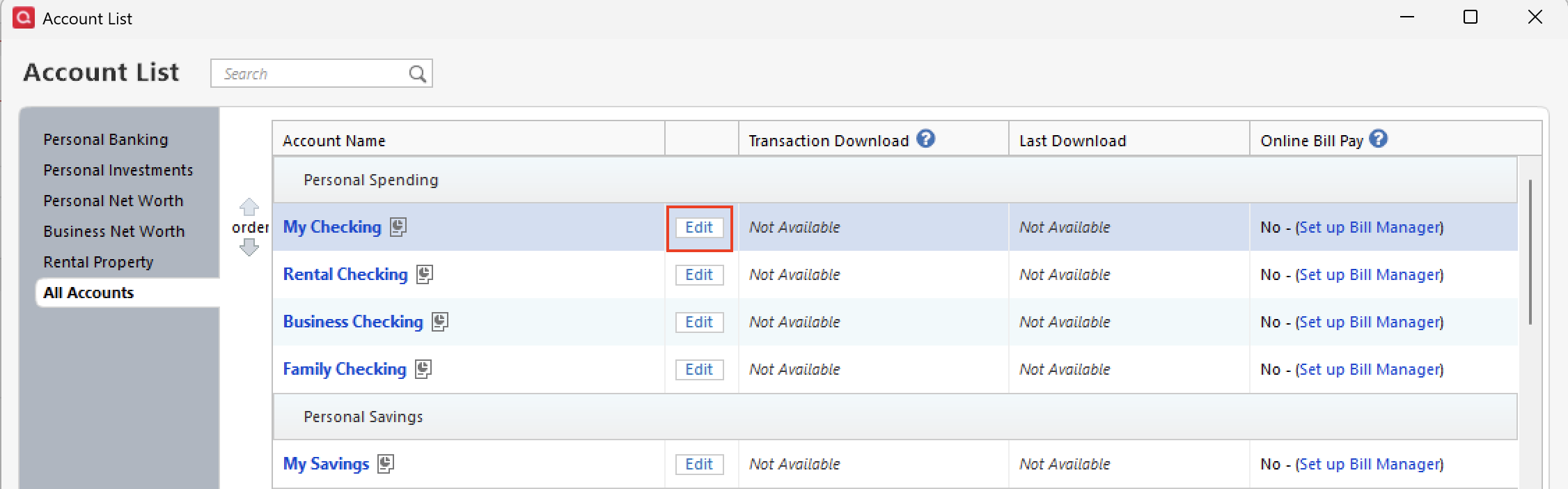
- Click over to the Online Services tab.
- You should see Automatic Entry: On, in blue. Click on this and turn it off. (If it says Off already, you can leave it off.)
I know that is a lot of steps I just gave you, and I don't want you to feel overwhelmed. If you're feeling uneasy about completing them, I would suggest contacting Quicken Support directly, so they can walk you through the entire process in real time.
Hope this helps!
Quicken Alyssa
Make sure to sign up for the email digest to see a round up of your top posts.
0 -
Where were these instuctions when the change over first occurred? I now have a mess in my most important account. When I did the update, the system created new accounts with different names. Then some transactions went to the old account and were duplicated, and a few (less than 10%) went to the newly created account. Both are wrong.
***** So, is it possible to somehow delete those accounts and start a new one from scratch with every transaction downloaded fresh from Bank of America?
Also - When I click on "email digest" there is no link to sign up. Useless and more time wasted.
0 -
Hello @Gail S ,
Thank you for taking the time to explain what happened. I apologize for the frustration this transition has caused, especially with such an important account.
Yes, it is possible to delete those incorrect accounts and start fresh. I would recommend saving a backup first. Then, see this Support Article for step-by-step instructions on how to delete accounts in Quicken.
If you need it, here is another Support Article that walks you through how to add your Bank of America accounts back into Quicken afterward.
Regarding the email digest, when you click the link, what exactly happens on your end? It should redirect you to the instructions for setting it up, so knowing what you’re seeing will help us figure out why it isn’t working for you.
We’re here to help you get everything back on track.
Quicken Alyssa
Make sure to sign up for the email digest to see a round up of your top posts.
0
