Reports is not recognizing Savings account

I am trying to run a report by category. I enter credit card transactions into my checking account and transfer them to one of my savings accounts. The report only shows transactions I did not transfer. I had to go through the register for the past 2 years and identify each individual payee. I was able to run a report by payee yesterday, but now that is not working. I have had this problem of Quicken not recognizing Savings account for more than 5 years. If I want any report to include all my accounts I have to export to Excel to run the report.
Thank you,
Ruth
MacBook Pro Sequoia 16.6.1
Quicken Classic Deluxe 8.3.2 Mac OS 15.6.1
Answers
-
Hello @RuthZy,
Thank you for sharing your experience, and I am happy to help.
Please check out this Help Article on customizing reports. To customize a report, you would need to run the report and then edit it. Can you confirm this is what you have been doing?
Once you are in the Edit options, you can select which accounts you would like to see in your report.
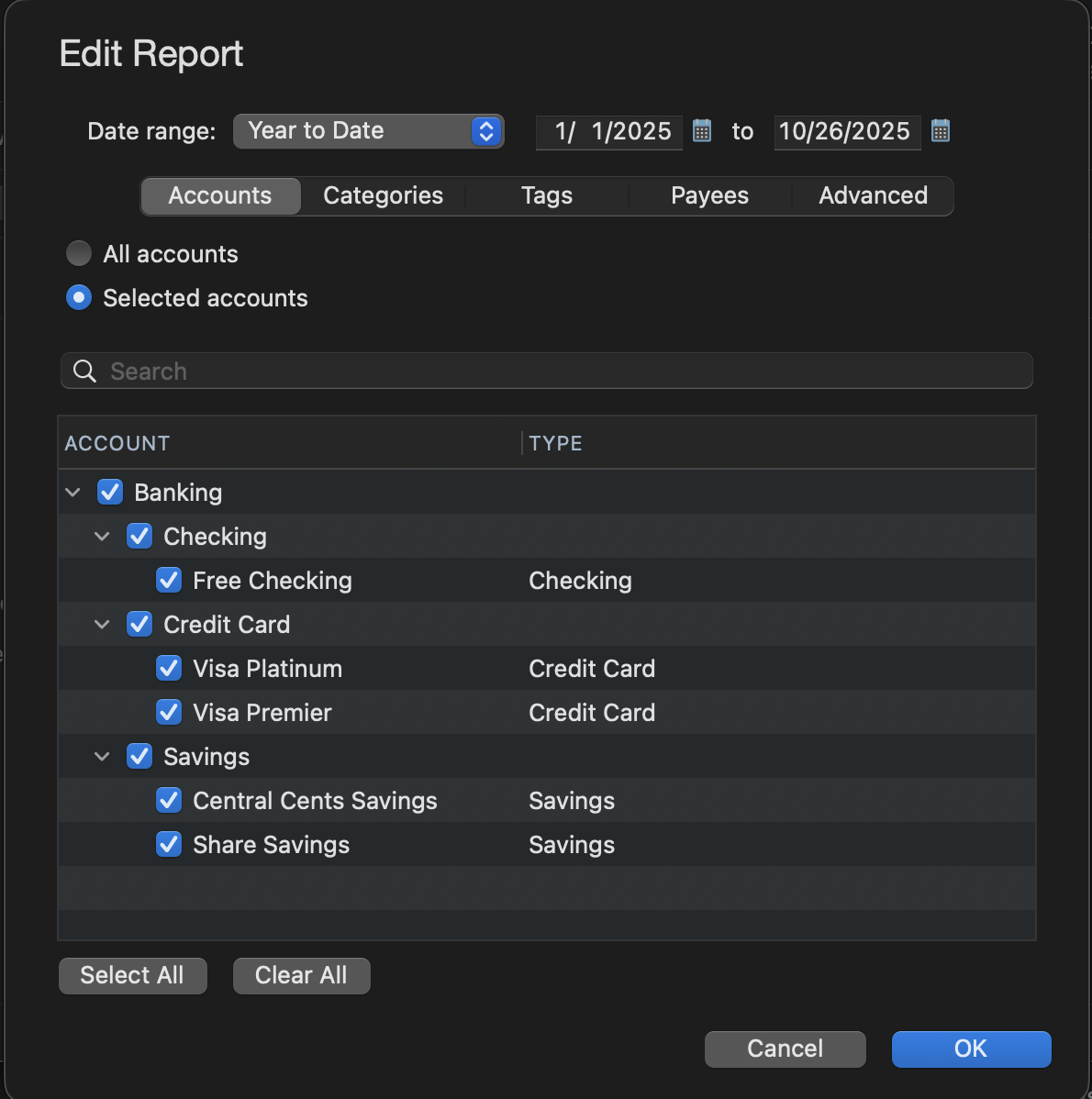
If you have already checked this and you have your Savings account selected here, it could be your display options for this account.
To check Display Options, click on the account from the bar on the left. Click on the Settings button in the bottom right corner of the screen. In the window that opens, select the Display Options tab. Check to see if you have "Keep account separate" checked off. If you do, uncheck it and run your report again.
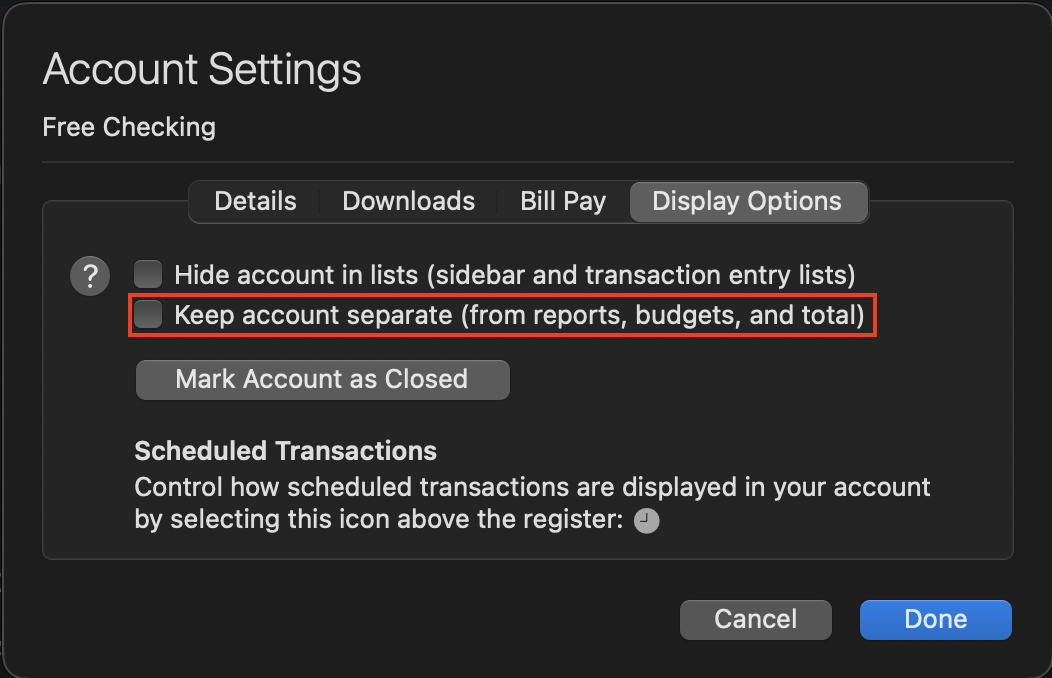
Let me know how it goes!
Quicken Alyssa
Make sure to sign up for the email digest to see a round up of your top posts.
0 -
Also, verify that these accounts are all the same currency.
0 -
May I ask a couple questions? Why are you transferring the credit card transactions to your savings account? And how are you entering them into the checking account?
Just in case you are entering your credit card bills the wrong way…..
The proper way is to set up a Credit Card ACCOUNT and enter the charges into it when the purchase is made and assigning it to a category. Then when you pay the credit card bill you TRANSFER the payment from your checking account to the credit card account (not a category). Then if or when you download the payment from the bank you match it to the one you already entered.When you enter the payment in your checking account you put the credit card account name in for the category using square brackets around the name to indicate it is a transfer...like this… [credit card] or newer Mac versions have a separate Transfer column.
I used to do it the wrong way for years! Then I wised up and now enter them properly. I would split my credit card payment into all the categories on one transaction in my checking account. And since I always pay more than the bill I would need to figure the difference and put it to another category. But then I needed to have them entered on the date the charges actually happened, especially at year end for taxes. So I finally set up a credit card account. It makes it much easier to enter and balance!
I'm staying on Quicken 2013 Premier for Windows.
0 -
@RuthZy If the transactions are transfers, then they don't have a category, and won't show up in a category report UNLESS you configure the report to include transfers to or from the account. To do that, click to Edit the report, click on Accounts and de-select the account you are transferring to, and click on Advanced and select "Include selected transactions with accounts outside of reports". Doing that will create a section in your report to show the transfer to the other account, and it will reflect them in the report's total.
Or, if you discovered the loophole in Quicken Mac which allows you to assign a category to a Transfer transaction, then you're experiencing one of the problems of this loophole. You should NOT be categorizing a transfer transaction.
That said, I agree with @volvogirl in questioning why you're entering credit card transactions in your checking account and why you are transferring them to your savings account. Why are credit card transactions not entered in a credit card account, with a transfer from the checking account to the credit card account when you pay the credit card bill? And what does a savings account have other than do with your credit card transactions?
Quicken Mac Subscription • Quicken user since 19930


