Fidelity Reauthorization Fails on One Account of Many

I, like many of you, put off the "reauthorization" with Fidelity, then finally bit the bullet. Now I have it working on most of my accounts.
However, I have one Roth Rollover account that refuses to update? I see it in the Fidelity screen where it lists all the accounts and I have checked it to reauthorize. However, when I complete the process and don't add the accounts to Quicken so I don't duplicate them but map them to their existing accounts, this one account doesn't establish updates.
When I looked at the Account List, this Roth Rollover showed as Direct Connect with no updates recently. I have tried to only update the one account, but that shuts down all the other accounts with Fidelity and still doesn't work to turn on the Roth Rollover account for downloads.
After that, I deactivated the Roth Rollover account and tried to initiate downloads. I went through the process, and it wants the reauthorization on ALL Fidelity accounts, not just this one, and I still get the same results - all my other accounts update and this Roth Rollover doesn't. It still shows that it is deactivated.
Any ideas how to fix this?
[Edited - Readability]
Best Answer
-
Hello @Scout_998,
Thank you for letting us know you're encountering this issue. Since the account still shows as Direct Connect when you check the account list, that makes me suspect that the account may be getting linked to the wrong account in Quicken. That would explain why it would seem to work on the Add/Link screen, but then still show connected by Direct Connect when you check the Account List. To check for this, please navigate to Tools>Account List. If you see the Show hidden accounts option near the lower left, please select it.
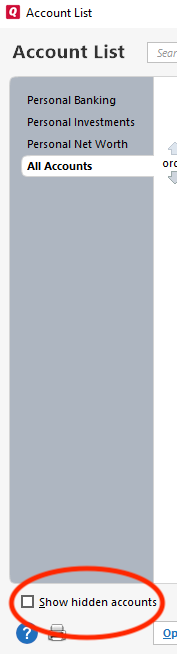
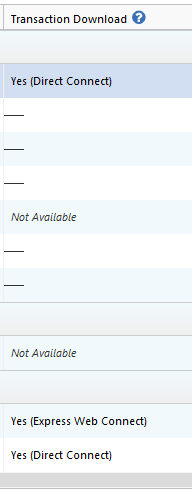
Review the account list for any extra or duplicate Fidelity accounts. Also check for any accounts which should not be connected, but are suddenly showing connected to Fidelity. You will be able to tell if Quicken thinks an account is connected by looking at the Transaction Download column.
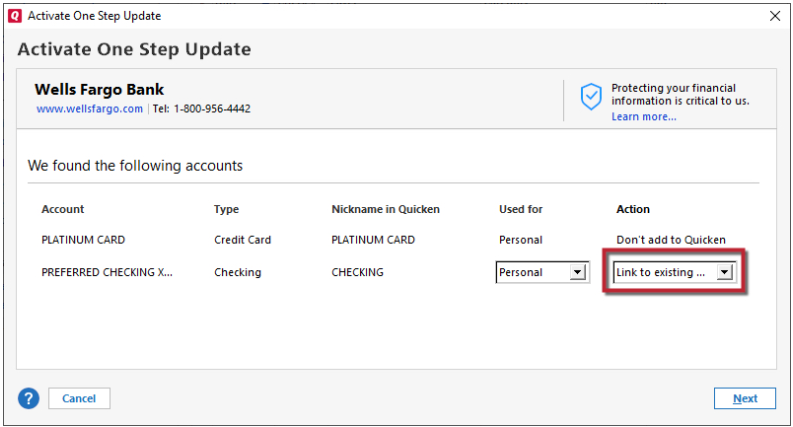
If you find any accounts like that, then backup your Quicken and deactivate those accounts. Once that is done, deactivate the problem account, navigate to Tools>Add Account, and follow the prompts. When you get to the Add/Link screen, carefully link all the Fidelity accounts to the correct nickname in Quicken.
Please let me know how it goes!
Quicken Kristina
Make sure to sign up for the email digest to see a round up of your top posts.
1

Answers
-
Hello @Scout_998,
Thank you for letting us know you're encountering this issue. Since the account still shows as Direct Connect when you check the account list, that makes me suspect that the account may be getting linked to the wrong account in Quicken. That would explain why it would seem to work on the Add/Link screen, but then still show connected by Direct Connect when you check the Account List. To check for this, please navigate to Tools>Account List. If you see the Show hidden accounts option near the lower left, please select it.
Review the account list for any extra or duplicate Fidelity accounts. Also check for any accounts which should not be connected, but are suddenly showing connected to Fidelity. You will be able to tell if Quicken thinks an account is connected by looking at the Transaction Download column.
If you find any accounts like that, then backup your Quicken and deactivate those accounts. Once that is done, deactivate the problem account, navigate to Tools>Add Account, and follow the prompts. When you get to the Add/Link screen, carefully link all the Fidelity accounts to the correct nickname in Quicken.
Please let me know how it goes!
Quicken Kristina
Make sure to sign up for the email digest to see a round up of your top posts.
1 -
Just an FYI.
I had the reauthorization process fail for a Fidelity account that was a linked cash account in Quicken. It failed the part of the process that links the Fidelity account to the Quicken account. Quicken ignored the link request and left it as a DC connection and created a replacement investment account with limited history.
I had to delete the new account Quicken created, and change the original account back to an un-linked investment account ( about a 15 minute churning of existing transactions), then reauthorize and link the account successfully. After that, I changed the account back to a a linked-cash investment account (about a 10 minute run through the transactions). I also had to make some manual corrections after to get the correct cash balance.
This is all because the EWC+ cutover process doesn't seem to be able to handle linked cash accounts.
Deluxe R66.23, Windows 11 Pro
0 -
Thanks to both of you! I didn't have the cash account linkage issue mentioned by leishirsute. Glad I didn't have to go down that rabbit hole as I've been a Quicken/Fidelity customer for 40 years and there are lots of transactions to go through. Kristina, the fix you mentioned was right on. I had to make a few minor tweaks to get it to work, but all things are now linked properly. Thanks for your help!
1 -
Thank you for the follow-up,
I'm glad to hear you've got everything working now!
If you need further assistance, please feel free to reach out!
Quicken Kristina
Make sure to sign up for the email digest to see a round up of your top posts.
0
Categories
- All Categories
- 24 Product Ideas
- 34 Announcements
- 248 Alerts, Online Banking & Known Product Issues
- 19 Product Alerts
- 265 Welcome to the Community!
- 301 Before you Buy
- 1.5K Product Ideas
- 55.8K Quicken Classic for Windows
- 16.9K Quicken Classic for Mac
- 1K Quicken Mobile
- 834 Quicken on the Web
- 129 Quicken LifeHub