I reauthorized my Fidelity Account multiple times but not getting the transactions

Is this an issue with Quicken or do I need to contact Fidelity?
Answers
-
Hello @Jetpaul1,
Thanks for reaching out!
When you reauthorize your Fidelity accounts in Quicken, are you also unlinking them directly from the Fidelity website? That can sometimes help resolve these kinds of issues.
Please try the following steps and see if it resolves the problem:
- Create a backup of your Quicken file first.
- Deactivate all Fidelity accounts in Quicken.
- Revoke Quicken’s third-party access from your Fidelity account on their website.
- Reactivate the accounts in Quicken. When redirected to the Fidelity site and then back to Quicken, make sure to select “LINK to existing” for any accounts that were already in your file.
This process often resolves issues with repeated reauthorization requests.
Let us know how it goes!
-Quicken Anja
Make sure to sign up for the email digest to see a round up of your top posts.0 -
Home & Business R64.35 Windows 11 Pro 25H2
I've been wrestling with this issue for weeks now, with hours upon hours of my time wasted, and am still unable to get my primary Fidelity brokerage account to reconnect.
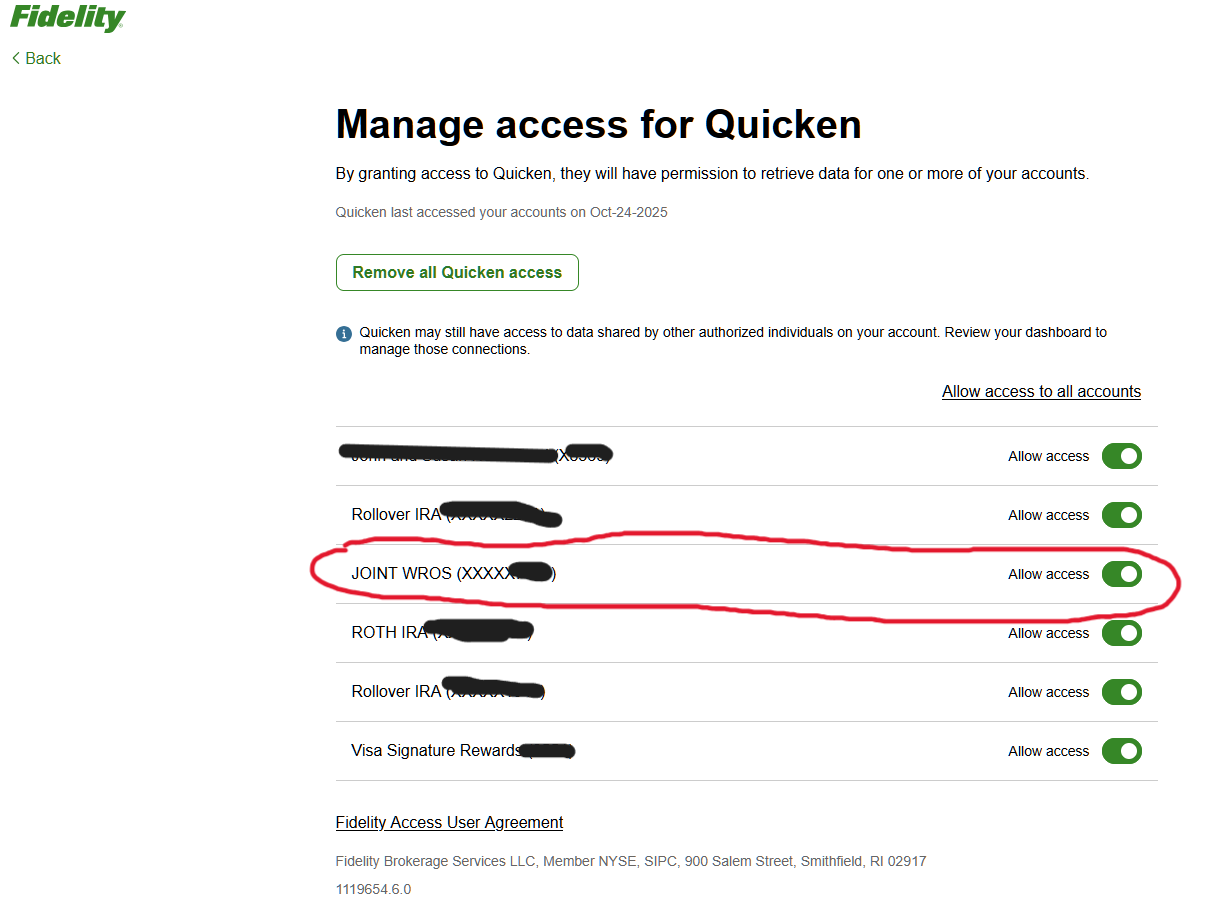
I have tried everything suggested in this forum, including - resorting to just now - the above procedure, following it to the letter. After deactivating and revoking, re-activating does not allow my primary Fidelity brokerage account to link to the existing Quicken account it once linked to. Instead it treats the account as though it were already linked for download in Quicken, when it most definitely is not.
Yet another unsuccessful attempt to get it to connect.
I need assistance.
PS Just to be clear, the screen capure below of Fidelity's Manage Access to Quicken web page was taken after I reactivated. I did completely revoke all Quicken access before attempting to reactivate. I carefully followed all of the instructions Anja posted immediately above.
 0
0 -
It seems this thread was marked "Answered" shortly after I added my post indicating that the solution proposed for the OP did not address my similar issue.
The point being I didn't receive any further answer, even though I made the effort to explain my issue that remains unaddressed.
0 -
[Removed - Disruptive/Unhelpful]
-1 -
Hello @Pennhaven,
Thank you for the follow-up and for providing the screenshots. I understand this has been frustrating.
Please keep in mind that this is a user-to-user Community forum, and the majority of answers come from other Quicken users. We have a small moderation team so responses are not immediate. For urgent or real-time assistance, the fastest option is to contact Quicken Support directly: phone support is available Monday–Friday during business hours (5:00 AM - 5:00 PM PT), and chat support is available seven days a week during business hours.
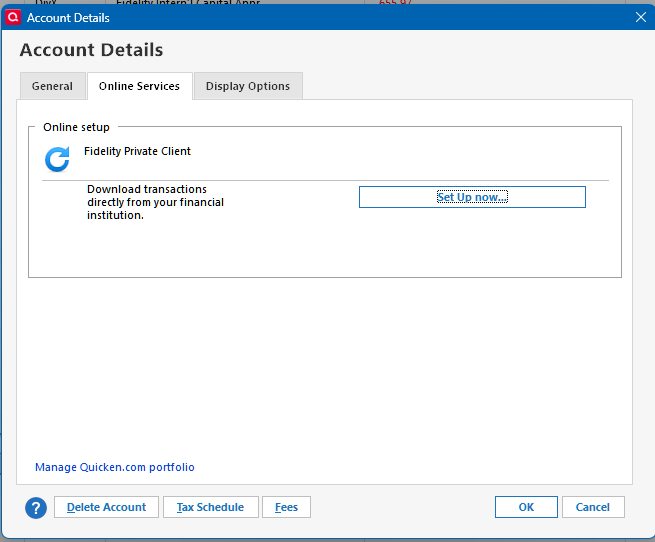
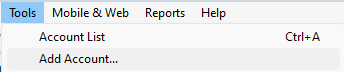
Regarding your issue, when you reactivated your Fidelity account, did you select “Set up now” from the screen shown in your screenshot, or did you go through Tools > Add Account?
This detail is important to determine why the account isn’t linking correctly.
Thanks for your patience while we work through this.
-Quicken Anja
Make sure to sign up for the email digest to see a round up of your top posts.0 -
Thank you for your followup today Anja.
I have now attempted to reactivate from both screens. "Set up now", which I believe I did originally, and "Tools > Add Account", just now
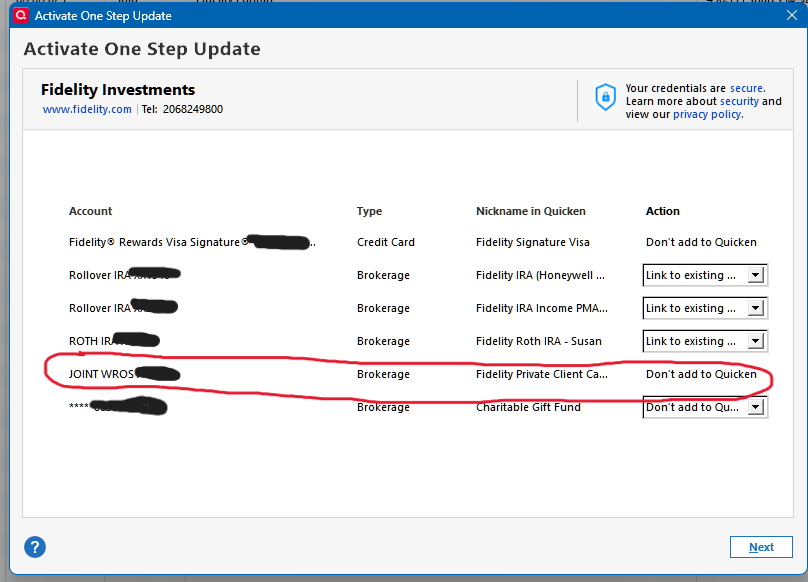
Here is the result from "Tools > Add Account".
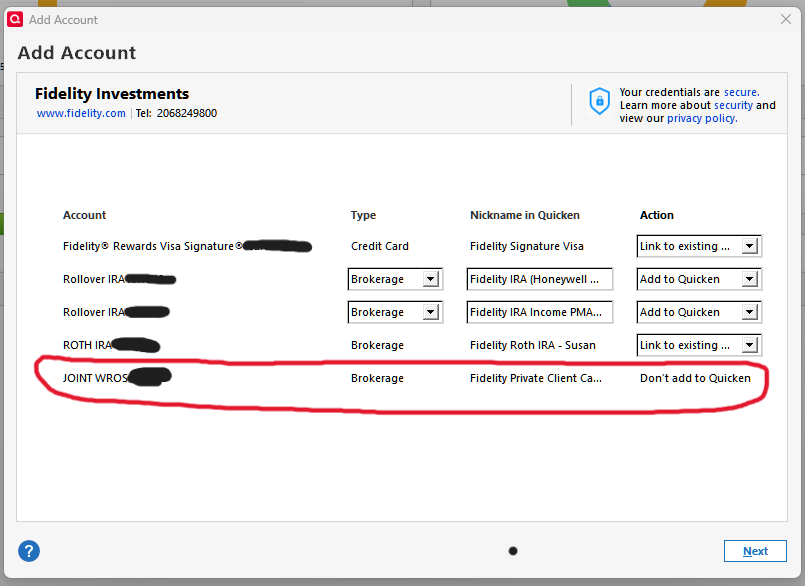
As you can see, Quicken still refuses to provide an "Action" to link my primary brokerage account with the corresponding existing account in Quicken.
It seems that Quicken won't acknowledge that the account is link-able, even while still recognizing it exists and displaying its "Nickname in Quicken". (This account is the longest-standing one, with much data going back decades, in case that may be relevant.)
Anything you or other forum members can suggest would be appreciated. I have been hoping to resolve this on my own schedule, rather than tie myself up in long phone conversation with Quicken Support.
I have also encountered a new secondary issue (yet another hassle):
You may notice that I removed the Charitable Gift Fund from authorization at Fidelity. This is because the update link I established yesterday did not work properly. Quicken kept much of my earlier manually entered transaction history but unfortunately eliminated the mutual fund share balance, leaving the account at zero value in Quicken, so I will now have to recreate the fund acquisition transactions to get returns to calculate properly in Quicken or else live with a manual placeholder and incomplete return calculations.
Thanks for your attention and any further help you can provide.
0 -
@Pennhaven Thanks again for the detailed updates and screenshots!
Primary Fidelity brokerage account:
Since Quicken still isn’t giving you the dropdown option to link to the existing account—this sometimes happens if there’s a hidden or similar-named account that Quicken thinks is connected. Please check for any hidden accounts:- Navigate to Tools → Account List.
- Check the box on the bottom-left for Show hidden accounts.
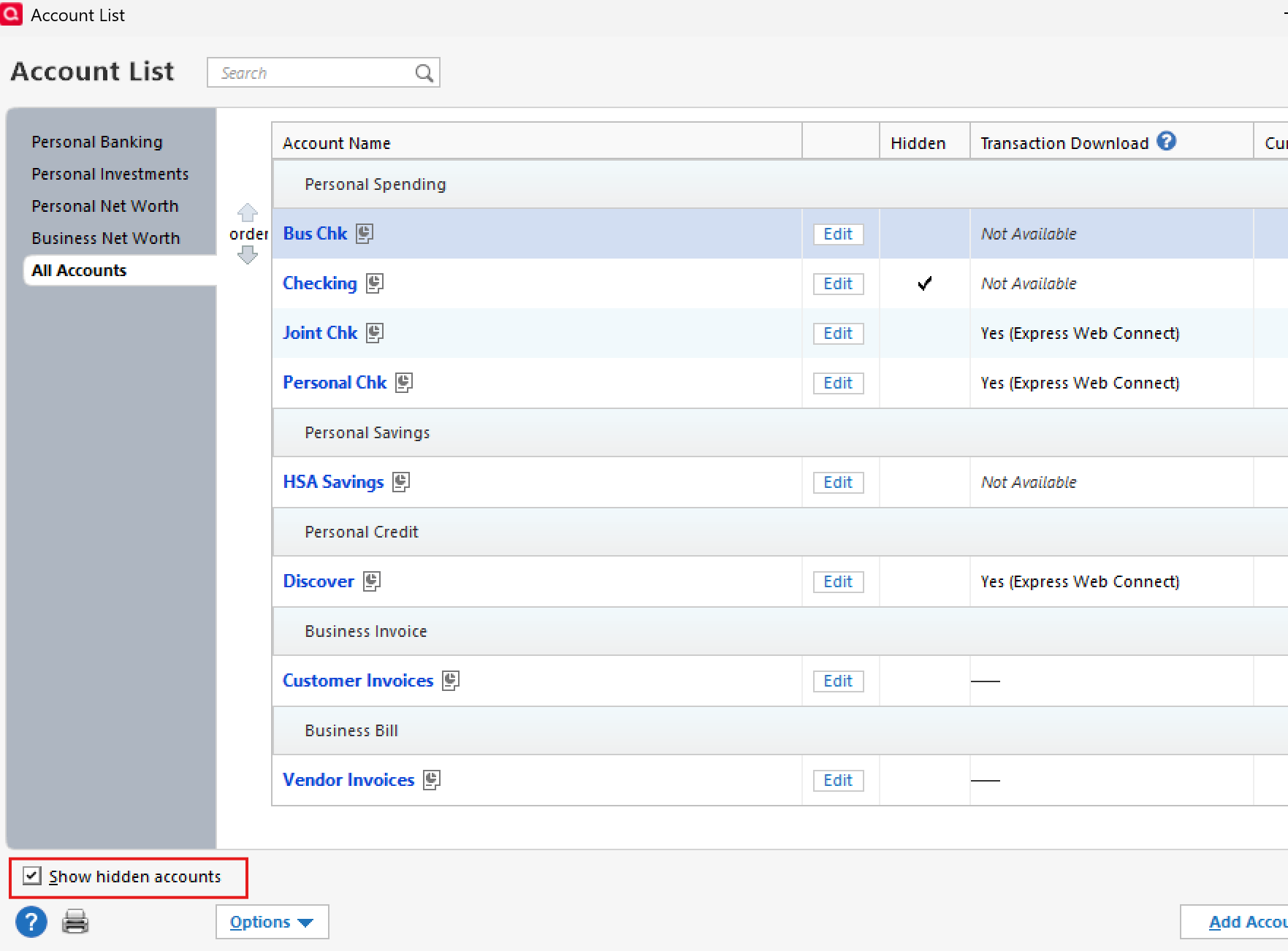
- Deactivate any accounts that may be linked incorrectly—this often allows the “link to existing” option to appear.
Mutual fund showing a zero balance:
This looks like a cash representation issue. Here’s what to check:- Confirm the ticker symbol of the affected holding.
- Check whether Quicken is treating it as cash instead of as a security.
- If it is being counted as cash, you can reset its cash representation in one of these ways:
- Click the blue cash balance link in the account register.
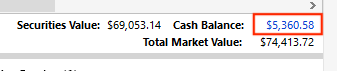
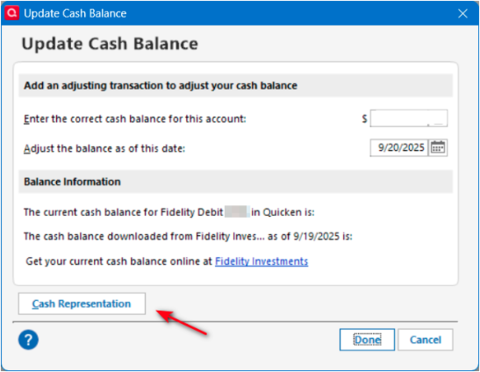
- Go to Tools > Account List > Click Edit on the Account in question > Account Details > Online Services tab.
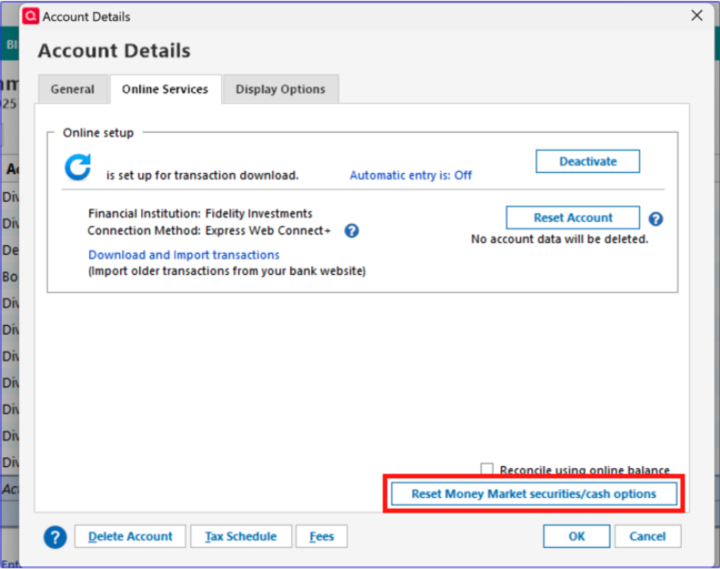
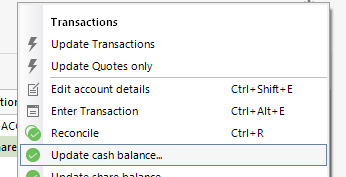
- Click the gear icon in the account register and choose Update Cash Balance.
- Click the blue cash balance link in the account register.
If those options to reset cash representation don't appear, please try these steps below which were provided by a member of our escalation team.
Steps to Follow:
1. Backup
- Save a backup of your Quicken file.
2. Adjust Preferences
- Go to Edit → Preferences → Downloaded Transactions
- Check “Never interpret downloaded money market funds as cash.”
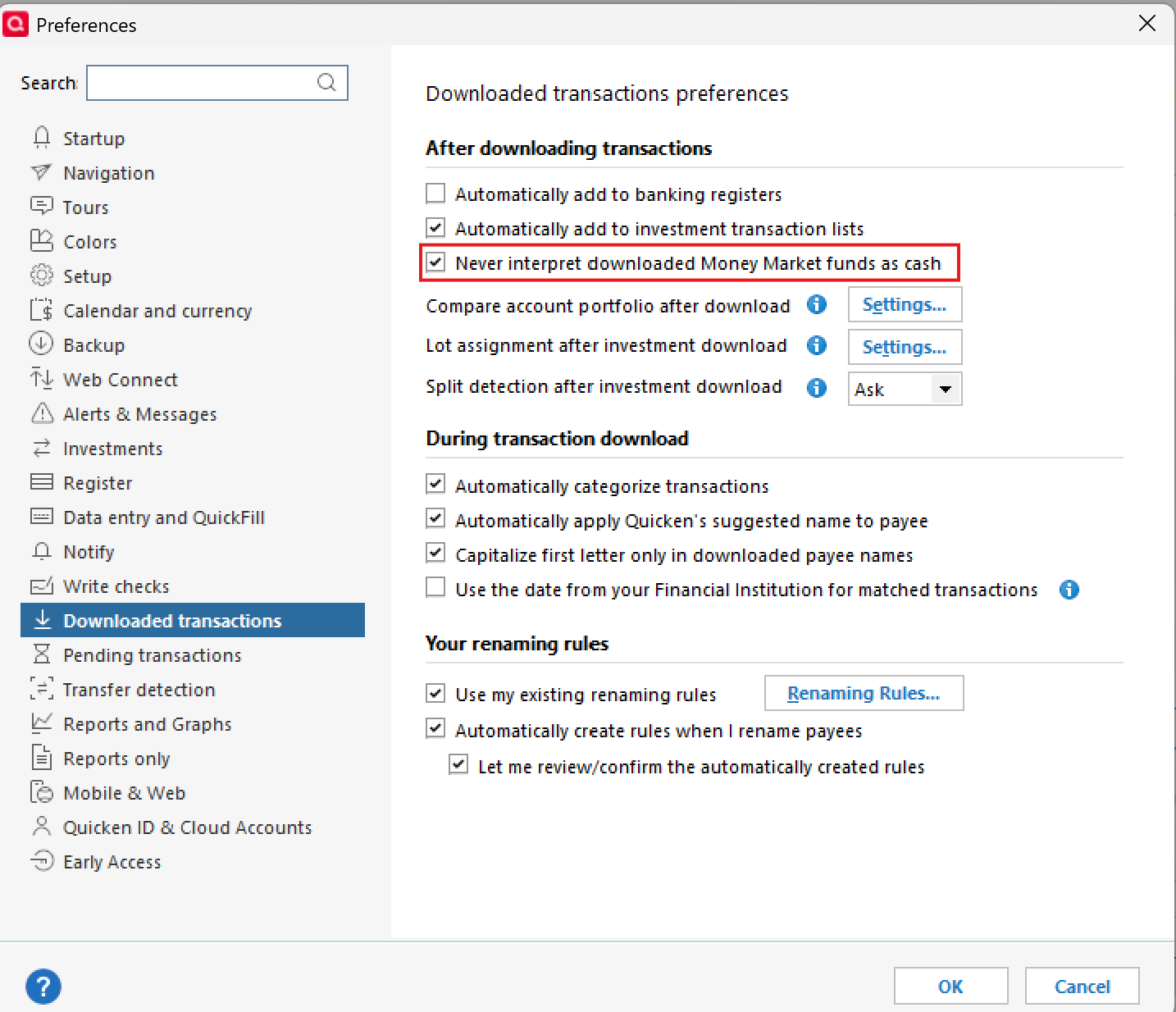
- Click OK
3. Force Transactions
- Run a One Step Update (OSU) on the affected accounts.
- Accept downloaded transactions.
- Review any prompts and make edits as needed.
4. Restore Preferences
- Go back to Edit → Preferences → Downloaded Transactions
- Uncheck “Never interpret downloaded money market funds as cash.”
- Click OK
Following these steps should resolve both the linking issue and the zero balance in your mutual fund.
Please try this and let us know how it goes—we’re happy to help troubleshoot further if needed!
-Quicken Anja
Make sure to sign up for the email digest to see a round up of your top posts.0 -
Primary Fidelity brokerage account:
Since Quicken still isn’t giving you the dropdown option to link to the existing account—this sometimes happens if there’s a hidden or similar-named account that Quicken thinks is connected. Please check for any hidden accounts:- Navigate to Tools → Account List.
- Check the box on the bottom-left for Show hidden accounts.
- Deactivate any accounts that may be linked incorrectly—this often allows the “link to existing” option to appear.
Anja,
I had already checked this. While there are earlier hidden Fidelity accounts, none of them have been activated for download for years, so there are none to deactivate.
0 -
Mutual fund showing a zero balance:
This looks like a cash representation issue. Here’s what to check:- Confirm the ticker symbol of the affected holding.
- Check whether Quicken is treating it as cash instead of as a security.
- If it is being counted as cash, you can reset its cash representation in one of these ways:
- Click the blue cash balance link in the account register.
Anja,
My issue with the Fidelity Charitable Gift Fund Account has nothing to do with cash representation. Fidelity Charitable Gift Funds are a different animal. They have no cash balance, only holdings in non-publicly traded mutual funds whose symbols aren't even known to account holders. Nor to the best of my knowledge were Charitable Gift Funds ever previously available for linking via Direct Connect. So I have previously handled all transactions in Quicken with manual entries.
But since the CGF was offered for connection under EWC+ I linked the account to Quicken. An unwitting mistake.
Here is what appears have happened:
A "phantom" "place-holder" entry was created that removed the share balance. However that entry is not correctly reflected on the Quicken account transaction screen, which still shows the correct share balance, though no dollar balance. Nor does it show up in any Placeholder sub-window. The only way I found this entry was by going to the Security Detail screen where it is shown. However I can find no way to delete that entry. It apparently can't be done on the Security Detail screen, and as I said it does not show up on the account's transaction screen.
This appears to be a bug in Quicken. Since the share balance is shown on the transaction screen and there is a current price manually entered for the security, the account dollar balance should reflect that. Yet it is showing a zero dollar balance. The logical deduction is that this is a result of the phantom entry, which "removed" shares, yet does not show up on the transaction screen, other than in the dollar balance.
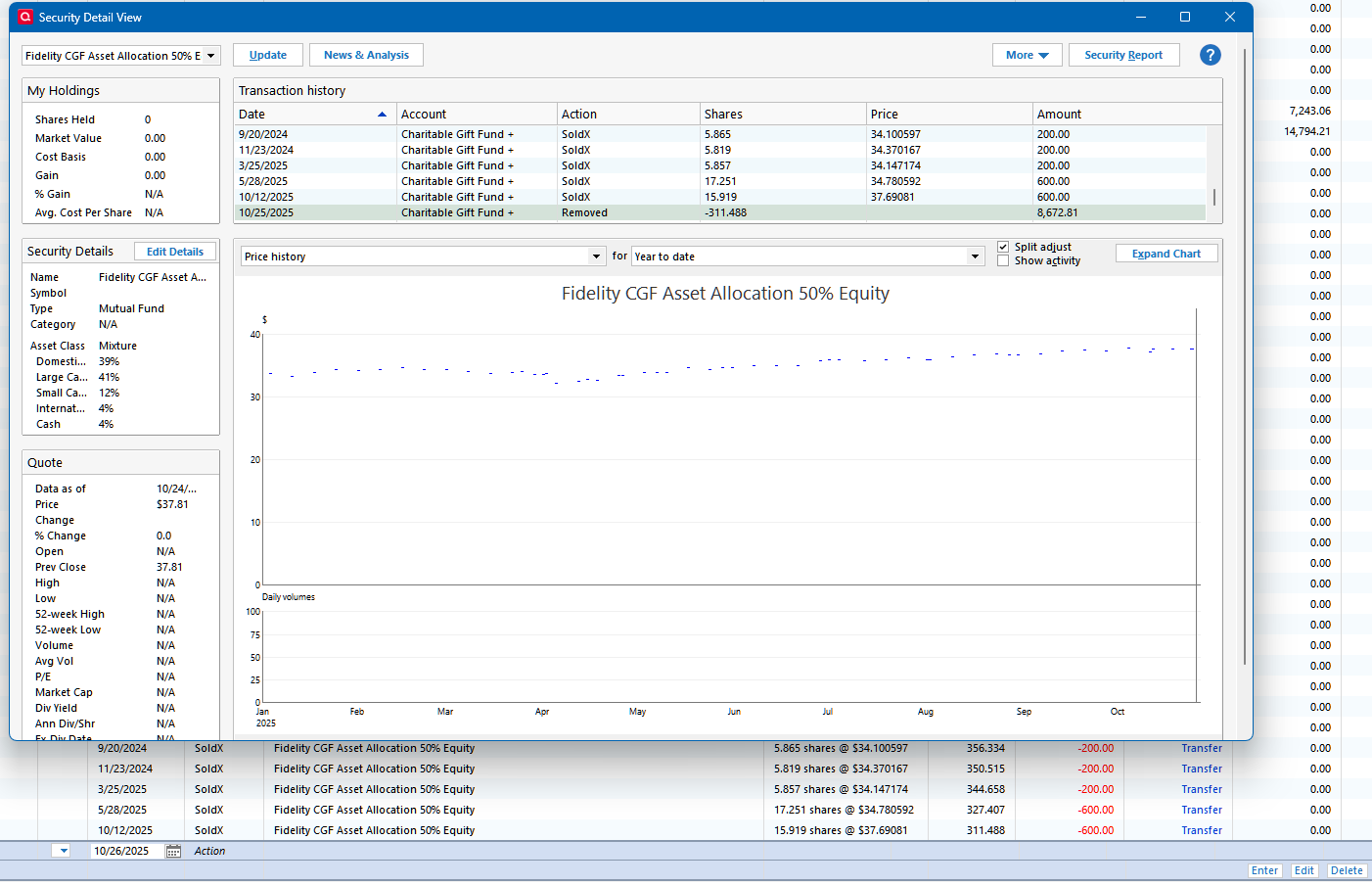
Here you can see what I am reporting, the Security Detail screen shows the Removed entry, but the account screen does not. It does show the correct share balance, but no dollar value for the account balance!
At this point, it seems I have two recourses:
- Revert to a backup pre- this latest attempt at Fidelity EWC+ linkage, then reenter all the subsequent transactions in all my other accounts.
- Create a new account for the charitable gift fund with the correct balance, and substitute it for the old one in all of my reports.
Neither one is really satisfactory from my perspective.
So please pass along this issue for your team to evaluate.
Followup:
I found a much better option to get rid of the problem transaction.
I used the Transaction screen "gear" menu to "Move [the] Transaction" to a newly created account, which I then deleted. This has corrected the Charitable Gift Fund balance. More hours of my time spent on this software. Software which I pay for to save me time keeping track of my finances!
But at least it is corrected. And I have disabled EWC+ for the Charitable Gift Fund. Maybe at some point it might be useful, but since it transferred to no transactions to Quicken and instead messed up the account balance, I strongly suggest that it should be disabled overall, until it works in some useful fashion.
0 -
@Pennhaven Thank you for following up with these details and for sharing your findings. I appreciate the time and effort you’ve put into troubleshooting this.
Since you’ve resolved the placeholder issue with the Charitable Gift Fund by moving and deleting the problematic transaction, and you’ve already confirmed that there are no hidden accounts but are still unable to choose the link to existing option, the next best step would be to contact Quicken Support directly. They can safely collect and review your log files and escalate the issue to the appropriate team for further investigation.
Thank you again for helping document your experience here in the Community.
-Quicken Anja
Make sure to sign up for the email digest to see a round up of your top posts.0 -
Anja,
Thanks for your response.
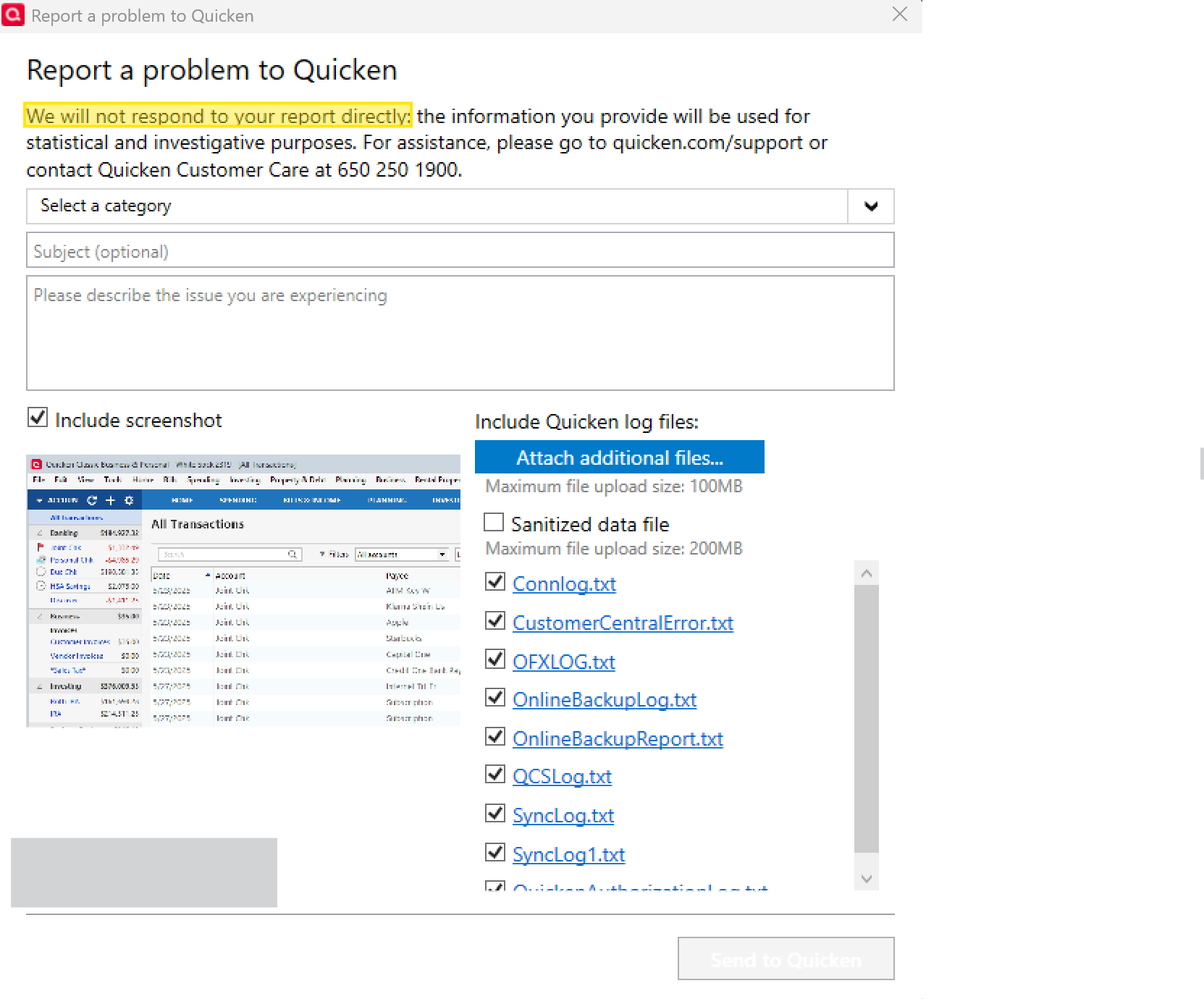
I have now used the "Report a problem" from the Quicken Help menu to describe the issue, upload logs and refer to our dialog in this discussion. I will now wait for support to request any additional information they require or offer any suggestions. I think a written approach provides a more efficient way to communicate details than to start over with a telephone conversation. I hope I am correct and that Support isn't too overwhelmed by these issues to get to mine!
0 -
@Pennhaven Thank you for submitting the problem report and uploading your logs. However, I just want to clarify that problem reports are primarily used to collect logs for active escalations or to track widespread issues, and as it says at the top of the submission screen, “we will not respond to your report directly.” So please don’t expect a direct reply through that channel—it’s mainly to help the team investigate.
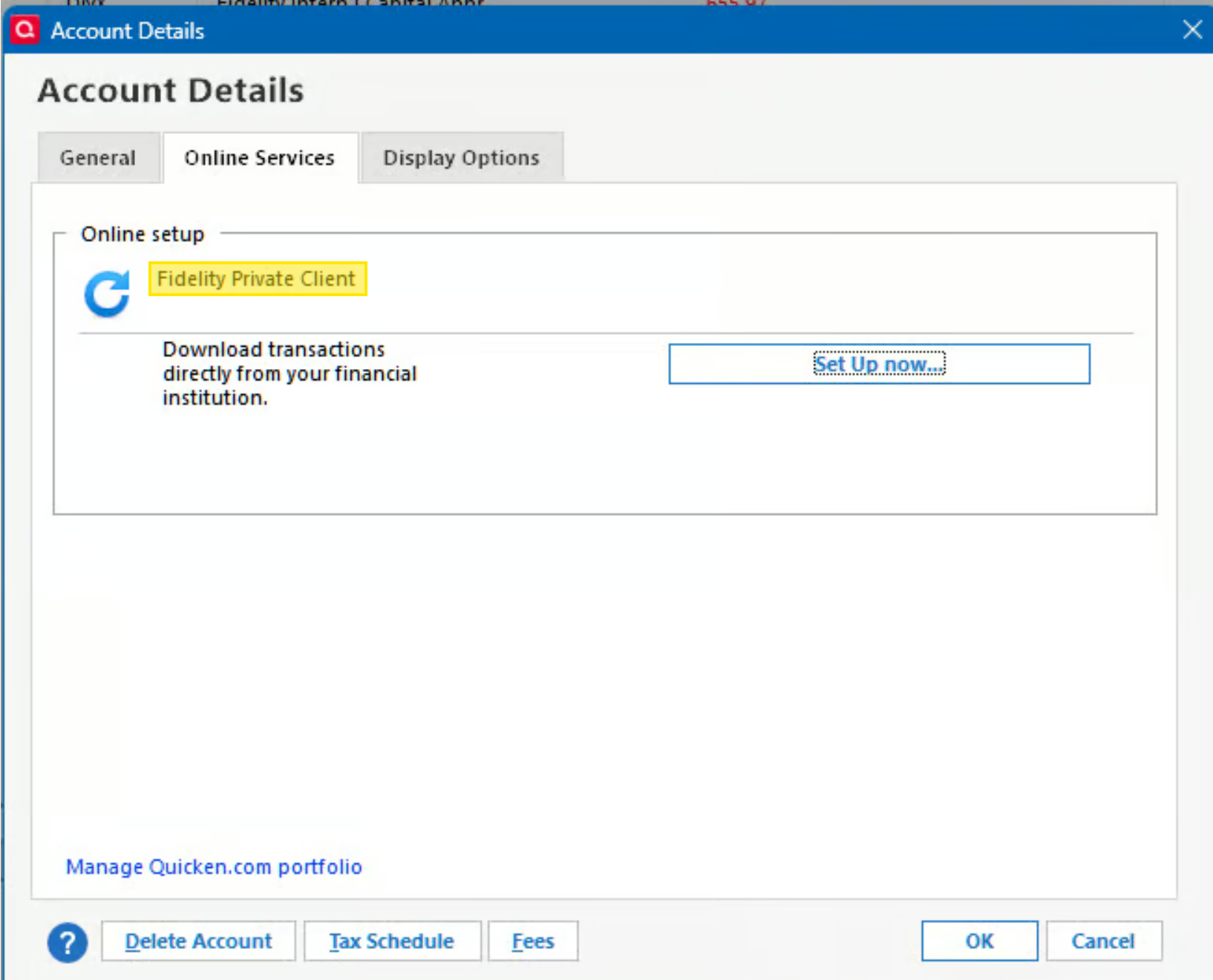
That said, I did notice something in your screenshots that I hadn’t caught before. In your Accounts Details > Online Services tab, the account name shows as “Fidelity Private Client”.
but in the screen where you’re not getting the “link to existing” option, it’s showing a slightly different name: “Fidelity Private Client Ca…”.
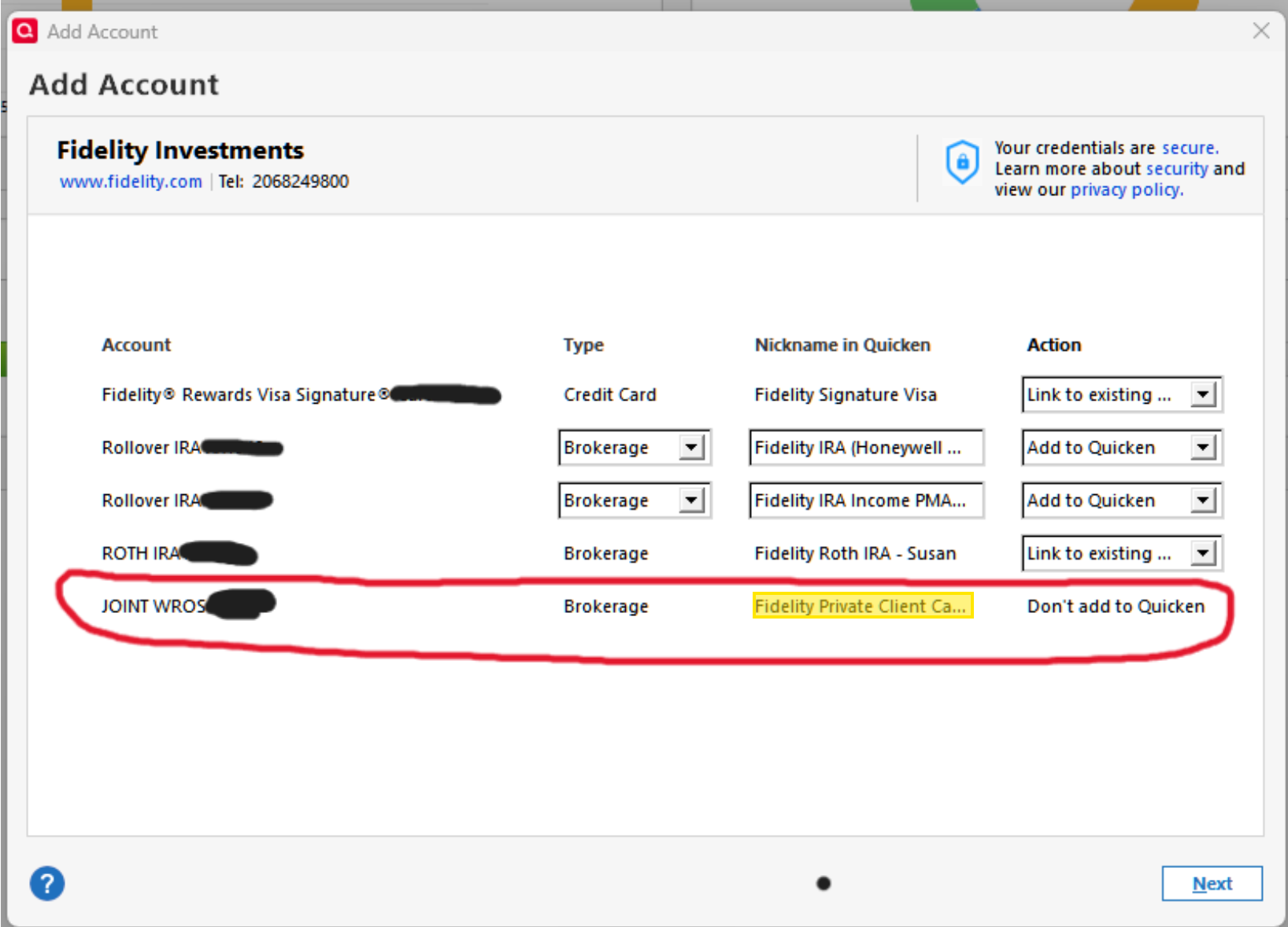
It looks like Quicken is connecting to a different account with a slightly different name. To address this:
- Locate the account labeled “Fidelity Private Client Ca…”.
- Deactivate that account.
- Then try reactivating via Tools > Add Account.
After doing this, see if you then get the option to link to the existing correct account (“Fidelity Private Client”).
Let me know how that goes!
-Quicken Anja
Make sure to sign up for the email digest to see a round up of your top posts.0 -
Anja,
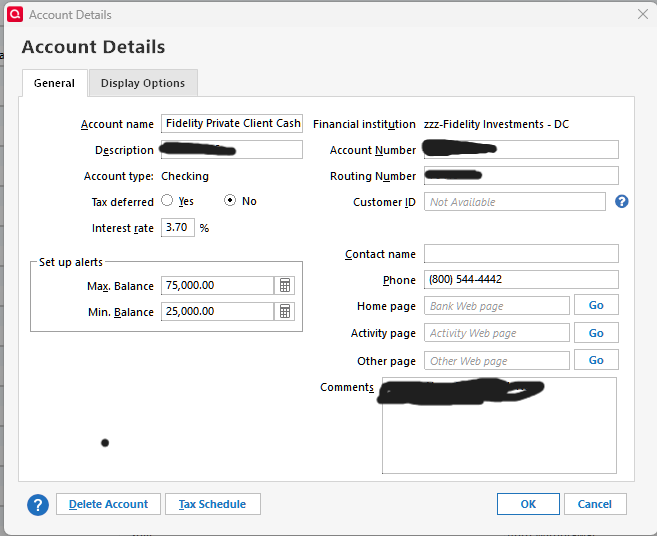
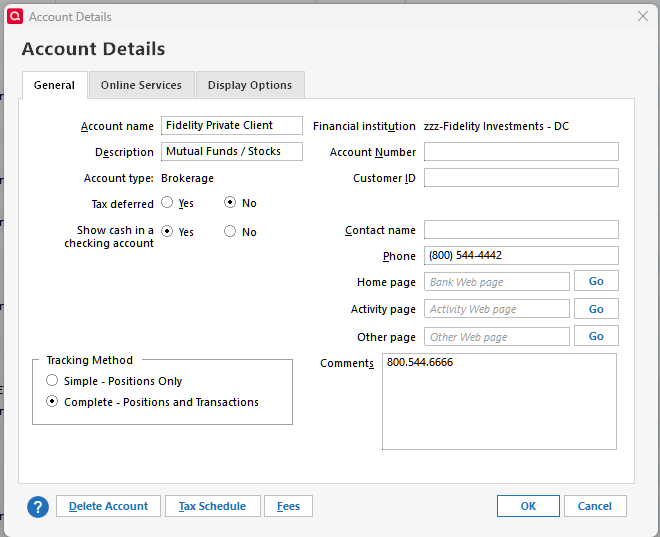
The account labeled "Fidelity Private Client Ca.." is, in fact, the linked checking account "Fidelity Private Client Cash Management" of the problem brokerage account labeled "Fidelity Private Client". There is no way to deactivate it separately that I can see. We've already deactivated and reactivated the brokerage account several times with no success.
Thanks for continuing to look into this though. It could well be that the linked checking account in Quicken is playing a role in the issue here. It's also may be worth noting that the Financial institution is still labeled "zzz-Fidelity Investments - DC", though that may be as expected since the account has never successfully transitioned to EWC+ in Quicken.
If you have any other ideas please let me know before I resort to contacting Support directly. Maybe the linked checking/cash management account can be relabeled to be the same as the investment account? But it seems to me they are supposed to have different names?
 0
0 -
@Pennhaven Thank you for clarifying and providing all of these details—this definitely helps clear things up. From what you’ve described, it looks like the issue is related to the linked cash account associated with your Fidelity brokerage account.
This is a known issue with an open internal ticket (CTP-14942), and there isn’t an ETA for a full fix yet. However, the following workaround should allow you to reconnect your account successfully (please save a backup first, just in case):
- Go to Tools > Account List > Edit on the affected brokerage account (Fidelity Private Client).
- On the General tab, set “Show cash in checking account” (linked cash account) to No.
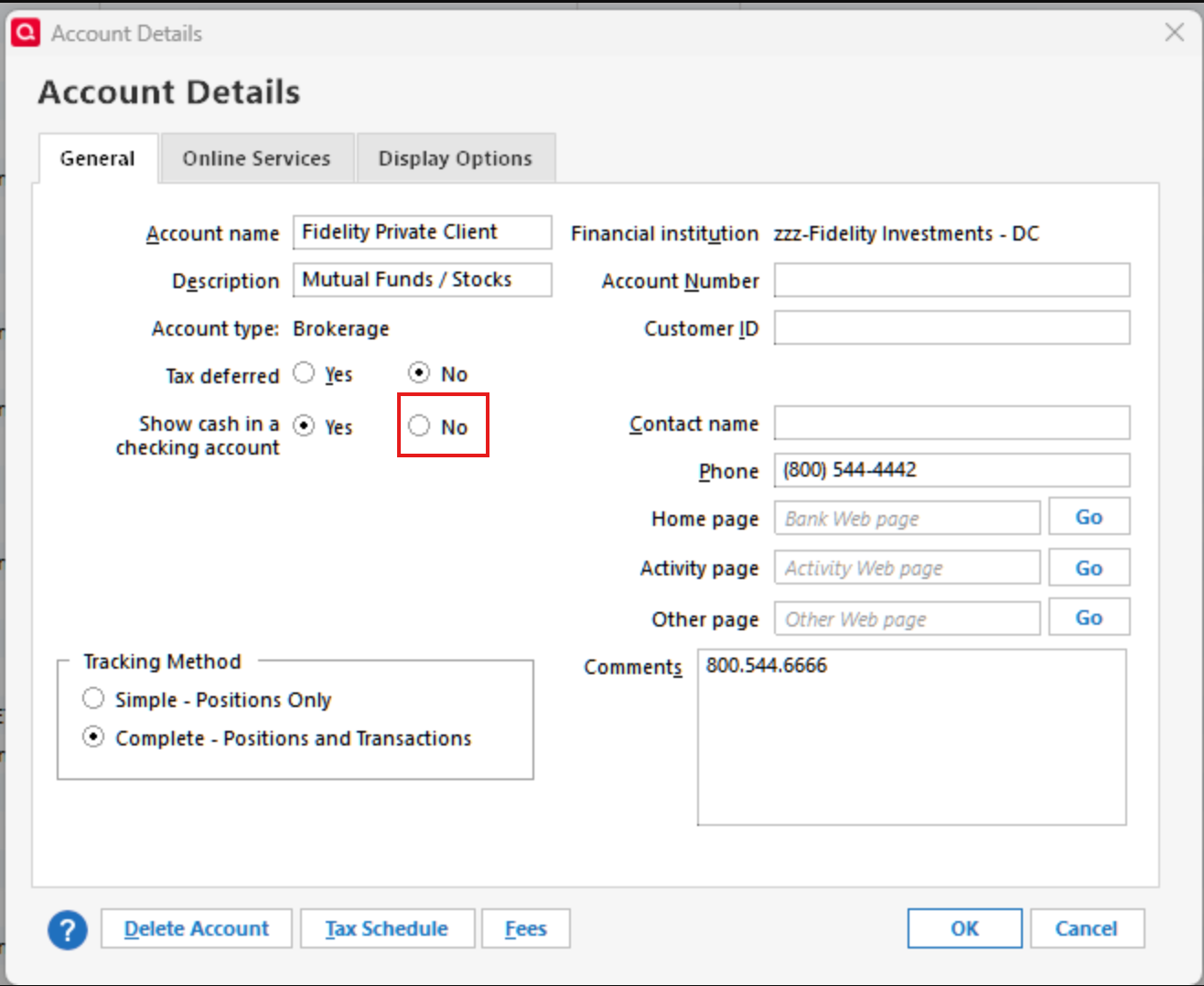
- Attempt to reauthorize the account in Quicken and see if it will now allow you to link it to the correct account. If it successfully reconnects, you can re-enable the linked cash account option.
This process has helped other users in similar situations reconnect their accounts without losing transaction data.
Please give this a try and let us know how it goes!
-Quicken Anja
Make sure to sign up for the email digest to see a round up of your top posts.0 -
- Go to Tools > Account List > Edit on the affected brokerage account (Fidelity Private Client).
- On the General tab, set “Show cash in checking account” (linked cash account) to No.
- Attempt to reauthorize the account in Quicken and see if it will now allow you to link it to the correct account. If it successfully reconnects, you can re-enable the linked cash account option.
Anja,
Thank you. I believe this actually worked! But not without a large amount of time consuming effort.
This brokerage account is over two decades old, with several thousands of transactions.
So all phases of this fix took a lot of time. Just de-linking the cash account took over an hour. (And I do not have a slow Windows workstation. It has a fast 8 core processor, 32GB of fast memory, and plenty of fast SSD storage.)
Then, the re-enabling of the checking account link after the successful EWC+ connection pretty much overwhelmed Quicken.
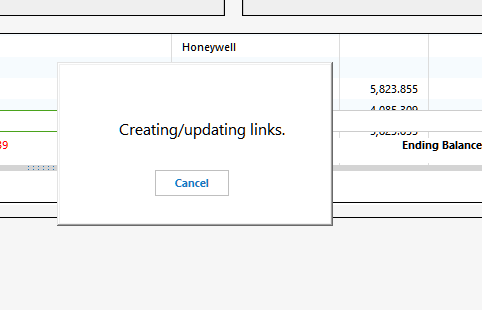
This went on for hours, with Quicken often pausing operations, then resuming.
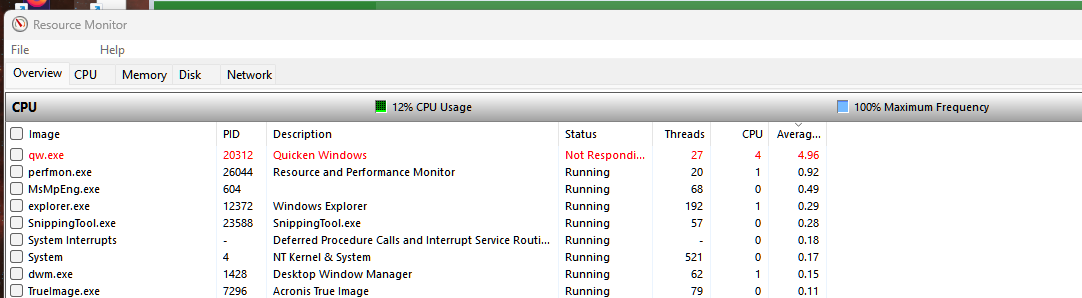
Eventually the Quicken window froze with display errors, so it was impossible to tell if it was still operating at all except by checking the Windows Resource Monitor to see if it was still accessing disk storage. To be sure I left it run all night, then finally had to use the Task Manager to terminate it.
Next I had to reconcile why the checking balance was off by about 20%. This turned out to be downloading of duplicate transactions, which I think went back to the first time I tried to connect with EWC+ back in August before reverting to a backup, because at that time everything was so fouled up . More time spent to do this and be certain.
Anyway for the time being, all seems to be working as it should. But, again, not without hours of my own time required to get it there. So I would strongly suggest that before recommending this process to other longtime Quicken users, who have a lot of accumulated transaction data, Quicken support first warn them, that there is a strong possibly it will not be easy or without further aggravation.
I certainly hope that Quicken management is considering some type of compensation for Fidelity customers, for all the time we've had to spend and frustration we've incurred. For example, providing several years of free subscription might indicate how serious ownership is about it's commitment to customers.
0 -
@Pennhaven Thanks for the update and for sharing all of these details. I’m glad to hear the workaround ultimately got your account reconnected, even though it took quite a bit of time and effort to get there.
I understand the process can be lengthy for long-standing accounts with extensive transaction history, and I appreciate you noting how Quicken handled the data and performance during the steps. We appreciate the feedback and will pass it along.
Thanks again for sticking with it and for documenting your results here.
-Quicken Anja
Make sure to sign up for the email digest to see a round up of your top posts.0 -
Anja,
Thank you for carefully noting my feedback and concerns. It is at least gratifying that Quicken has capable diligent people to address issues via discussion forum. This also provides a helpful resource for clients to check whether the issues they encounter are commonplace, and what solutions might be available, without always have to enter a customer service phone (or messaging) tree, which I think often is more time consuming for both the client and customer service. Not that those options can't also be valuable.
0 -
Thanks, @Pennhaven—I appreciate that. I’m glad the discussion here has been helpful, and I agree—the Community can be a great resource for seeing what others are running into and what’s worked for them.
-Quicken Anja
Make sure to sign up for the email digest to see a round up of your top posts.0 -
"
- Go to Tools > Account List > Edit on the affected brokerage account (Fidelity Private Client).
- On the General tab, set “Show cash in checking account” (linked cash account) to No.
- Attempt to reauthorize the account in Quicken and see if it will now allow you to link it to the correct account. If it successfully reconnects, you can re-enable the linked cash account option."
Further unfortunate followup on this process.
In addition to the significant time consuming issues I noted in my October 29 post, it also created a major problem with reconciliation of the checking account.
Hundreds of transactions that had previously been reconciled lost their R designations in the Quicken checking account. Transactions (dividend distributions, etc.) that still were cleared in the linked Quicken brokerage account and still designated "c" there, were no longer "R" or "c" in the checking portion, even though they were all "R" through September, before I embarked on this process.
With the huge volume of "un-reconciled" transactions I could see no way to reconcile the account "properly". I thought that perhaps I could force a reconciliation (already knowing that the October month ending balance was in agreement with the Fidelity statement) by tweaking the reconciliation prior balance, but for some reason Quicken overrode whatever number I entered with a negative balance over $100K. The account never had a actual negative balance, let alone a negative balance when it had been previously reconciled. When I began the reconciliation Quicken indicated that there was no prior reconciliation date, yet it forced a prior balance that I could not change.
It was simply impossible for me to enter any other prior balance. Accepting the negative prior balance that Quicken forced on me, and marking all transactions resulted in difference of $ millions. (This account's balance has never been above the lower-mid $100K range.) Marking only the actual transactions since my prior September reconciled balance left me with a difference of approximately negative $300,000.
The workaround I was forced to employ was to enter two offsetting $300K+ adjustment transactions, equal to the un-reconciled amount, at the end of September, one positive and the other negative, marking one "c" and leaving the other unmarked. This allowed Quicken to complete the reconciliation without a difference. Though of course the hundreds of earlier transaction still remain un-marked. At least I should still be able to reconcile monthly going forward. But I would forever-after need to ignore all the those previously reconciled transactions that are now left unmarked in Quicken.
Of course, this is yet more of my time spent only partially undoing the damage Quicken has done.
I suppose I could still go back and use the reconciliation tool to mark all the real transactions, then change the offsetting transactions to the $million+ value it would then take to force the reconciliation, leaving only the one offset un-cleared. That might be the best case. 🙄
1 -
"
I suppose I could still go back and use the reconciliation tool to mark all the real transactions, then change the offsetting transactions to the $million+ value it would then take to force the reconciliation, leaving only the one offset un-cleared. That might be the best case. 🙄
"
So I restored a backup to try that approach, and this time the reconciliation did work using the forced prior balance and Mark All (5172 transactions), resulting in a difference of 0. So, I have no idea why trying the same thing yesterday resulted in a difference of over $1 million. 🙄
At any rate, after more time spent, it seems OK now. 🙂
0 -
Thanks for circling back and sharing all of this detail, @Pennhaven. I appreciate you taking the time to outline what happened after trying that workflow—especially the impact on your reconciliation state. That context is genuinely helpful for our ongoing review.
Your experience will be added to the internal investigation so the team can take this behavior into account as they continue working through the linked cash account issues. Thank you again for the thorough breakdown—I know this was a lot of additional time and effort on your end, and it does help move the review forward.
Thank you!
-Quicken Anja
Make sure to sign up for the email digest to see a round up of your top posts.0
