Can you have 2 copies of Quicken use EWC+ on same institution?

I have been using Quicken for Windows, with Fidelity using Direct Connect, for decades.
Recently imported the data file into Quicken for Mac and eventually got it connected to Fidelity using Quicken Connect (EWC+). Meanwhile, I continued downloading from Fidelity on QWin using DC
A few days ago, on QWin, I converted Fidelity to EWC+. It did download the first time, since I got all the duplicates and messed up cash, all of which I corrected.
Today, after doing OSU on both platforms, the holdings on QMac match what's on Fidelity, but the holdings have not been updated on QWin. There may be several causes.
- Maybe I cannot continue to use EWC+ on 2 platforms.
- Or maybe Fidelity's presentation of quotes during EWC+ is massively delayed, while QMac has perhaps been downloading quotes (from wherever Quicken gets them), while QWin is not. On QWin, I've never used the OSU feature to download quotes. (I just tried it, and now my Fidelity portfolio holdings ARE correct.) So this might explain why QMac got updated before QWin. But that raises the question, why are quotes that delayed on Fidelity? I can understand slow updating of mutual fund prices, but I also have some individual stocks that weren't updated (though, of course, they are correct in real-time at fidelity.com). Does EWC+ only include the prior day's closing prices, and they are delayed by many hours?
I have many more questions about how the downloading of quotes on QMac can be controlled, but I'll post that in the QMac discussions.
[Edited-Readability]
Comments
-
Hello @qudtp,
Thank you for sharing a detailed description of what you are experiencing.
It is interesting that quotes are updating more often for you on QMac, than they are on QWin. Is this only true for Fidelity quotes, or does it affect other financial institutions as well?
One thing we can check on QWin is your preferences for investment accounts.
To do this:
- Go to Edit.
- Select Preferences.
- Select Investments.
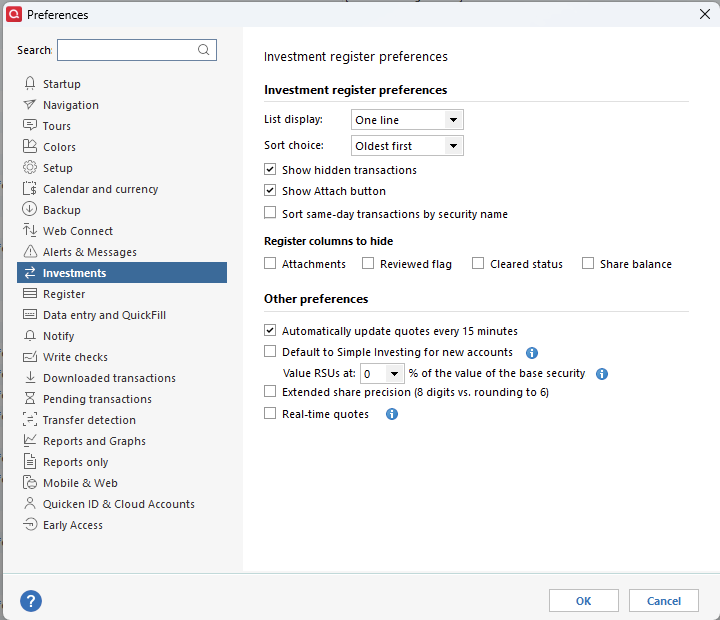
- Make sure you have "Automatically update quotes every 15 minutes" checked off.
- You can choose Real-time quotes as well, if you would like.
Let me know if this makes a difference.
Thank you.
Quicken Alyssa
Make sure to sign up for the email digest to see a round up of your top posts.
0 -
I don't have securities at other institutions except Fidelity.
Your suggestion does reveal something interesting for me - I don't see that setting to "Automatically update quotes every 15 minutes". I do have a glitch, something weird in my Windows display settings, that causes some Quicken screen elements to be hidden. In Reports, for instance, in the Customize window, I can't see the checkboxes or check marks next to the accounts in the account list selection area on the Accounts tab. (But I do see those checkboxes for Display, Categories, Payees, Tags etc.)
And here in Preferences, I see only 2 of those 4 settings - I see just the one to Default to Simple Investing, and the top part of Extended share precision (I don't see the second line about RSUs). So I see just 2 lines where you are showing 5 lines for the 4 checkboxes.
So I can't directly see if I have automatic quote update every 15 minutes. It's just a display glitch.
But that is a separate issue we don't have to explore here - if ever. I'm used to that problem.
I don't know if there is another way to directly check whether that 15-minute update is enabled, but looking at my security prices, I think it must be disabled.
The only place I know where I can see the time that a quote was updated is at the bottom of a Security Detail View window.
Whether in Holdings, or in Securites List, when I click on a security to bring up the Security Detail View, at the very bottom of the window it says "Online quotes delayed at least 15 minutes. Options quotes are previous day's close. Updated nn/dd/yyyy at hh:mm am|pm local time."
And in my case, with every security I looked at, the timestamp was 10/22 at 12:50 PM (which is around 24 hours ago) - it says that even in the details for securities that no longer exist, securities that are hidden, and securities I no longer own. I waited 25 minutes and rechecked - the time of update was unchanged.
Then in one Security Detail View window, I clicked the Update button. After the update finished, the update timestamp for all my securities was changed to the current date and time.
Since this timestamp appears on all of my securities, I don't know if it means:
- It is downloading quotes even for securities I don't own and/or are hidden and/or don't even exist (like old CDs, treasuries, extinct mutual funds)
- Or it's just a general message put at the bottom of every Security Detail View that just means that's the time of the most recent security download, overall.
Either way, it seems clear that I am not automatically downloading quotes on Windows.
Since I also had quote download disabled in OSU, it seems the only quotes I'd be downloading would be coming from Fidelity during OSU.
I think actually that is the way I always wanted it - I wanted to restrict online activity to those directly with my institutions. When everything was using Direct Connect, that was easier to do. That restriction is less meaningful now, since direct connections are mostly gone.
Since it appears true that I was only downloading quotes from Fidelity, then the question for now is still outstanding - whether EWC+ can't be used on QMac and QWin at the same time, or if EWC+ from Fidelity presents delayed information.
Since most people have either enabled the 15-minute update, or the update in OSU, or both, then the only thing they might notice is if transactions with EWC+ are delayed. There may not be many reports of delayed quotes from Fidelity.
As I just downloaded quotes to QWin with that Update button, I'll have to wait to experiment some more.
Leaving Quicken quote download off, I'll try Fidelity update at various times after market close tonight and before market open tomorrow, to try to see when the quotes of securities at Fidelity are updated.
Does that sound like a good plan?
Thank you, Alyssa!
0 -
OK, I have confirmed.
On QWin, when not downloading quotes from Quicken (automatic 15 minute download is off, and OSU download is off, and no manual download is done by pressing an UPdate button), the security quotes rely on Fidelity EWC+, and the quote is delayed.
For the 10/23/25 prices, Fidelity provided the closing price on 10/24/25 sometime between 6:20AM and 9:47 AM Eastern time
(Those happen to be the times when I did OSU.)
In the Security View Detail, in the Quote section on the left side, the "Date as of" and "Price" are updated with the values from the Fidelity. I don't know if all of the fields shown in the Quote section are updated from EWC+ data, or if some of it is inaccurate until Quicken quote download is performed.
The status bar at the bottom of the Security View Detail referring to "Online quotes" does not appear to be related to the Fidelity data - the Updated date and time there appear to be the date and time the last quote download from Quicken was performed.
This delay could be caused by how timely Fidelity is updating the servers that provide the EWC+ function, or it could be related to how often Intuit or Quicken is requesting fresh data from Fidelity.
It's probably why transactions are also delayed. I won't have any transactions until the end of the month dividends, so I can't test that.
Obviously Direct Connect eliminated Quicken and Intuit involvement, so if there was any delay, it would have been on Fidelity's side. Now there are extra variables. Maybe delays have been inherent in EWC+ all along, but the migration of Fidelity may be revealing the limitations to a wider audience.
0 -
Thank you for testing it and following up with all of those details.
Given the 'glitch" you mentioned having, I would like to test this out in a new file if that's ok. Doing so will tell us if these issues are related to your data file specifically or not.
To do this:
- Go to File.
- Select New Quicken File.
- Click New Quicken File and then click Ok.
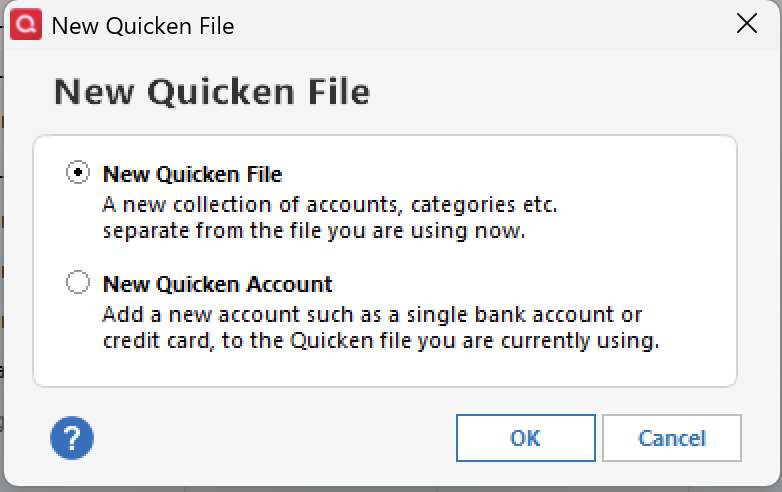
- Go through the prompts; it may ask you if you want to sync or back up your file.
- Name the file. You can name it anything, like "test". Click Save.
- Continue following the prompts until you get to the Add Accounts window.
- At the bottom of the Add Account window, you should see the option for Offline Account. Select this.
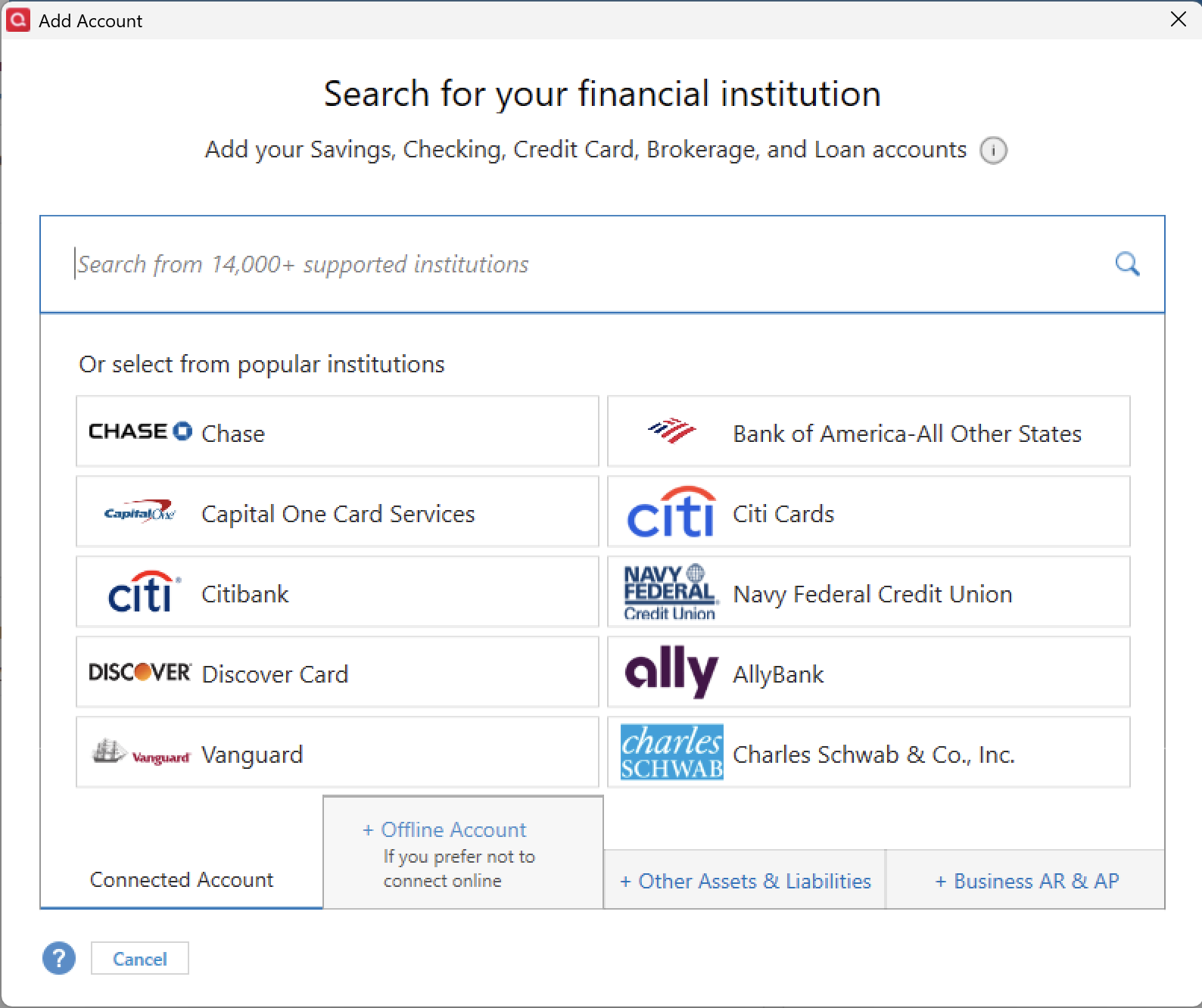
- Select Brokerage.
- Follow the prompts through, just clicking Ok in every window. You don't have to add any information.
- Once you have the account added, go to Edit.
- Select Preferences.
- Click on Investments.
In this file, do you see the options that were missing in your original file?
To get back to your original file, go to File and select the second file listed at the bottom of this menu.
Let me know what you found!
Quicken Alyssa
Make sure to sign up for the email digest to see a round up of your top posts.
0 -
I haven't tried this yet, but will, so please don't close the discussion yet.
(What is the policy for this - how long do you give someone to answer, before you close the discussion due to the lack of response? Just asking for future reference.)
0 -
I followed your instructions - I still am missing several lines of preferences.
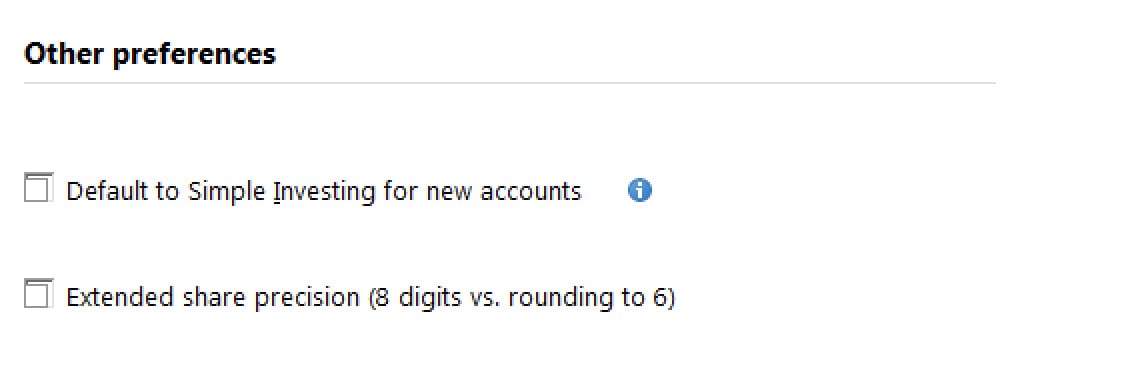
To be honest, I'm using an unsupported setup, so I don't think this is the kind of thing we should be trying to investigate further. I'm running Quicken in a Windows 7 virtual machine - my Mac isn't really capable of running Windows 10, for some reason, though I have tried various editions of it for years. My Mac is due for replacement, and after that I'll be able to use Windows 11.
As for the original question - by now it's clear that I can use Quicken on both Mac and Windows - there is no conflict. I've downloaded all the month-end dividends to both versions without any problem. So for me the issue was just that I had not opted to download quotes from Quicken, but the latest prices weren't available yet in the Fidelity download. Now I'm downloading quotes from Quicken as part of OSU.
Thanks again!
0 -
Thank you for following up, and thank you for your honesty. I am glad you are able to download quotes as part of the OSU now.
To answer your question about how long you have to respond before a post is closed, the answer is one month. Posts are closed after one month of inactivity. If ever a post does get closed, it's nothing to stress over; you can always create a new discussion. You can even provide us with the closed one as a reference.
Thanks again!
Quicken Alyssa
Make sure to sign up for the email digest to see a round up of your top posts.
0 -
For what it is worth, I have seen mixed behaviors depending on the financial institution. I was testing something and as such created a new data file and setup both Chase and Citi Card accounts using Express Web Connect +.
Every time I setup the Citi Card account in one data file, it made me reauthorize in the other. But with Chase I had no problems with all my accounts being activated at the same time. Note I didn't do extensive testing since all I was doing is testing a problem when Quicken is renaming payees in new data files even when no renaming rules are set in the data file.
0 -
Interesting. I use Citi Cards with DC in both Windows and Mac with no problems, but EWC+ is a whole other thing.
I have to admit I've been getting relatively frequent update failures on both platforms with Citi, but I just wait them out and the trouble clears usually later the same day without having to re-authorize.
0 -
Direct Connect and Express Web Connect + are definitely completely different animals.
0

