Autoreconcile works until it doesn't (Q Mac)

Minor issue that's been plaguing me for a long time. I have several accounts at my brokerage that are set up to automatically reconcile. In about half of the accounts, it works as expected. In the other half, I get a warning "there is a discrepancy between your online balance and cleared transactions" but when I click on the reconcile button, the transactions that were just downloaded are checked and the difference is zero. I just need to okay it and the account is in balance. I'm not sure why it showing a discrepancy when there isn't and why some accounts with the exact same account set up work fine. Any ideas?
Comments
-
Hello @dan.greenberg.ct,
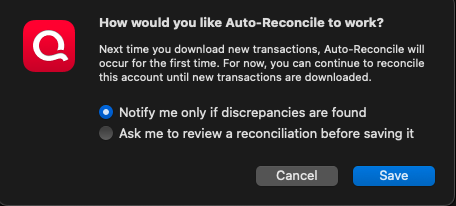
Thank you for reaching out! When did you first notice this issue? Did it first start after a computer/program update or computer/program crash? Do you keep your Quicken file directly on your local hard drive? Is it synced with any cloud service, such as iCloud, OneDrive, or Dropbox? Is it always the same accounts that encounter this issue, or is it more random? Are all of the accounts set to notify only when they find discrepancies, or do you have some set to ask you to review before saving the reconciliation?
I look forward to your reply!
Quicken Kristina
Make sure to sign up for the email digest to see a round up of your top posts.
0 -
I'm not sure when I first noticed it but honestly think it may have always been this way. The data file is kept locally, synced to iCloud but not accessed from there. I don't have any other issues with iCloud and Quicken so I don't think that's the culprit.
I think it's probably the same accounts (they're at my brokerage) but I'll try to make a note of it next time there are transactions that trigger this issue. All of the accounts, working and not working, are set up as in your screenshot, to notify me only if discrepancies are found. The issue is that there aren't discrepancies and it's not automatically reconciling.
[Edited - Readability]
0 -
I have the same issue with my Schwab account. All my other investment accounts auto reconcile fine. Very odd that it is just one account with this issue.
0 -
Thank you for your replies,
Do you recall if your Schwab account has always been like that, or if it used to auto-reconcile without issue?
One way to test if the problem is specific to certain accounts, is to backup your Quicken file, deactivate one of the problem accounts, then navigate to Accounts>Add Account… and add the problem account as new rather than linking to the existing. Once that is done, test to see if the issue persists in the newly added account. If it does not, then you should be able to copy/paste the history from the old account into the new, and use the new account going forward.
Thank you!
Quicken Kristina
Make sure to sign up for the email digest to see a round up of your top posts.
0 -
@Quicken Kristina I've only had a Schwab account since they bought Ameritrade and moved it all to Schwab. I believe that was in late 2023 or so. I'm sorry but I cannot remember if it ever auto reconciled or not. It has not been auto reconciling for quite some time though.
1 -
My issue is also with Schwab. I made a note on the transaction on the list time this happened so I would remember which account it was. Last night other transactions posted to the same account and it was auto-reconciled. This leads me to believe that it may be something with the transaction, not the account. When I look at Inspector though I can't find anything that looks unusual about the transaction (no special characters for example). I'm not going to bother with the new account testing you suggest as I don't feel it's worth the effort though other people are obviously having the same issue and may be willing to do so.
0 -
Thank you for your replies,
It is interesting that this may be triggered by a specific transaction rather than being tied specifically to the account. Have you noticed anything unique about the transaction(s) that seem to trigger this? For example, is it a specific transaction type or amount?
Have you noticed the same thing, or are you seeing different behavior?
Thank you!
Quicken Kristina
Make sure to sign up for the email digest to see a round up of your top posts.
0 -
@Quicken Kristina The last two times Schwab downloaded any transactions, it auto reconciled correctly. Maybe it's fixed ? If it fails to auto reconcile again I'll make sure to note which transaction(s) may have triggered it.
0 -
It happened to me again with this morning's sync. Different Schwab accounts and different transactions. I can't find anything unique about them.
0 -
@Quicken Kristina Same thing with me today failure to auto reconcile. Nothing different or unusual about these transactions vs those that did auto reconcile a few days ago.
0 -
Thank you for your replies,
Due to the nature of this issue, I recommend that you contact Quicken Support directly for further assistance, as they have access to tools we can't access on the Community and they're able to escalate the issue as needed. Quicken Support's contact information can be found through this link here. Phone support is available from 5:00 am PT to 5:00 pm PT, Monday through Friday. Chat support is available from 5:00 am PT to 5:00 pm PT, 7 days a week.
I apologize that I could not be of more assistance!
Quicken Kristina
Make sure to sign up for the email digest to see a round up of your top posts.
0

Categories
- All Categories
- 17 Product Ideas
- 34 Announcements
- 246 Alerts, Online Banking & Known Product Issues
- 19 Product Alerts
- 517 Welcome to the Community!
- 682 Before you Buy
- 1.5K Product Ideas
- 55.7K Quicken Classic for Windows
- 16.8K Quicken Classic for Mac
- 1K Quicken Mobile
- 834 Quicken on the Web
- 127 Quicken LifeHub