Fidelity not downloading transactions

When using either one step update or update transactions with fidelity, quicken appears to connect and says completed but does not download any transactions even though there are several transactions to be downloaded. (Checked the fidelity site to ensure there where some to be downloaded.)
Comments
-
[Removed - Off Topic/Rant/Speculation]
1 -
I am having the same issues. What is going on…..
0 -
I feel exactly the same. This transition has been a nightmare. I have a ton of data in quicken and am feeling like I better get ready for it to be corrupted. I echo the comments that I'd really rather not go somewhere else after over 30 years with Quicken…
0 -
I have been having Quicken Fidelity problems for a couple weeks, and now it appears in Discover and Elan. Very frustrating since I have years of history in Quicken that I use in reports. It's time to renew my subscription. I hope they get this fixed soon. This problem has been taking way too much of my time.
1 -
I would second these comments.
0 -
I had the problem with Elan as well. The way I fixed it was to deactivate Elan on the Fidelity site and then add the account choosing Elan as the provider. All worked after that. Basically, it means that although Fidelity shows that account on its site, I don't check the Fidelity Box but let Elan provide the transactions. Hope this helps you.
0 -
Some of my Fidelity accounts download and and some Fidelity account did not download. Got 501 error.
0 -
I came to look in the forums because transactions that posted to Fidelity after October 27th are not downloading. Same symptoms as OP. I did a reset and went through re-authorization for web connect with Fidelity. Still not updated.
0 -
Hello All,
Thank you for letting us know you're seeing an issue with new transactions downloading into your Fidelity accounts. If you haven't already done so, please follow this troubleshooting from our article on missing transactions/transactions not downloading:
Be sure to follow these steps in order:
1. Go to Edit > Preferences > Downloaded Transactions. The option Automatically add to investment transaction lists needs to be unchecked.

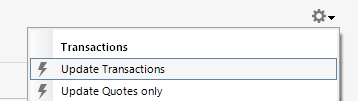
2. Refresh your online account information by clicking the Actions Gear Icon on the upper right of the register, and select Update Transactions. Follow the on-screen instructions to complete the update.
3. Confirm that the Sort Order in your account is by Date; just click the top of the Date column in your account register. It's possible the transactions are in your register, but not where you thought they'd be.

4. Try refreshing your login session: To do this, go to Help > Refresh Sign in. After completing the log-in process, trying running a One Step Update again.
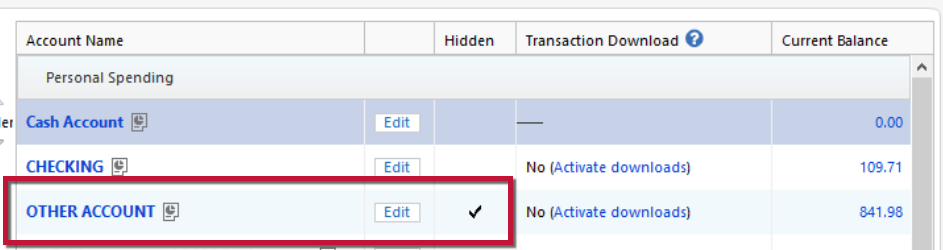
5. Go to Tools > Account List and check Show Hidden Accounts at the bottom left. Confirm the missing transactions haven't been added to a hidden account by clicking on the name of any account that appears with a check mark in the Hidden column.
If the troubleshooting above does not correct the issue, then please contact Quicken Support directly for further assistance, as they have access to tools we can't access on the Community and they're able to escalate the issue as needed. The Quicken Support phone number can be found through this link here. Phone support is available from 5:00 am PT to 5:00 pm PT, Monday through Friday.
I hope this helps!
Quicken Kristina
Make sure to sign up for the email digest to see a round up of your top posts.
0 -
[Removed - Rant]
0 -
I have the same problem downing transactions from Fidelity to Quicken since the beginning of September. Tried all the suggestions found in this forum including resetting connection multiple times. I have also had 2 long sessions with Quicken support (including screen sharing), that ended with the issue being escalated to "the department in charge". I was told that they will contact me once the issue was resolved. That was on October 1. Haven't heard back yet.
What I am doing now is to manually entered the transactions daily and importing the quotes via position download from Fidelity and manipulating the CSV file in Excel (via macro) to Quicken's import format (ticker + "," + price). That turns out to be more reliable. Previously, even with doing OSU every day, I found that I had some missed transactions that I had to manually reconcile monthly.
After >30 years of using quicken download, I now wonder why I need my subscription if what I am doing is more reliable and takes less time (but with more effort and clicks)
Best Wishes
0 -
Hello @cy_young,
Thank you for sharing your experience. I reviewed your interactions with Support and can see they did document that the issue was escalated. I'm not able to see that escalated department's tickets, so I'm unable to see any further status on the issue.
I apologize that I could not be of more assistance!
Quicken Kristina
Make sure to sign up for the email digest to see a round up of your top posts.
0 -
Hours have been spent with Quicken, who claims they are still working on the problem, and Fidelity IT, who says they are providing Quicken with what they need. They have requested that if the problem gets fixed, to notify Fidelity. Everything worked prior to the transition. [Removed - Rant]
0 -
Hello @12Fairmount+,
Thank you for joining the discussion. If you're encountering the same issue with missing transactions/transactions not downloading, did you follow the troubleshooting posted earlier in this thread? If you have and it didn't help, did you contact Quicken Support for further assistance? Your post implies that you have contacted them, but I was unable to see a recent ticket. Do you have the ticket number?
Thank you!
Quicken Kristina
Make sure to sign up for the email digest to see a round up of your top posts.
0 -
Dealing with Ivan in the Office of the President after many calls with Quicken Support. They are aware of this long-running nightmare. The people at Fidelity claim they have sent Quicken support all they need to correct the problems. They even requested that if Quicken ever gets it fixed to let them know. How is that for great customer service? This has been a problem since August. Too long for paying customers.
0
