Fidelity not updating

Is the AWS issue impacting transaction updates in quicken. I placed trades with Fidelity on the 17th of October and while the activity is showing at Fidelity, there is no activity getting updated in Quicken for Mac as of today.
Comments
-
Hello @sycamore1234,
Thank you for posing this question. Are you still experiencing this issue today?
If so, there are a couple of things we can check.
- Where is your data file located?
- Is your file being synced by any third-party services, like OneDrive, iCloud, or Carbonite?
- Are you running any VPN/Antivirus/Firewall software that could be preventing Quicken from accessing the internet?
- Do you currently have any pending updates on your Mac?
- Are you able to download transactions from other financial institutions, and only Fidelity is affected?
- Or are you not able to download anything at all?
Looking forward to your response.
Quicken Alyssa
Make sure to sign up for the email digest to see a round up of your top posts.
-1 -
Issue still persists. Transactions are not downloading despite the account being set to download all detail. Not having this issue with Vanguard, Baird or any of my bank accounts - just Fidelity. The correct positions are reflected but without cost basis data but the sell and buy transactions are not being reflected in the register. I also noticed about a month or so ago that my 401K contributions started showing the buy transactions but was not showing the contribution so it was showing negative cash. This was never the issue until recently and its becoming increasingly frustrating.
0 -
hello @Quicken Alyssa - logged in again today. Still not updating transactions in my Fidelity HSA. I had a dividend reinvestment post on October 2nd but there was a dividend posted at Fidelity on 10/10 and then a few sell/buy transactions that have not posted to the register. It appears the holdings page is updated correctly but the detail is not showing. I checked the settings and the investment tracking method has not changed and still reflects "detail" but I'm not getting the detail. Separately with my 401k. It's posting the purchases every two weeks but not posting the contributions that are directed from my paycheck. I have to manually add the contributions to get my cash back to zero - that was never an issue till about 3 months ago. What's going on?
0 -
Thank you for following up and providing those details.
We do have a Community Announcement for the issue you are seeing with your Fidelity HSA account.
For the issue you are seeing with your 401k, are those splits on an income reminder that you have set up in Quicken? If so, you could try deleting the reminder and re-adding it.
You can do that by going to the Bills & Income tab>clicking on the Income tab>click the three dots in the Actions column>click Delete Series…
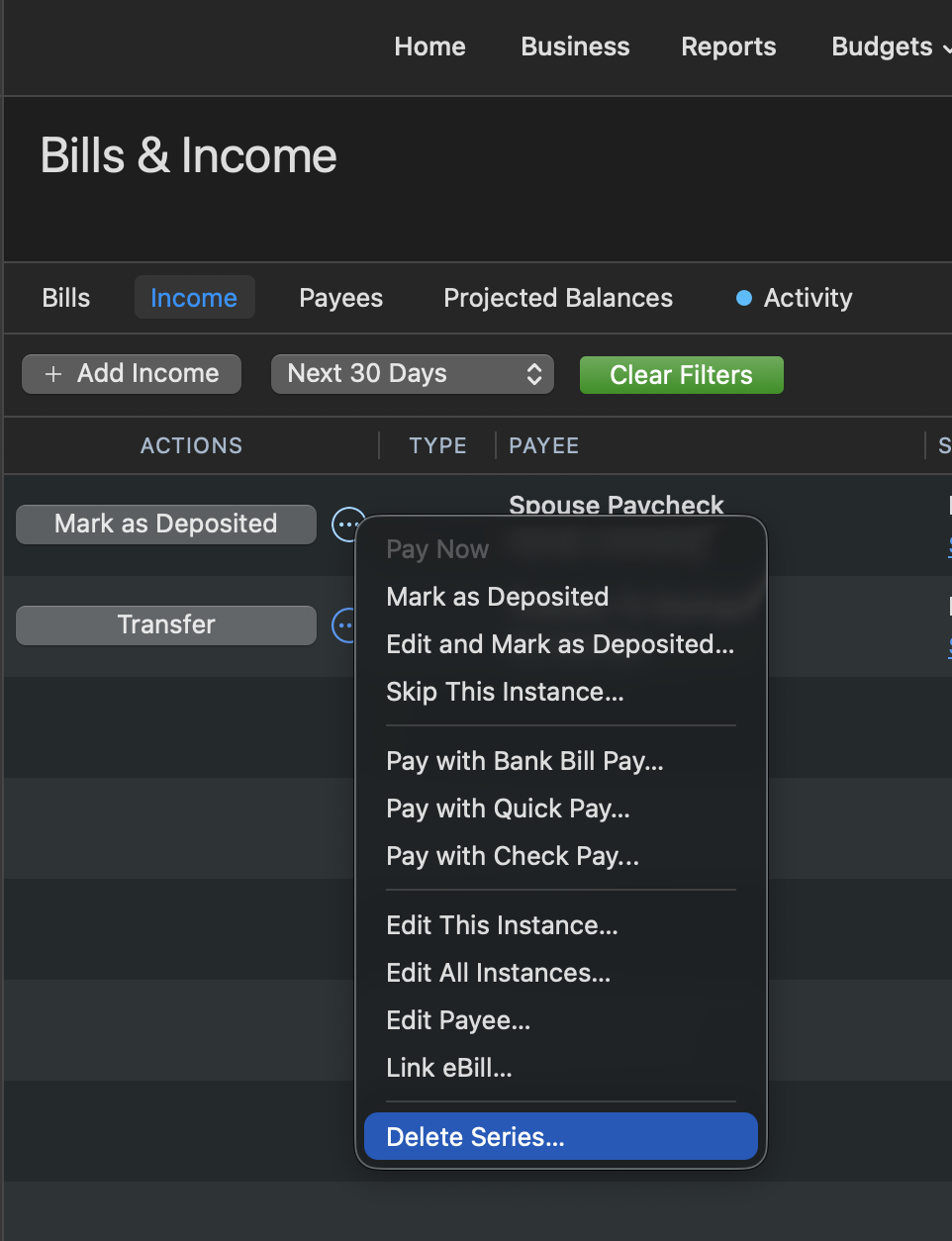
Another thing to check would be;
- Where is your data file located?
- Is your file being synced by any third-party services, like OneDrive, iCloud, or Carbonite?
Let me know how it goes.
Quicken Alyssa
Make sure to sign up for the email digest to see a round up of your top posts.
0 -
There are no income reminders so that's not it. Not a techie so not exactly sure other than my data file is with quicken. I do not use those other services.
0 -
Thank you for following up.
Can you please provide some screenshots of what you are seeing? If needed, please refer to this Community FAQ for instructions on how to attach a screenshot. Alternatively, you can also drag and drop screenshots to your response if you are not given the option to add attachments.
Thank you.
Quicken Alyssa
Make sure to sign up for the email digest to see a round up of your top posts.
0 -
@Quicken Alyssa what are you wanting to see screenshots of? All I can tell you is I have no filters, no splits, have not changed any settings on the 401k account ever but for the past few months, when money is deducted from my pay for my 401k contribution, the contribution amount does not post to Fidelity but the ETF/Fund purchases do post and then create a negative cash position (because the contribution isn't being reflected. Like I said, it worked for years and then all of a sudden it doesn't (a few months ago). I have not changed anything.
0 -
Thank you for providing additional information.
I think we need to check out how this information is being sent to Quicken. To do this, we would need to take a look at your log files. You can submit log files by going to Help>Report a problem>Send to Quicken.
Once you have done so, please contact Quicken Support directly so they can investigate this further and process an escalation if needed.
Thank you!
Quicken Alyssa
Make sure to sign up for the email digest to see a round up of your top posts.
0 -
@Quicken Alyssa believe I did that last week but will do it again.
0 -
Quicken Alyssa
Make sure to sign up for the email digest to see a round up of your top posts.
0
