OSU Issues/Error CC-501
Answers
-
That was the same with me before the CC-501 error code started showing up. But this evening when I ran OSU there was no error code and all expected transactions downloaded. In addition, OSU ran much faster than it has for the last couple of days. Keeping my fingers crossed that I will be able to put this issue behind me now so I can focus more on a bigger issue for me….PNC Bank DC not downloading transactions. Sheesh! Will the fun never end? 🤔
Quicken Classic Premier (US) Subscription: R66.23 on Windows 11 Home
1 -
Schwab and Fidelity downloaded successfully for me on the morning of November 2. 👍️
0 -
"CC-501 Unknown Error" errors for me on: Bank of America (CC), Chase (CC, Mort.), Dell Preferred (CC), Discover (CC), Fidelity, FNB Omaha (CC), US Bank (CC), Wells Fargo (CC, Loan).
0 -
As of this morning… the CC-501 error message I was seeing yesterday is gone, so the OSU completion notification box looks clean, but no transactions have been downloaded after 10/30/2025 (have been running OSU twice a day since 10/30), so I have had to enter all my Schwab & Fidelity transactions from 10/31 manually (haven't yet marked them cleared or reconciled yet… hoping the retroactive downloads will commence soon).
0 -
After the CC-501 error was resolved, my transactions (from Fidelity) did not download. I tried the Reset option but that didn't do anything.
0 -
I was able to connect to my Fidelity accounts this morning once the online connection to Fidelity was reset. So - the CC-501 error appears to be corrected, at least for me….HOWEVER…once this was reset, I have a new error - and interested if anyone else is seeing this…
Prior to the CC-501 error that started on 29-October, I would use the online center to compare security holding quantities to what's online versus what's in Quicken. There were no mismatches. But - after this reset - I have mismatches across most of my Fidelity accounts. What's very interesting is that the quantity that is being reported in Quicken using the Online Center tool does NOT match what's in my register. My register matches what is being reported online at Fidelity's web site - but the Online Center reported shares are not accurate. This appears to be a new issue as of this most recent update.
I have separately reported this issue via Quicken for Windows as of this morning. I would appreciate if any other users and/or Quicken moderators would report if they are seeing this issue or aware of it. Thank you.0 -
Which security(ies) are you seeing that shares mismatch with?
Are the money market funds (MMFs) that are used as your Core Position? FDRXX is the most commonly reported MMF having issues with mismatches because Core Positions are to be reported as either the Cash Balance or as held shares but not both…and we are supposed to be able to select with of the two we want Quicken to be showing. This is a known issue and it was mentioned in the last Announcement that was posted that a fix is planned for the pending R65 release (whenever that will be).:
Or are you seeing securities in some accounts that should not be there? If so, when you reset your connection were you prompted to decide what to do with the downloads and, if so, did you carefully LINK them to the correct accounts in Quicken? If not, or if you are not sure, you might want to consider restoring a recent backup file and doing the Reset Account, again. It will likely be the easiest way to fix this issue.
Quicken Classic Premier (US) Subscription: R66.23 on Windows 11 Home
0 -
The mismatch is with individual securities - not the money market accounts. I did carefully link all of the accounts - as I do have several - so I don't believe this is the issue. For example, I have one account where the only holding is a very specific security - and the quantity reported for this one security does not agree with what is online at Fidelity or what is reported in my register - yet the Quicken online center shows a different quantity than either of those - and then reports a security mismatch.
Here are some photos of what is going on within that account. As I look at further details, it seems it is showing 'deleted transactions' that are making the balances 'mismatch' - but my register has all of the transactions (they are not deleted) - so I don't really understand what is happening at this point. For example, from the picture below, my register has 6 transactions listed - that this tool is showing as deleted.
@boatnmaniac - I appreciate the help. Based on this - do you still recommend restoring from a backup prior to seeing this error. Unfortunately - I would need to recreate everything from the past 4-5 days - but if you think that's worthwhile - I can do it. Or - use placeholder transactions instead for each individual security? That too would be a LOT of work. Thanks.
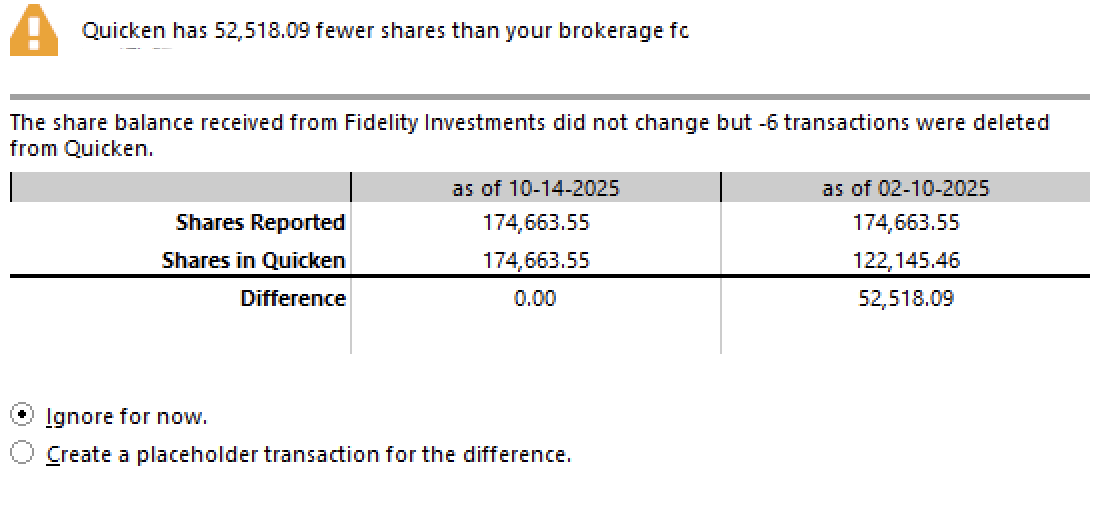
Notice here too - it says that "-6 transactions were deleted from Quicken". A negative number of transactions were deleted - that seems odd to say the least. Is there a synchronization issue?
0 -
[Removed - Off Topic/Duplicate Post]
0 -
I replied above but am just figuring out how to use the Quote function here. Thank you again for your help/advise.
0 -
Based upon what you posted I'm guessing that the discrepancies might have been caused by duplicate transactions that were imported into the register. That was a big issue for many when migrating from DC to EWC+ but I also had some duplicates that occurred in 1 account when I needed to reset it because of this Fidelity CC-501 error code issue. I think if I were you that is where I'd start looking first.
Quicken Classic Premier (US) Subscription: R66.23 on Windows 11 Home
0 -
I don't think duplicate transactions are an issue here. Here's an example of one account at Fidelity with one security. I purchased this security in September of this year, and my Quicken register clearly has all of the associated purchase detail - which is a single purchase. Yet - when I use the Online Center tool to compare securities - this is what I see:
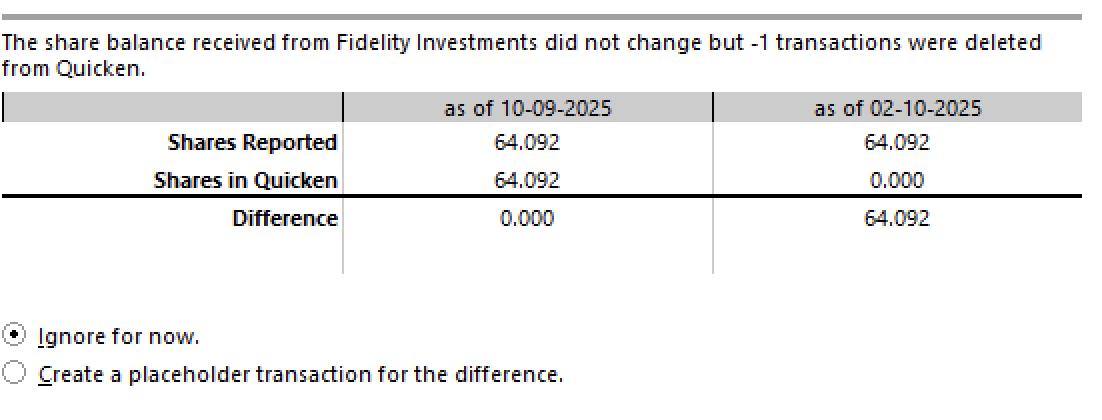
It's as if it is pulling the comparison data from February, not today. Notice the dates listed in the comparison tool. It's interesting that it is showing a date of 09-October for what you think would be the data as of today (02-November)- so I believe something is amiss.
I have reported this via the Report a Problem tool within Quicken Windows - but I'm at a complete loss in terms of what to try next - but while I appreciate your help - this is definitely not a duplicate transaction issue.0 -
Nov 2, 2025, 11:12 AM Phoenix Time, OSU ran fine for Fidelity and others. I didn't do any resets etc. because in the past that has caused me grief after the external issues have been resolved, I just wait for magic to happen. ☢ I'm thankful that these issues are being addressed. I can't conceive of going through the pain and aggravation to port to any alternative to Quicken. Most alternatives seem incomplete in some shape or form plus I have records going back to the early 1990's that I occasionally look at to see all my foolish investment mistakes. Thanks to all in the community that offer some good advice and direction.😊
 Windows 11 Home / Quicken Premier Subscription - Quicken user since the last century2
 -
All worked for me today!
1 -
I'm still getting the CC-501 Error on my Fidelity accounts. Very annoying!
0 -
As of this morning, the 506 errors have gone away but OSU still hangs. Toggling animation on/off closing quicken each time does finally make it complete.
0 -
My update on this issue… As I reported yesterday, the CC-501 issue went away but none of my month-end transactions from Schwab & Fidelity got downloaded. Same thing today. However, a stock dividend that was deposited before markets opened this morning did show up as a transaction in one of the Schwab accounts after I ran OSU an hour ago. So hopefully the ability to download new transactions is now restored — will confirm after a few early-month dividends come in over the next couple of days. I will now have to manually clear/reconcile the transactions from 10/31 that never got downloaded, which I'd entered manually over the weekend. Very annoying. At least the snafu didn't happen at the end of a quarter or the start of a new quarter, which is typically when many more dividend transactions occur in a lot of users' brokerage accounts.
0 -
For me, the CC-501 error also went away but transactions did not download for my Schwab accounts. So I deactivated one account (not reset), closed Quicken, opened Quicken back up and reactivated account. The transactions downloaded for that account. I did this technique one at a time for each Schwab account I have and they all downloaded the transactions. I did this yesterday. This morning morning I did a one-step update and all my accounts downloaded properly. Maybe this will help.
1 -
Still having similar problem. Would not get an error msg but OSU would not d/load any new transactions. Regions bank was the only one that I was expecting new transactions because they showed up on the Banks website. But I suspect the rest of them were not working also.
I was going to reset the account, but when I put in the user name and password, I got the cc-501 msg. This has been present for 3-4 days now.
0 -
Good to know this trick for the future! The problem for us is we have over a dozen accts at Schwab across two logins, so deactivating and reactivating all of them would be a bit of a chore I'd rather avoid in this instance since the impact was relatively small. Thanks for trying this out and telling the community.
0 -
I also have that problem. NO accounts work. Tried to reset three major accounts and all I got is "we are having a problem" with the CC-501 error. Quicken is broken.
0 -
Maybe you should try what worked for as I described in three messages above. Deactivate, not reset, one account, close Quicken, reopen Quicken and then reactivate the account. Good luck!
0 -
I am not getting the CC-501 error anymore and while the OSU download process completes without errors I am still not getting any transactions to download. I have tried both the 'reset' and the 'deactivate' steps and while they also complete without errors I still get no transactions.
I am only seeing the problem with Fidelity.
0 -
A suggestion:
In case you haven't tried it, back up the datafile. After deactivating all the Fidelity accounts, don't Activate from the Account Details screen. Instead, use add an account (+ sign in the Account Bar) and add Fidelity Investments. You will go through a process that asks what to do with the accounts Quicken finds in Fidelity and you can then link the ones you want to their current account data in Quicken. In the past, I've seen Activate did not behave exactly the same as add an account to reconnect an account and adding seemed to pull in transactions that activate didn't. No guarantees it will work. But it's a procedure I've used in the past when transactions were not downloading by just activating. The issues with EWC+ and Fidelity are unpredictable.
Deluxe R66.23, Windows 11 Pro
0 -
Still having issues today Nov 4, 2025. I have spent 9 hours troubleshooting this following every step suggested several times. I even tried to install it on a different computer on a different network for good measure. I actually took a day off work so I could get it working because it is critical for me right now. I have been using quicken since around 2000, and now a lot of my transactions are messed up and I can't fix them. I don't have access to statements from 25 years ago nor should I need to. I am more than frustrated and I'm still not able to handle my finances!!!
1 -
This has me considering dropping Quicken. I as well have been using it a very long time but the challenges in recent years including this one make me think I am spening more time trying to make a product work, which I am paying for, than the value I actually get from it.
3 -
The OSU download process completes with CC-501s for several of my accounts but all of my accounts. I 1st tried this a few hours ago and again just now. I was able to download everything last night. Not sure why it started acting up today.
0 -
@kujo46 I posted this in another forum to attempt to assist another user with similar problems, and he indicated that it did work for him.
"This may be a total waste of time for you, but I'm throwing it out there anyway. I also was having some issues with downloads not receiving transactions that should have been there, getting a strange CC-505 from Merrill accounts, etc. I called the Premier support line and they suggested the following, and it actually worked. Your mileage may vary. They asked me to sign out of the Quicken account: Edit — Preferences… — Quicken ID & Cloud Accounts — Sign in as a different user, then to sign back in as the same user as usual. Be sure you know which email address and password you use before you sign out. They explained that this action resets the Quicken servers. I was then able to run a normal OSU, and it completed successfully."
Hope this helps.
2 -
There have been errors with Amex accounts since the first of the month and today I am seeing this CC-501 error on multiple credit card amounts.
Will we receive any notification when there is a resolution to these issues?
1