CC-506 error on all JP Morgan accounts

Comments
-
Well, Quicken is rapidly becoming unusable. Today OSU completed (after I toggled animation on/off) but then reported CC-506 errors for all JPMorgan accounts.
When I open each account, transactions did download (correctly as near as I can tell). If I update each account separately, it still reports errors for all 4 accounts each, even though only 1 account updated. On the individual updates OSU reports download completed but then the 506 error correction screens pop up and still reports an error.
It seems that the 506 errors will not clear even after a second successful download and the error was bogus to begin with, as the transactions did download.
OSU is so flakey that I no longer trust any information coming out of it, which means that nothing in Quicken can be trusted at this point. I am about to go back to manual financial tracking or find a different software package if Quicken can not be corrected and stabilized VERY soon. [Removed - Rant]. Moderator, please report to developers that this issue has become more than critical!
[Edited - Readability]
0 -
Hello @Mark Shafton,
Thank you for reaching out! Since you are seeing CC-506 errors, but your accounts appear to be updating, the first thing I would suspect is that you may have hidden accounts causing the error. To check for that, navigate to Tools>Account List. Near the lower left of the window, there should be an option to Show hidden accounts (if you don't have hidden accounts, this option will not be visible).
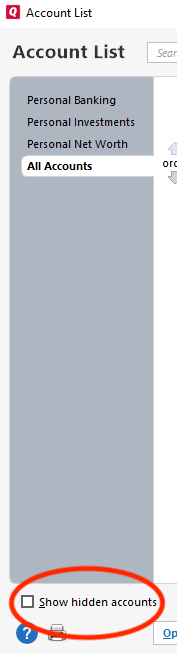
Select that option, if available, then review your account list for any hidden accounts connected to JP Morgan. You can tell if an account is connected by looking in the Transaction Download column.
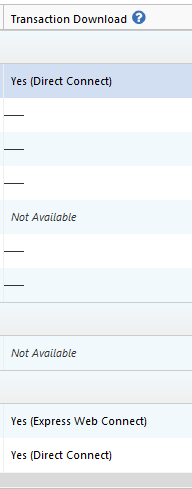
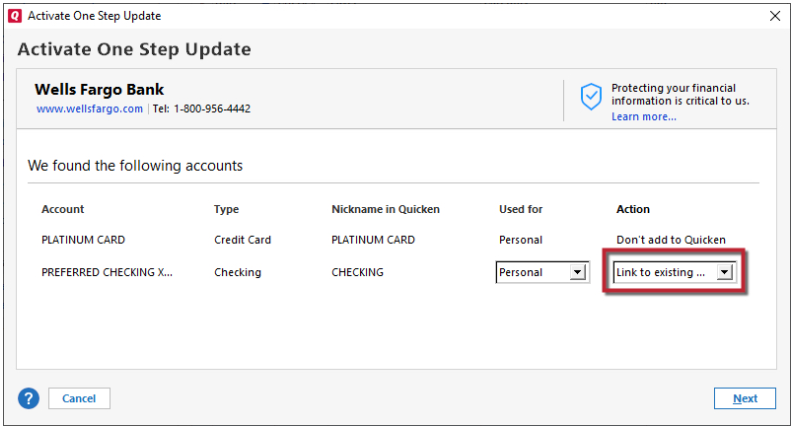
If you find any hidden accounts that are connected to JP Morgan, backup your Quicken file, deactivate those accounts, then either leave them deactivated (if they're older/closed accounts that shouldn't be trying to connect anyway) or reconnect them by navigating to Tools>Add Account and following the prompts, making sure to carefully relink them to the correct nickname in Quicken.
Let me know how it goes!
Quicken Kristina
Make sure to sign up for the email digest to see a round up of your top posts.
0 -
@quicken Kristina, Yes I have hidden accounts but all are deactivated and none are from JPM institution.
P.S. You can remove my "rants" as much as you like but it does not alter the facts. There have been more quicken bugs in the last year than in my 20 years previous. I have used this for a VERY long time. I started with the very first release of quicken.
0 -
Thank you for your reply,
Since hidden accounts aren't causing the problem, the issue may be file specific. I suggest that you try validating your data file. Please save a backup file prior to performing these steps.
Validate:
- File
- Validate and Repair File...
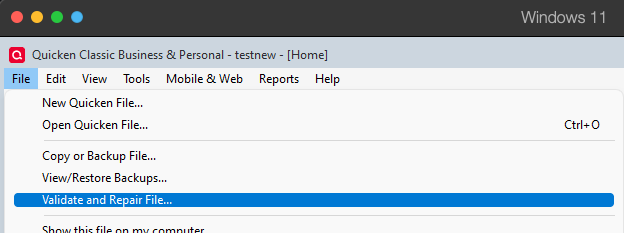
- Validate File
- Click OK
- Close the Data Log
- Close Quicken (leave it closed for at least 5 secs)
- Reopen Quicken and see if the issue persists.
I hope this helps!
Quicken Kristina
Make sure to sign up for the email digest to see a round up of your top posts.
0 -
Thanks. I validated before I ever reported these osu errors and again right now but it did not help. I don't think this is a separate error but part of the OSU hangs as I still have that as well. Toggling animation makes OSU complete but it g generates a variety of odd behaviors including 501, 506, transactions downloaded but error reported, no transactions when the finish screen says there is, etc. etc. The reports from other users seem to confirm this. I am not alone with 506 errors. Others have reported in the original thread.
0 -
Thank you for your reply,
Is the CC-506 issue persisting? When I check on our end, no error messages are reflecting still.
Thank you!
Quicken Kristina
Make sure to sign up for the email digest to see a round up of your top posts.
0 -
The 506 messages went away after 1 day.. I mentioned this in the original thread. Still have OSU hangs daily which can be worked around by toggling animation. Thanks.
0 -
Thank you for the follow-up,
The OSU hanging/slowness issue is still a known issue. If you haven't done so, please bookmark this Community Alert:
If the issue persists after the alert is marked resolved, please let me know!
Quicken Kristina
Make sure to sign up for the email digest to see a round up of your top posts.
0

