Bill does not show in Projected Balance

I had an Online Bill with Chase that correctly did show the minimum and full balance. So that the full balance would show in the Projected Balance, under Bills & Income, I created a manual bill reminder for the same bill, then merged the two. The Online bill values disappeared, and the bill went to waiting for a new bill. The upcoming payment amount under Home was gone. I deleted the biller and reminder, then redid the process with the same result. I then unlinked the manual and online bill. The manual bill is listed in the upcoming bill list, under the projected balance screen, but the bill is not shown in the projected balance for the spend account. I have no problem with other accounts that show correctly in both Bills and in the projected balance.
Quicke Deluxe, version R64.35
[Edited-Readability]
Comments
-
Hello @Earl Zier,
Thank you for providing a detailed account of what you are experiencing.
I have some quick questions to help me determine the next best steps.
- Where is your data file located?
- Is your file being synced/backed up by any third-party services like OneDrive, Dropbox, or Carbonite?
- Do you get the same result if you change the spend account?
- When did this issue start?
- If you create a manual bill without linking it to an online biller, does it show correctly?
Let's start there. Looking forward to your response.
Quicken Alyssa
Make sure to sign up for the email digest to see a round up of your top posts.
0 -
Data file and backup file are located on Google Drive/My Drive. Not sure what you mean by changing the spend account. The account used for all is my primary checking account. This started about a week ago when I realized that my online bills were not showing in the projected balance for the checking account. Apparently, this had to be reset when Quicken changed the billing service.
I have added manual bill reminders, and they show in the projected balance graph. I did find that on a few; I had the incorrect category which caused the account to not show in the projected balance. Should I delete and redo the online billers that seem to be a problem?
Sorry for the delay in responding, but I wanted to do a little rechecking first.
"
B
0 -
Thank you for following up and providing that additional information.
First thing I would recommend is moving your data file off the Google Drive and back onto your C Drive. The default file path is C:>Users>your username>Documents>Quicken, and this is the safest place for your file. Using your file from an external or cloud drive can cause data file damage.
After you have moved it, I would then validate it.
To do this:
- Go to File.
- Select Validate and Repair file…

- Check the first box for Validate file.
- Click Ok.
Once that is done, yes, I would say that deleting and re-adding online billers is a good step to try.
Let me know how it goes!
Quicken Alyssa
Make sure to sign up for the email digest to see a round up of your top posts.
0 -
I have moved the data file as you suggested and run the validation. There were no problems reported.
I rechecked all of the reminders and links. Interestingly, two bills did not show both minimum and full pay options until I switched to full pay. Everything looks good now, except for the two Chase accounts that show "Awaiting next bill."
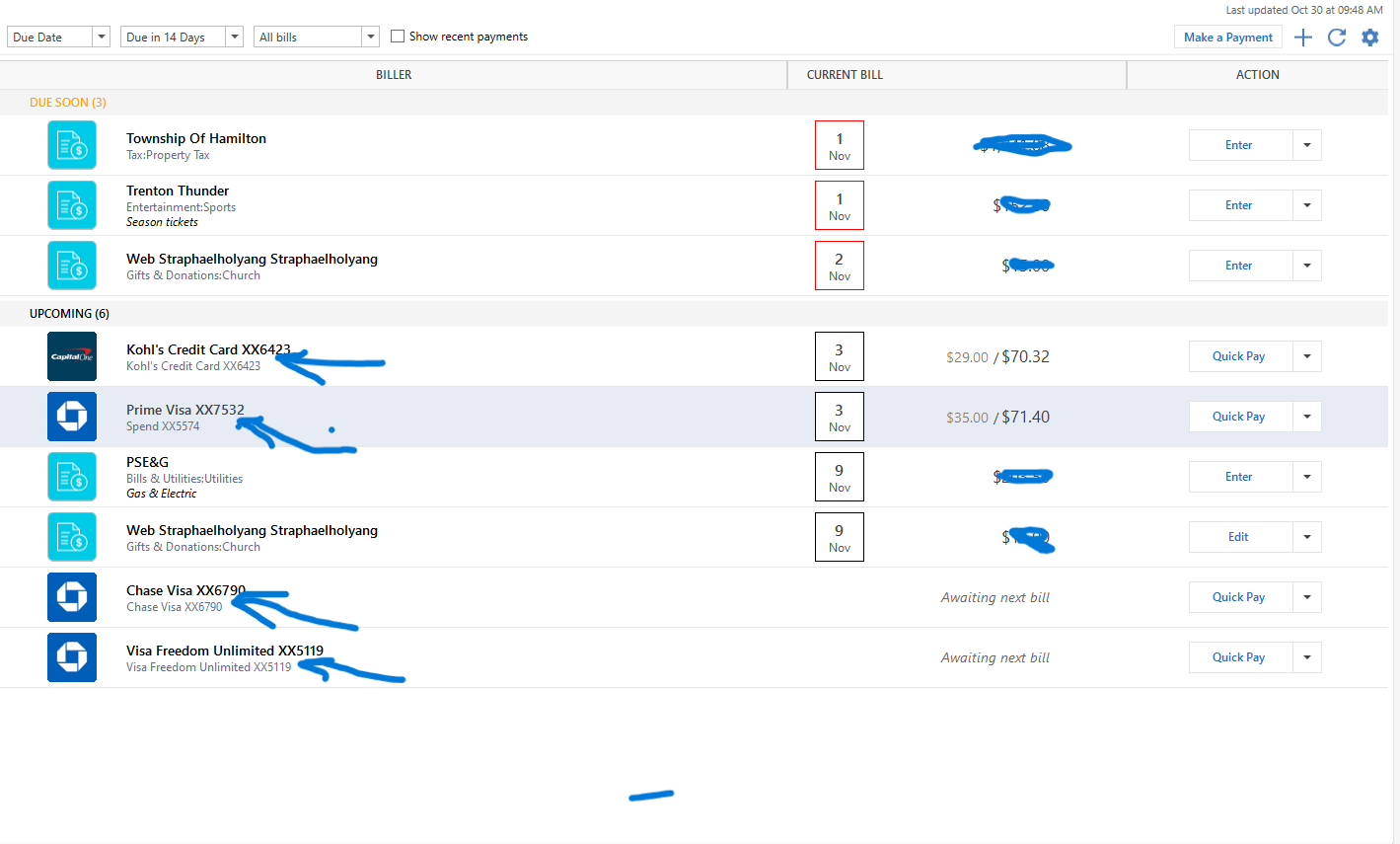
All of the accounts are shown in the "Projected balance" graph, but I notice a difference in the Category shown between the Prime Visa and the other three accounts. I would have expected the same "Spend" account to be shown. Any thoughts? All show good links.
0 -
I am happy to hear that the bills are now showing in the projected balances.
Interesting that Prime Visa has a different account listed. One thing you can try is going to the Bills & Income tab, clicking the gear icon on the right, selecting Review and Repair from the menu options.
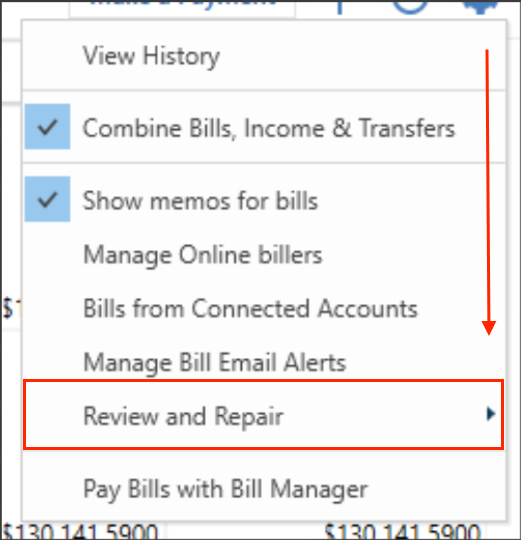
Once there, select Review and Repair Online Billers.
Let me know if this corrects the lingering issues.
Quicken Alyssa
Make sure to sign up for the email digest to see a round up of your top posts.
0 -
I made a correction to the Prime Online payment that corrected that issue. My biggest problem is the ongoing inability of Quicken to show the Online bills from Chase.
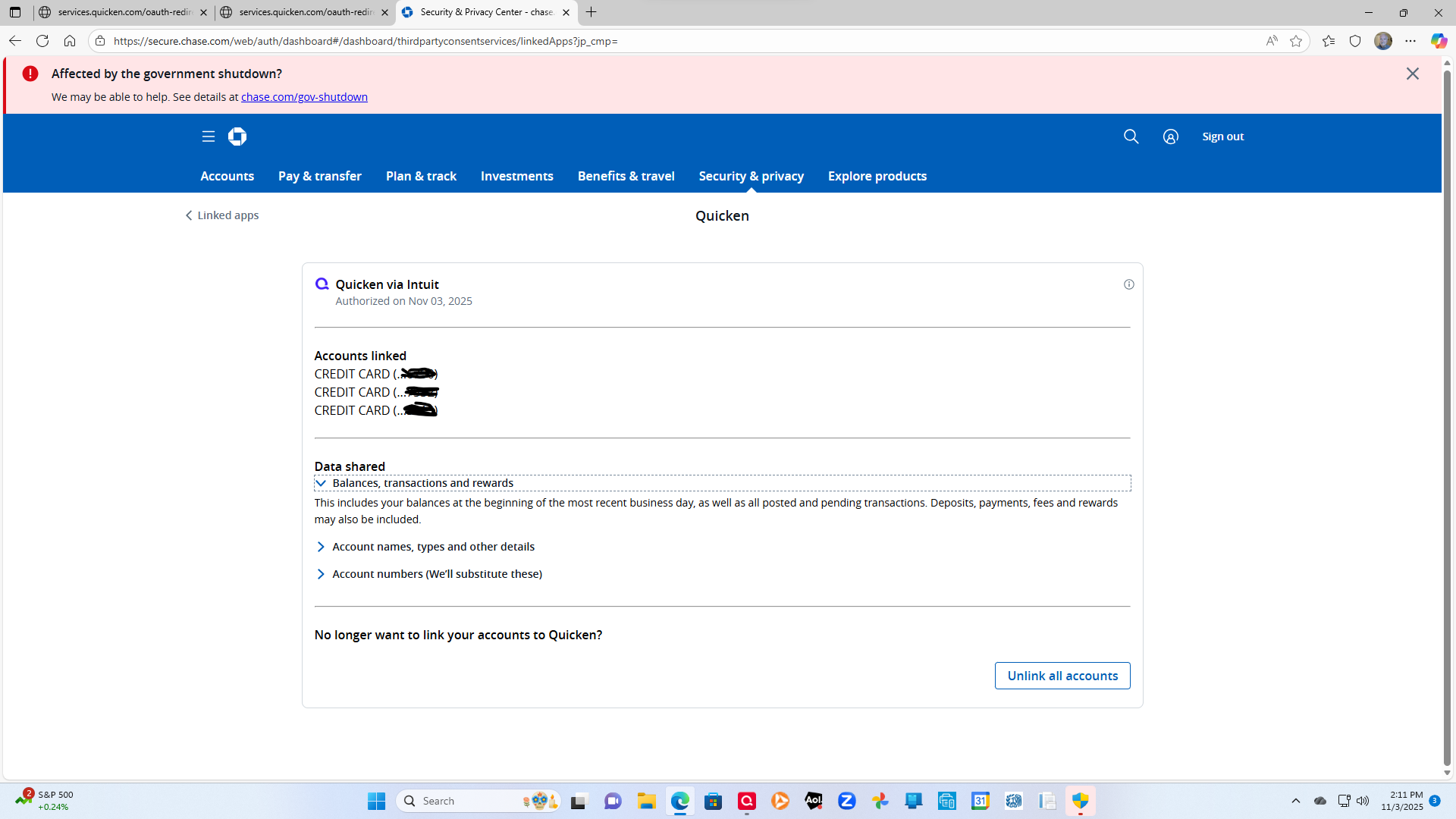
You can see in the screenshot above that my three Chase accounts are linked to Quicken. The day-to-day transactions update correctly, but the online bills do not update at all. I don't know if it significant, but the data shared, as shown above, does not include billing data.
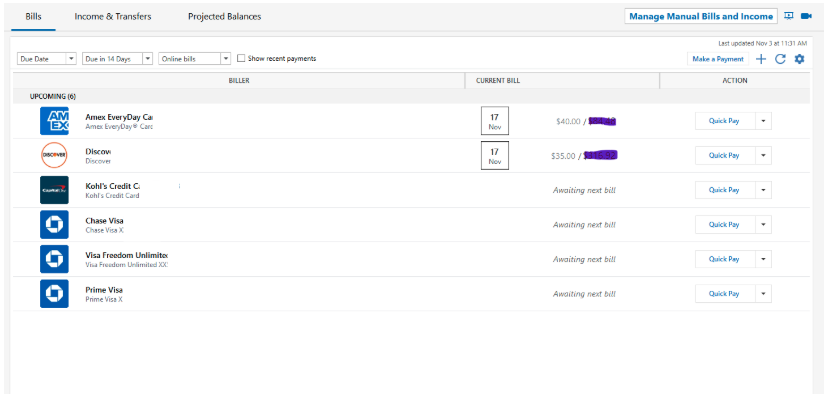
I have a significant payment due to the Visa Freedom Unlimited card on 11/27 which should be shown. The Online bills for Chase will not update. I did use the "Pay" option for that card to pay on 11/27, which now, at least, shows in the projected balance of the spend account. What could be the problem?
[Edited - Removed Partial Account Numbers]
0 -
Thank you for following up with those additional details.
Were you able to Review & Repair your Online Billers, with the steps provided above?
If so, it is recommended that you contact Quicken Support directly for further assistance, as they can walk you through troubleshooting steps in real-time and escalate the situation as needed. The Quicken Support phone number can be found through this link here. Phone support is available from 5:00 am PT to 5:00 pm PT, Monday through Friday.
Thanks again!
Quicken Alyssa
Make sure to sign up for the email digest to see a round up of your top posts.
0 -
Spoke with Support today. This is an ongoing problem with the new biller. I've copied the alert below.
ONGOING 9/18/25 Fiserv Biller Enrollments Failing
Center
Large
Accessibility
Delete
Quicken Anja Moderator modSeptember 4 edited September 18
We are receiving reports that customers attempting to enroll their billers through Fiserv, our new Bill Presentment system, are experiencing failures.
This is the error that customers see when trying to set up their billers:
"Unexpected error occurred" with type "NullPointerException"
This has been escalated internally, though we do not have an ETA at this time.
To be notified of updates as they become available, please click the bookmark ribbon located in the upper right. If you do not see the bookmark ribbon, please make sure that you are signed into the Quicken Community.
Thank you!
(Ticket #11933060)Thanks for your help.
0 -
Hello @Earl Zier,
Thank you for providing that information.
The Fiserv alert that you provided is not the same thing you are experiencing, as Chase is not a Fiserv biller.
I have created a ticket for the issue of bills stuck in "Awaiting next bill", due to seeing many users reporting this issue. Please navigate to Help > Report a problem > Send to Quicken, from within your Quicken program, and submit a problem report with log files and screenshots attached in order to contribute to the investigation.

When you submit the report, please include in the description the specific biller(s) that you are seeing "Awaiting Next bill" on.
Please let me know once you have done this so I can add it to the ticket.
Thank you.
[CTP-15189]
Quicken Alyssa
Make sure to sign up for the email digest to see a round up of your top posts.
0 -
Done. Reported the problem as "Hangup on "Awaiting Next Bill." Thanks for your effort in following up with me throughout this problem.
0 -
Thank you for letting me know, and you are most welcome!
I have added them to the ticket.
Thanks again!
Quicken Alyssa
Make sure to sign up for the email digest to see a round up of your top posts.
0 -
I have experienced the "Awaiting next bill" message with Chase credit cards since the cutover to the new provider. Had a call with first and second level support in October but still no status update or fix. If you go to "Manage online billers" you will probably see the information as bill date, amount due, minimum due, etc. However, that information does not appear on the main biller page. I reported this to support and shared my screen with the rep.
So far, this new more reliable system has dropped two of my billers and does not work properly with Chase which consists of 4 credit cards. Basically, it is worthless to me at this point.
0 -
Hello @sfinney55,
Thank you for adding to this discussion with your experience, though I am sorry for the frustration you have faced.
I reviewed the tickets from your interaction with support, and it looks like the escalation is still open and being investigated. We do not have an ETA to provide at this time. Further communication from the team handling the escalation will happen via email, so keep an eye out for that.
Feel free to reach out here, in the Community, or contact Quicken Support directly to check in for updates periodically, if needed.
Hope this helps.
Quicken Alyssa
Make sure to sign up for the email digest to see a round up of your top posts.
0
