Errors during One Step Update - transactions posted to incorrect accounts

A One Step Update on 11-1-2025 ran very slowly. When the OSU was finally complete, month-end transactions were properly noted in the affected accounts and were accepted normally in the proper accounts. However, after they were accepted in the proper accounts, they all posted to the first account in my Accounts list rather than the proper account. On the suggestion of the Quicken AI Chatbot, I deleted online access to the first account in an attempt to relink. The relink started but could not be completed. At least three of the four affected accounts are back-office serviced by the same provider but are different financial institutions. Quicken Classic Premier, Version R64.35, Build 27.1.64.35, Windows 11.
Comments
-
Update - I was finally able to reconnect the online access to my OSU and was able to perform an update. However, the issue of the transactions posting to the incorrect account remains.
0 -
Do you have more than one account with the same account number in the Quicken Account Details? That happens to me for my & my wife's 401(k) (same employer) where the plan number is interpreted as an account number.
0 -
Hello @chuckfoster,
Thank you for reaching out! The slow One Step Update has been an intermittent issue today and over the weekend, happening most often in the morning. Please see this Community Alert for more information:
For the issue with transactions downloading to the wrong account, as @EvDob said, that can happen if you have more than one account with the same account number in Quicken's Account Details (to view account details, navigate to Tools>Account List, then click the Edit button next to the account).
Alternatively, you may also be seeing transactions downloading into the wrong account if the account is linked to the incorrect account from the financial institution. To check for that, navigate to Tools>Account List and click Edit next to the account that the transactions are incorrectly downloading into. On the General tab, it should show you the financial institution and information about the account Quicken sees it as connected to.
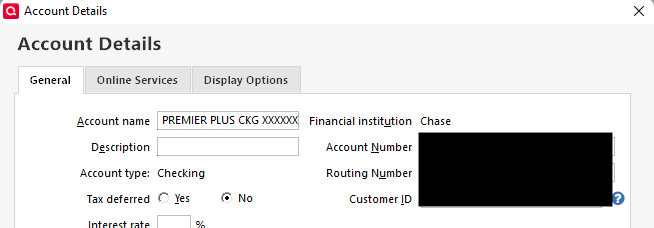
If it is connected to an incorrect account, then backup your Quicken, deactivate the account, navigate to Tools>Add Account, follow the prompts, and carefully link the account to the correct nickname in Quicken.
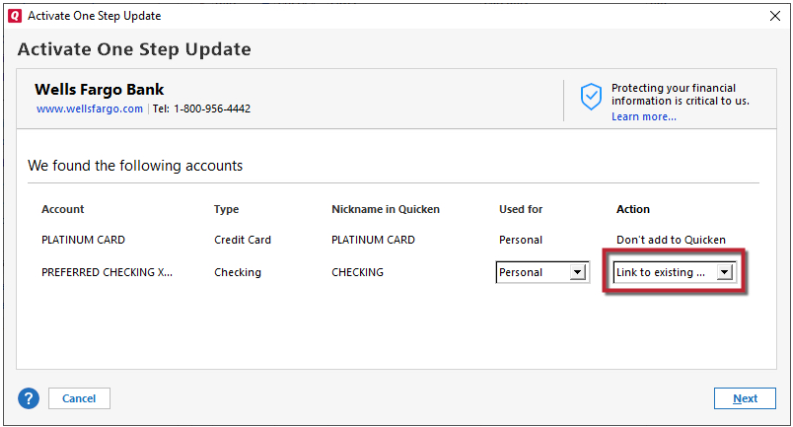
I hope this helps!
Quicken Kristina
Make sure to sign up for the email digest to see a round up of your top posts.
0
