Quicken/Fidelity Link wants to link existing Brokerage accounts as checking through online set up

On 11/1/25 I was having issues getting downloads from Fidelity. Only credit card and one roth Brokerage account would download transactions. I tried to reset the account but the program, after all the signins to fidelity would try to link the account as a checking account to the existing account in Quicken. I also tried to deactivate all Fidelity accounts and then try to set up online connection again after closing quicken and reopening. when doing this two accounts out of 7 came up correctly where the program wanted to link the account as a credit card account or brokerage account to existing Quicken accounts. That brokerage account would not still not download transactions that were available. The other 5 brokerage accounts the program wanted to link the accounts as checking accounts to the cash accounts of the various other brokerage accounts when it was a brokerage account that I started the online set up with. I told quicken to not add the accounts to quicken as this has never been the right way to connect a brokerage account to online services in quicken. Please give us an ETA on resolution. This whole effort with Fidelity download changes has been very frustrating as everything was working great with the previous connection so I would appreciate a partial refund on annual software fee given the continuous issues over the last month with this issue.
Comments
-
Same issue here… although a little better. I have 6 accounts, 5 show up correctly as brokerage accounts and 1 shows up as a Checking account (although it should be brokerage). I also would like to know how to fix this.
0 -
I have checked the support page and community and it says 11/1 download issues are resolved however i have gone back and restored a 10/30 backup and I am still having issues with Fideility downloads. Two of 7 fidelity accounts download transactions and the rest receive nothing when numerous transactions are available. how do I resolve this?
0 -
Hello @Dennis Nelson & @artwhitehead88,
Thank you for sharing your experience. To help troubleshoot this issue, please provide more information. Do your Fidelity accounts have linked cash accounts in Quicken? If they do, there is a known issue with linked cash accounts causing Quicken to see the accounts as the wrong account type when you try to reconnect them (CTP-14942). The work around for this issue is to turn off the linked cash accounts by backing up your file, then navigating to Tools>Account List, clicking the Edit button next to the account, then on the General tab, and select No next to Show cash in a checking account.
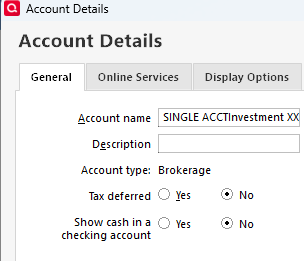
Once this is done, you should be able to deactivate the accounts and reconnect them by navigating to Tools>Add Account, following the prompts, then carefully linking them to the correct nickname in Quicken once you get to the Add/Link screen.
I hope this helps!
Quicken Kristina
Make sure to sign up for the email digest to see a round up of your top posts.
0 -
Nope. Account already had No selected for the separate Cash account. When I try and add it, every other account shows as Brokerage, like it's supposed to, but the one account shows up as Checking. Therefore I still can't link it to the existing Brokerage account.
0 -
Thank you for your reply @artwhitehead88,
Typically the financial institution controls the account type that comes across to Quicken. Is this account a brokerage? If not, what kind of account is it?
It's possible the issue is being caused by a file specific problem. To troubleshoot that, I suggest that you try validating your data file. Please save a backup file prior to performing these steps.
Validate:
- File
- Validate and Repair File...
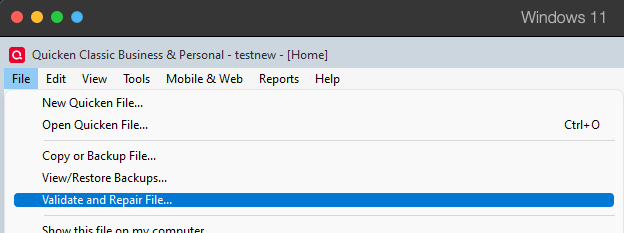
- Validate File
- Click OK
- Close the Data Log
- Close Quicken (leave it closed for at least 5 secs)
- Reopen Quicken and see if the issue persists.
Please let me know how it goes!
Quicken Kristina
Make sure to sign up for the email digest to see a round up of your top posts.
0 -
It worked properly after doing the Validation. Hopefully this helps someone else having a similar problem. Thank You.
0 -
I was able to get help from Quicken Support on this issue. What we had to do to get my Fidelity accounts online connection set up as brokerage was a pretty involved process (especially since I had 30 years of data from Fidelity).
Since my first time through with Quicken Support was fraught with program freezes and program shut downs, I started anew on the next day by restoring a backup file from 11/1/25. First step then was to deactivate every Fidelity account from online services including the credit card (note: after each of these steps I did a backup and labeled the back up with the step completed and shut down Quicken and restarted (after OneDrive backup) after each step and a couple time I rebooted the computer to make sure the cash was cleared out).
The second step was then to remove the connection of the brokerage account to the cash account by selecting "no" to showing cash in checking account and selecting OK. This process took a while and there were some questions to answer along the way for a select few transactions (remember 30 years of data). The data is retained in the process somehow. Again, I made a backup after each account was detached from its cash account. I did do a check after the first account was detached which was to go through the online setup process to see if it would recognize that account as a brokerage rather than a checking, and if it did, I knew I was on right path, and cancelled the set up and went back to detaching the other Fidelity brokerage accounts from the related cash accounts. (making backups after each one so I would not have to start all over if program freezes occurred and mucked up the changes).
After all the accounts had their cash accounts detached, I then went through the online set up, and was able to have all the accounts come through as brokerage, and then linked them to the appropriate accounts in Quicken. After the downloads were received, I then accepted all the downloads after review.
The next step was to reattach the cash accounts to each brokerage account by going into account detail and now saying "yes" to showing cash in checking account. After each account I had to review the account cash balance, and on a few accounts, I had to adjust the cash balance to actual through making a manual adjustment, including on a few that impacted closed accounts (like my 401(k), which had been rolled into a Fidelity IRA) due to a kind of duplicate entry for the cash transfer that had occurred back at the time.
This process worked, and I did get normal downloads from all my fidelity accounts the next day, except for my fidelity HSA, which apparently is still having issues (I did manual entries in that account as luckily there is not a lot of activity).
I probably spent 10 to 15 hours on this issue over 3 days to get it resolved. [Removed - Rant] Good luck to all with similar problem.
[Edited - Readability]
0 -
Thank you for the follow-up @Dennis Nelson,
I'm glad to hear that you were able to work with Support to resolve the issue.
Thank you for sharing the steps you used to get everything working again!
Quicken Kristina
Make sure to sign up for the email digest to see a round up of your top posts.
0
