TD Bank Direct Connect silently failing to download new transactions

This discussion was created from comments split from:
TD Bank – Direct Connect Broken & Constant Reactivations Across Multiple Files (previous thread)
.
Comments
-
This process did not work for me today. I got an add account error box:
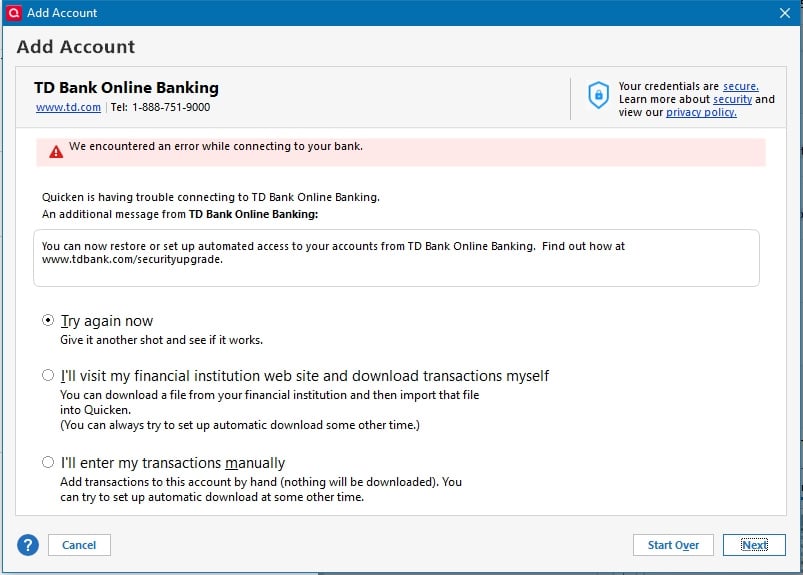
Also, the www.tdbank.com/securityupgrade web page has the following content:
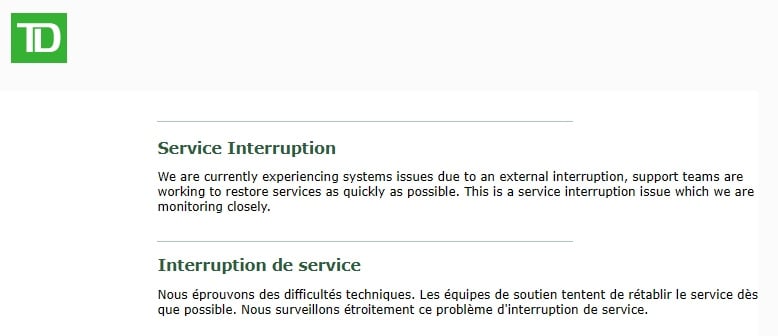
Things have been broken for me since the beginning of the week. I've sent a message to TD Bank…haven't heard anything from them yet.
0 -
I spent a fair amount of time on the phone with TD Bank. We were able to get Direct Connect access setup for my TD Bank account. But my original issue - Quicken sending/receiving transactions to/from TD Bank - continues to fail silently (it looks like everything worked, but no transactions are sent or downloaded.) The mini-osu data shows nothing being sent or received and leads me to believe that Quicken isn't able to actually establish a connection to TD Bank for transactions.
0 -
following this did not work?
Support had me deactivate online access for all TD Bank accounts, then run a file validation. After that, I re-added the accounts using
Tools → Add Account → TD Bank → Advanced Options → Direct Connectit did for me.
0 -
I did get connected again…but transaction uploads and downloads continue to fail silently.
0 -
Hello @Dave526,
Thank you for letting us know your transactions are not downloading. To start troubleshooting the issue, please follow these steps from our article on missing transactions/transactions not downloading:
Be sure to follow these steps in order:
1. Go to Edit > Preferences > Downloaded Transactions. The option Automatically add to banking registers needs to be unchecked.
2. Refresh your online account information by clicking the Actions Gear Icon on the upper right of the register, and select Update Now. Follow the on-screen instructions to complete the update.
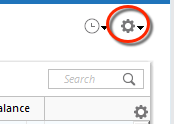
3. Confirm that the Sort Order in your account is by Date; just click the top of the Date column in your account register. It's possible the transactions are in your register, but not where you thought they'd be.

4. Click the Reset button at the top of the register. This will confirm that there's no filtering in your account register.
5. Try refreshing your login session: To do this, go to Help > Refresh Sign in. After completing the log-in process, trying running a One Step Update again.
6. Go to Actions (Gear Icon) > Register Columns > Check Downloaded Payee in the account register. This allows you to search by Payee to confirm the transactions haven't been renamed unexpectedly.
7. Go to Tools > Account List and check Show Hidden Accounts at the bottom left. Confirm the missing transactions haven't been added to a hidden account by clicking on the name of any account that appears with a check mark in the Hidden column.

Please let me know how it goes!
Quicken Kristina
Make sure to sign up for the email digest to see a round up of your top posts.
0 -
Hi Kristina,
- The "Automatically Add" option was already unchecked
- Did "Update Now" - failed silently (ie, no error, but no download or upload)
- Sort order is by "Date"
- I don't have a "Reset" button at the top of my registry.
- Performed "Refresh Sign In" and update still failed silently
- "Downloaded Payee" showed an additional column but no change to failure
- I checked all of my hidden accounts (Is there a way to cleanly delete old accounts?) Anyway, no unexpected transactions
A few notes -
- I can easily tell if my transactions are being processed because I have a payment entered, to be uploaded. After an update it's still sitting there, waiting to be uploaded.
- The various Quicken logs show minimal "Mini-OSU" information. Conlog.txt just shows a time stamp - "20251109 09:27:38:", OFXLOG.txt just shows the surrounding "Mini-OSU Start…" / "Mini-OSU End…" with blank lines in between. I suspect that this means that Quicken was unable to establish an actual connection to TD Bank.
- I spent a fair amount of time on the phone with two reps from TD Bank. The second, more technical, rep said he's been aware of problems like this and thinks there's some sort of authentication breakdown. But it's beyond his area of expertise and he said he'd elevate it within the bank organization.
- The current problem is very similar to a problem that happened around the beginning of this year. At that time I worked with a couple of Quicken engineers and they worked with TD Bank technical people (as I recall) but it took a couple of weeks before things got sorted out. I sent an email to one of the Quicken engineers I worked with then but haven't heard anything back.
I'm a little surprised because it appears that some Quicken / TD Bank interactions (for other users) may be completing successfully. If that's the case, debugging should probably focus on the differences between our usage cases…
Dave Jordan
0 -
Thank you for your reply,
The Reset button is typically visible only if you have filters active (and it doesn't exist in Investment accounts at all).
Yes, you can delete accounts. Since deleting an account is permanent, and can be reversed only by restoring a backup from before the account was deleted, please backup your file prior to deleting any accounts. Then, you can follow the instructions in this article to delete accounts you no longer need in your Quicken file:
You mentioned that you already contacted the financial institution and they already escalated the issue on their end. Did they do any troubleshooting with you over the phone? If so, what steps did you follow?
Thank you!
Quicken Kristina
Make sure to sign up for the email digest to see a round up of your top posts.
0 -
Yes, we did try some troubleshooting over the phone. But it was a few days ago and I've taken a lot of different troubleshooting steps - I don't remember exactly what we did. But I would say we didn't do anything that wasn't a variation on the various approaches which have been outlined before.
One thing that they may have pointed out is that when starting from scratch - Quicken account deactivated and nothing authorized on the TD Bank side - the Quicken attempt to activate will fail, but you can then go to TD Bank and allow Quicken access. After doing that, Quicken will succeed in activating the account for Direct Connect. I had know this in the past but had forgotten the detail.
Dave
0 -
Thank you for your reply,
Just in case it's a file specific issue rather than a connection issue, I suggest that you try validating your data file. Please save a backup file prior to performing these steps.
Validate:
- File
- Validate and Repair File...
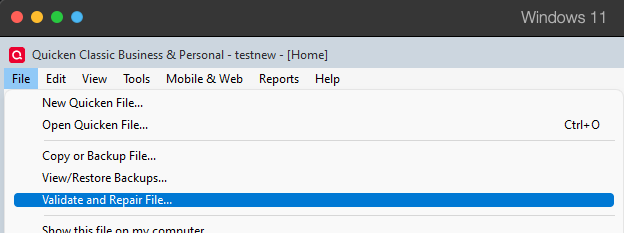
- Validate File
- Click OK
- Close the Data Log
- Close Quicken (leave it closed for at least 5 secs)
- Reopen Quicken and see if the issue persists.
Please let me know how it goes!
Quicken Kristina
Make sure to sign up for the email digest to see a round up of your top posts.
0 -
Well…that seems to have fixed it.
I don't quite know why, as I had done a file validation fairly early in the process of debugging this issue and today's file validation (pdf of log attached) only found some "might be missing" very old stock splits for a no-longer-active account.
(Speaking of a no-longer-active account, the question I had about deleting old accounts wasn't the mechanics of doing it…but what happens to transactions which involve the old, about to be deleted, account and a currently active account? For example, say the old account is a bank account which I closed by transferring the funds to a different bank. What happens to that transfer when the old account is deleted?)
Anyway, it appears my issue is resolved for the moment.
Thanks for your help!
0 -
Thank you for the follow-up,
I'm glad to hear the issue is resolved!
If you need further assistance, please feel free to reach out!
Quicken Kristina
Make sure to sign up for the email digest to see a round up of your top posts.
0 -
I am still having this issue. I removed online access to all my TD Bank accounts, then reconnected and some transactions downloaded. That was a few days ago. Daily updates since then fail to download new transactions and a bill pay is waiting to be sent and will not go through.
0 -
A couple of thoughts…
Does the update process complete in just a second or two when you just update your TD Bank account on its own? When I've seen this happen it means that Quicken his little or no actual interaction with the bank. A look at the last few entries in OFXLOG.txt (from Quicken "Help" - "Report a Problem") may indicate this - when I see a typical successful interaction it involves more than 300 lines in OFXLOG.txt. An unsuccessful interaction only shows a less than 20 lines.
Have you done a file validation ("File" - "Validate and Repair File" - Selecting "Validate File" option)? Have you done that twice? I had done a file validation, which cleared up some problems, but TD Bank still failed silently. A did a second file validation, which showed no problems, and then TD Bank updates succeeded.
A big part of the problem with this issue is that there are so many specific steps that have to be followed to get TD Bank working again - deactivating and reactivating in Quicken, deactivating and reactivating at TD Bank, doing (multiple) file validations, etc. It seems that these work when the right steps are done in a correct order (whatever that is) but fail otherwise. Not the most user friendly approach to banking!
0 -
Yes, update process completed almost instantly with a "complete" message in green but no uploaded/downloaded transactions have taken place.
I just looked at the OFXLOG.txt file and it is <50 lines (a bit more than 20 though) between the start and finish of the connection to TD Bank.
I performed a file validation after I disconnected TD Bank before then reconnecting. I will try the double validation now.
0 -
Dave526,
Thanks for the idea! I performed a validation TWICE on my file (after online banking was already connected) and now pending downloads took place. Now I will need to see if this is a permanent fix or not. Earlier in the week I got one download to work but then it broke again on future connection attempts.
0

