Cash Balance in Fidelity CMA-linked Brokerage Account Incorrect

This is regarding Quicken Classic R64.30 Premier, Windows 10
Fidelity Investments
There are numerous posts on the transaction download issues related to EWC+ (Express Web Connect Plus). Since the transition my CMA-linked Brokerage account cash balance is incorrect. The cash balance error started on 09-30-2021 transaction and progressively became worse.
The linked cash account balance is correct however, the Brokerage account is incorrect. The cash balance in other managed and IRA accounts are correct. The CMA-linked Brokerage account is a unmanaged account. A investment transaction report is showing all transactions specifically Sell is randomly are not included making it difficult to determine where the cash balance error started.
The Account List shows that download is not active and selecting the Activate download and following the linking process the dialog box default was left on Convert this fund into my cash balance was selected which may have been the incorrect choice. I tried the process again and selected Track it as a security did not correct the issue.

The posts begain in early September so when can a expected resoultion of this issue be resolved?
Is there a process to correct the CMA-linked Brokerage account to show the correct balance without having to restore to from a backup?
[Edited - Readability/Removed partial account number]
Comments
-
Hello @apodsim,
Thank you for sharing your experience! To clarify, has it been ongoing since 30 Sep 2021, or did you just notice it recently (if so, when did you first notice it)? Is the brokerage in your screenshot the investment side of the CMA account you're seeing issues with?
The fact that it's not showing as connected makes me suspect you may have a duplicate account connected. To check for that, navigate to Tools>Account List. In the Account List window, if there is a Show hidden accounts option in the lower left, select it.
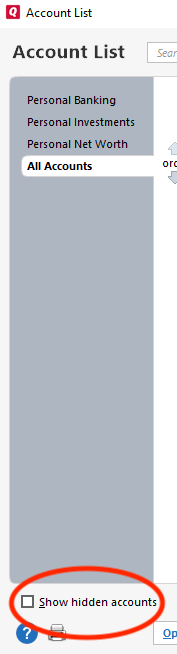
Then, review the list for any potential duplicate accounts.
If you find a duplicate account that is connected, then backup your Quicken, deactivate the duplicate account, then connect your account by navigating to Tools>Add Account and following the prompts, making sure to carefully link to the correct nickname in Quicken.
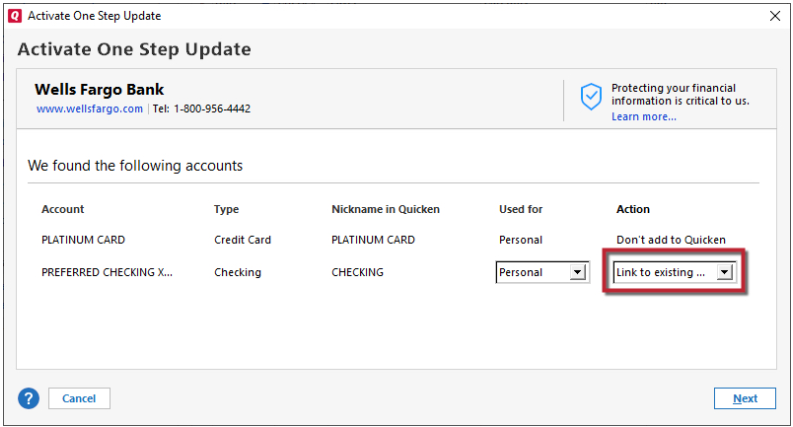
Verify that your information is showing correctly, then delete the duplicate account if appropriate.
I hope this helps!
Quicken Kristina
Make sure to sign up for the email digest to see a round up of your top posts.
0 -
I was sucessful in locating the transaction causing the cash balance error. It did take quite some time to do this however.
0 -
Thank you for the follow-up,
I'm glad to hear you were able to track down the problem transaction.
If you need further assistance, please feel free to reach out!
Quicken Kristina
Make sure to sign up for the email digest to see a round up of your top posts.
0 -
After finally speaking to a Quicken representative I learned this issue of cash duplication can only be corrected manually. While this bug should be an easy fix by a programmer, there seems to be no interest by Quicken to do so. This indicates poor customer support in my opinion. As a result I have eliminated all brokerage accounts from Quicken.
0

