Scheduled Reminders issue

I am having a problem with scheduled reminders. Like this person had back in 2022 -
Problem with scheduled reminders — Quicken
It seems the issue is still there. Attached is a screenshot of my income reminder showing up multiple times on the same day. I have done everything that was recommended to do but still an issue.
My version os Quicken is Classic premier. version R64.35 build 27.1.64.35
Comments
-
Hello @mjcjyk,
Thank you for sharing your experience and letting us know what you have tried so far.
I do have some follow-up questions for you if that's ok.
- Where is your data file located?
- Is your file being backed up/synced by any third-party services like Dropbox, OneDrive, or Carbonite?
- Do you have more than one scheduled reminder?
- If so, is this happening with all of them?
- Have you tried deleting one of these reminders and re-adding it?
Something we can try is validating your file.
To do this:
- Go to File.
- Select Validate and Repair file…

- Check the first box for Validate file.
- Click Ok.
Once that is done, check to see if it still resets to $0.00, and let me know how it goes.
Thank you!
Quicken Alyssa
Make sure to sign up for the email digest to see a round up of your top posts.
0 -
Hi Alyssa,
- Where is your data file located? - file is located on the local drive
- Is your file being backed up/synced by any third-party services like Dropbox, OneDrive, or Carbonite? - no
- Do you have more than one scheduled reminder? Yes,
- If so, is this happening with all of them? - It happens to most of the scheduled reminders
- Have you tried deleting one of these reminders and re-adding it? - Yes, I have to do this multiple times. It is very annoying that I have to constantly do this.
I have run the validate and repair tool several times. Still hasn't resolved the issue.
0 -
Thank you for following up with those additional details.
Can I have you reset your cloud data and then see if this issue persists?
To reset the cloud data:
- Go to Edit.
- Select Preferences.
- Click on Mobile & Web.
- Click Reset your cloud data, in blue.
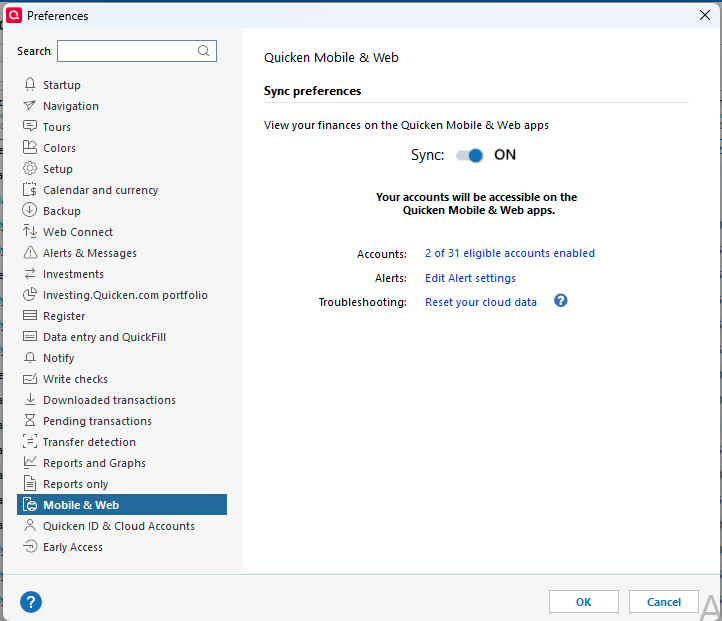
Wait for the reset to finish, and let me know if the issue with reminders continues happening.
Thank you!
Quicken Alyssa
Make sure to sign up for the email digest to see a round up of your top posts.
0 -
I have done the reset. Will see what happens and let you know in a couple of days. If this doesn't resolve the issue I will have to start to look for an alternative application.
0 -
Quicken Alyssa
Make sure to sign up for the email digest to see a round up of your top posts.
0 -
I did the reset but still the same issue. I turned off the sync and that seemed to have taken care of the issue. I am going leave the sync feature off.
1 -
Thank you for letting us know what worked for you, and I am happy the issue is resolved.
If you need more help, don't hesitate to reach out.
Thanks again!
Quicken Alyssa
Make sure to sign up for the email digest to see a round up of your top posts.
0

