Fidelity cc 506 error

I got the Fidelity cc-501 error yesterday, but that's gone now. Today I hoped to successfully download, but that didn't work. I have 7 accounts at fidelity, and on just one of them, it said "CC-506 error. Quicken is unable to update your account. This may be because the account was closed, or its nickname was changed." The account was not closed, nor its nickname changed. However, it did download transactions for the account.
But for all the accounts, it downloaded transactions from August through now, just like it did with the change in interface recently. Now what?
Comments
-
I also tried deactivating an account, to then try reactivating it, but the deactivate button wouldn't take - it remained activated!!
0 -
Hello @kmagnush,
Thank you for reaching out. Since you encountered the issue with the deactivate button not deactivating, have you closed and reopened the Quicken program? If you haven't, please do so. If that does not correct the issue, please try restarting your computer.
If the issue with the deactivate not deactivating persists after that, I suggest that you try validating your data file. Please save a backup file prior to performing these steps.
Validate:
- File
- Validate and Repair File...
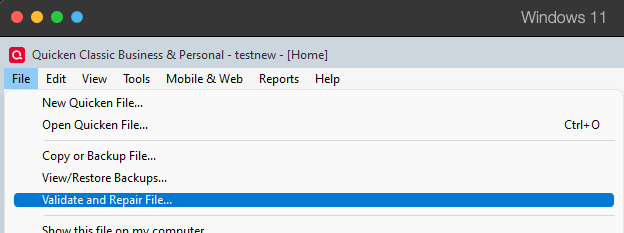
- Validate File
- Click OK
- Close the Data Log
- Close Quicken (leave it closed for at least 5 secs)
- Reopen Quicken and see if the issue persists.
Please let me know how it goes!
Quicken Kristina
Make sure to sign up for the email digest to see a round up of your top posts.
0 -
The reboot didn't work (didn't try the validate file yet). Any thoughts on the 506 error?
0 -
Thank you for your reply,
It is unusual to get a CC-506 error and still have the transactions download. When I check our internal tools, the error is not reflecting at all. It is possible this is being caused by hidden accounts. To check for that, navigate to Tools>Account List. Near the lower left of the window, there should be an option to Show hidden accounts (if you don't have hidden accounts, this option will not be visible).
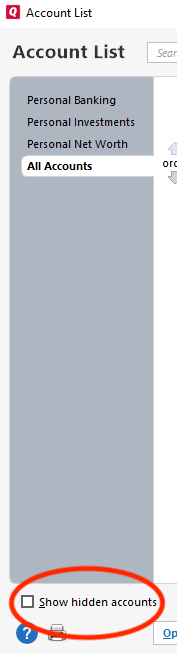
Select that option, if available, then review your account list for any hidden accounts connected to JP Morgan. You can tell if an account is connected by looking in the Transaction Download column.
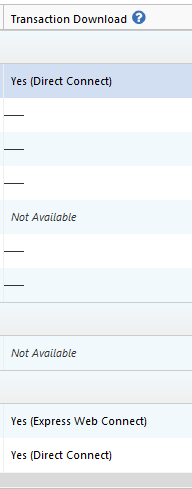
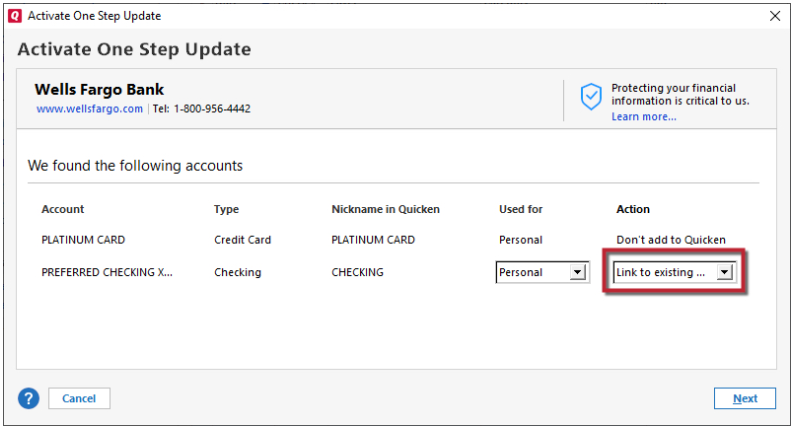
If you find any hidden accounts that are connected to JP Morgan, backup your Quicken file, deactivate those accounts, then either leave them deactivated (if they're older/closed accounts that shouldn't be trying to connect anyway) or reconnect them by navigating to Tools>Add Account and following the prompts, making sure to carefully relink them to the correct nickname in Quicken.
I hope this helps!
Quicken Kristina
Make sure to sign up for the email digest to see a round up of your top posts.
0 -
I have been getting the same CC-506 error for a couple Fidelity accounts for the past week. I have tried to reset with no luck. I have also tried to deactivate and reactivate. For that, I am able to do so but continue to get the CC-506 errors.
0 -
I did a little bit of troubleshooting last night and recalled that I was downloading from two Fidelity accounts, one for me and one for my mom. I deactivated all of my Fidelity accounts and added them all through my Fidelity account. I am an authorized user for my mom's accounts so I was able to add those through my account. This has fixed the CC-506 errors. As I said in my previous post, the CC-506 errors started showing up a week ago. Before that, everything worked fine with downloading Fidelity accounts using two different accounts. Not sure if this is your situation but hope this helps.
2 -
Hello @Tony Fong,
Thank you for sharing your experience! Hopefully it helps others with similar issues!
Thank you!
Quicken Kristina
Make sure to sign up for the email digest to see a round up of your top posts.
0 -
Glad to help! I have been a Quicken user for something like 25 years and feel like the past 10, it's been held together with Scotch tape sometimes! I always seem to be able to get Quicken to do what I need it to do. So workarounds like this are not a surprise for me.
I have more to share on this issue. I actually deactivated one of the Fidelity accounts this morning and tried to set it up again. When I did this, I got the 506 error again. I had to go through my workaround and deactivate all of my Fidelity accounts again. What I realized is that as you activate a Fidelity account, you must check off all of the previously activated accounts on the webpage asking you which accounts you want to allow access. If you only check off the one that you are trying to activate, the previously setup accounts will give you the 506 error. So you have to be very meticulous as you setup each Quicken/Fidelity account and make sure each of the previously setup accounts are checked off on that webpage. I suppose if I had checked off all of the activated accounts this morning and the one I deactivated/activated that it might have worked and I wouldn't have had to have deactivated and reactivated all of my accounts. Anyway, more info that I hope is helpful to others.
1 -
Thanks for sharing!
You're not the only one who has encountered that problem. It's logical to assume that you're just authorizing/reauthorizing that one account, but when you unselect accounts on the financial institution website, they see it as revoking Quicken's permission to download those accounts into your Quicken file.
Hopefully this will help others!
Quicken Kristina
Make sure to sign up for the email digest to see a round up of your top posts.
2
