Red Pencils and missing Lightning Bolts

Using Quicken Classic Deluxe V R64.35 Build 27.1.64.35 Windows 10/11
As of the last couple releases, I'm not seeing the lightning bolt for every Online transaction.
As well, I've started seeing the red pencil whenever there's no lightning bolt.
It used to be that I'd see one every time an online transaction was successfully transmitted to my bank.
So - are the three red pencil transactions actually being processed?
(Note - I'm writing this on 11/8/25 so NONE of these have actually cleared)
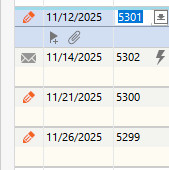
This is making it difficult for me to know if my online transactions are actually being processed or not. ( My bank, PNC, does not show Quicken payments anywhere until they are cleared.)
So - how do I know that these online payments are actually being processed?
I don't want to wait for a payment to be late to find it didn't process…
Answers
-
I really don't know, but if the Account in question has been migrated to Express Web Connect+ (EWC+) then that protocol doesn't allow for direct bill paying through Quicken. You might check to see if that's happened and maybe that's why you're seeing the pencil.
0 -
Nope - I've been using Direct Connect for many years. It's the only reason I continue to use Quicken.
0 -
I've been using Direct Connect for many years.
Which bank are you using? See Edit Account Details, General tab, Financial Institution Name.
In recent months, a number of banks have forced users to migrate from Direct Connect to a different download protocol, Express Web Connect+. This new download protocol no longer supports Online Bank Bill Pay.
So, please doublecheck that your accounts really still are connected using Direct Connect. See Edit Account Details, Online Service tab for the accounts in question.
0 -
Hello @Wayne Hoit,
Thank you for sharing your experience.
Given that the issue you are seeing is with PNC, I think you are being affected by a Known Issue that is currently happening with this financial institution.
If you think this could be what you are experiencing, try deactivating and reactivating your accounts. If deactivating/reactivating does not resolve the issue, please contact Quicken Support directly so we can gather information from you.
After reviewing the alert, you can bookmark it to stay updated on any progress/changes as they occur.
If you do not think this is the issue you are experiencing, let us know!
Thank you.
Quicken Alyssa
Make sure to sign up for the email digest to see a round up of your top posts.
0

