Closed account in Quicken but still asking me to reauthorize and shows Transaction Download as Yes

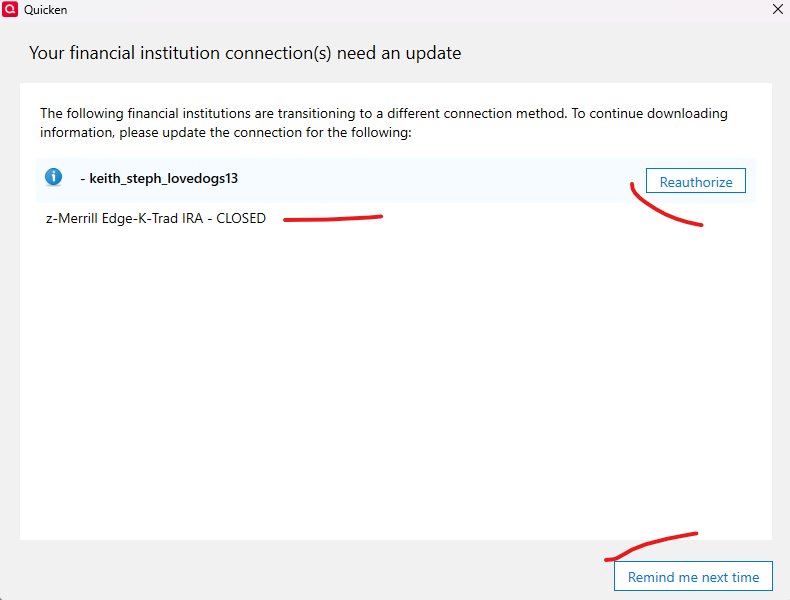
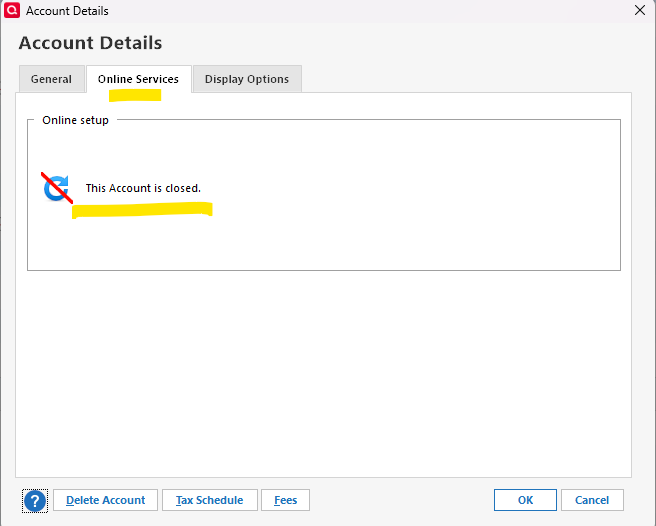
I closed two accounts and when I refresh my One Step Update, Quicken is asking me to reauthorize. All but two of my closed accounts in the Account List say "Not Available". The one that's asking me to reauthorize though shows Yes (Direct Connect) for some reason. When I go into Edit that account and Online Services it shows as Closed. How do I get Quicken to stop asking me to reauthorize this Closed account?

Comments
-
This link should address your issue…
Should Not Be Prompted to Migrate Fidelity NetBenefits Account to EWC+ — Quicken
 1
1 -
For anyone who finds this post… The various suggestions provided above may or may not work. None worked for me, but I finally found something that does.
- Export the problem account to a QIF.
- Delete the account—you will be warned about the dangers; accept them. This will remove the "Xfer Acct" on the other side of the transaction. Do not worry about it!
- Recreate the account using the same name with a 0 balance.
- Import the QIF into that account—it will relink the transfers and the reauthorization problem goes away.
I hope that this helps others.
1 -
I'm nervous about moving everything to an offline account. Is there no way to disassociate Fidelity from the account itself so this wont happen?
0 -
Why? You should only be moving the register entries from one closed account (that did not close-out correctly) to an offline account that should not be granted online access. This account will then be closed to match the prior state of the original account and thus removing the nag prompt that will not go away.
0 -
I see - but you can you confirm that I need to do this via exporting a qif rather than moving transactions manually?
Also technically my original/bad account isn't CLOSED. Should I try closing it first to see if that resolves the issue?
0 -
I never advised using QIF to export/import. I can confirm using Quicken move transactions is quick and simple. Review the steps I outlined in the link above and you should be fine.
This thread is for a closed account still trying to authenticate. If your account has not been closed, then this process does not apply.
0


Categories
- All Categories
- 6 Product Ideas
- 34 Announcements
- 249 Alerts, Online Banking & Known Product Issues
- 19 Product Alerts
- 266 Welcome to the Community!
- 297 Before you Buy
- 1.5K Product Ideas
- 55.8K Quicken Classic for Windows
- 16.9K Quicken Classic for Mac
- 1K Quicken Mobile
- 834 Quicken on the Web
- 129 Quicken LifeHub