Pershing Investments - MFA - Remember My Device

I recently had to revalidate the Quicken Connect download info (including MFA) for a "Pershing Investments (66786)" account. Pershing seems to require this every four months which I appreciate. However, this last time, Quicken no longer obeys Pershing's "Remember my device" feature and I'm needing to revalidate with an MFA code upon every Quicken-initiated download.
Quicken developers/support may already be aware of this while working Ticket #11991654/CTP-14800, but my issue wasn't specifically mentioned in the ticket so I'm just mentioning it here.
Comments
-
Hello @xingeranium,
Thank you for sharing your experience and providing those details.
You are right, we do have that known issue for BNY Pershing - OFX 2000, but it does not mention specifically what you are seeing.
Given that the MFA requirements and prompts come directly from the financial institution, I do not think there is anything we can do in Quicken to change the frequency of them. Something you could try is changing the preferences on the bank's website. For instance, is there a way to turn the "remember my device" off and then back on?
If not, it might be worth giving Pershing a call. Ask to speak with someone in online banking, and see if they have any pointers.
Hope this helps!
Quicken Alyssa
Make sure to sign up for the email digest to see a round up of your top posts.
0 -
Thanks for the suggestion @Quicken Alyssa. I hadn't logged into the Pershing web site recently. When I did, I was met with this message:
To improve login security, starting on October 17, 2025, you will be asked to select a contact method to receive a onetime passcode for every log in. With this security change, the "Remember My Device" option will no longer be available. To prepare, please validate your contact information for your onetime passcode retrieval. It is encouraged to provide more than one method to ensure a smooth login experience.
So you're correct — there is nothing Quicken can do in this situation.
However, the good news is that while looking at some other community postings, I found that I originally could have set up the download account using "Cetera Network Advisors LLC" instead of "BNY Pershing." BNY Pershing provides services for Cetera, and setting up the download to use Quicken's Cetera configuration seems to be working great!
0 -
Thank you for following up with this additional information.
I am happy to hear you found a workaround as well, and this information may prove to be useful for others experiencing this.
Thanks again!
Quicken Alyssa
Make sure to sign up for the email digest to see a round up of your top posts.
0 -
I'm seeing the same behavior, however Pershing also sends an email saying, "Security Update: You Used Remember My Device."
I'm not clear on the mechanism being used, but it appears there's a cookie from Pershing that Quicken forgets about after every session. Not caching that cookie might be the problem?
1 -
I am also seeing this exact same behavior as well (i.e., including the "You Used Remember My Device" email every time).
0 -
Hello All,
Thank you for adding to this discussion.
If you have not yet done so, I would give Pershing a call. Ask to speak with someone in online banking, and see if they can provide any insights.
If you have already contacted Pershing and were unable to get anywhere with them, please contact Quicken Support directly for further assistance. They can dig deeper into this and may be able to escalate it from our end for you.
Let me know how it goes!
Quicken Alyssa
Make sure to sign up for the email digest to see a round up of your top posts.
0 -
Attached is the issue I am seeing when trying to setup Quicken with Pershing. Please advise.
0 -
@Hisashi T Fujinaka and @darinu71 and @QknUser942820948
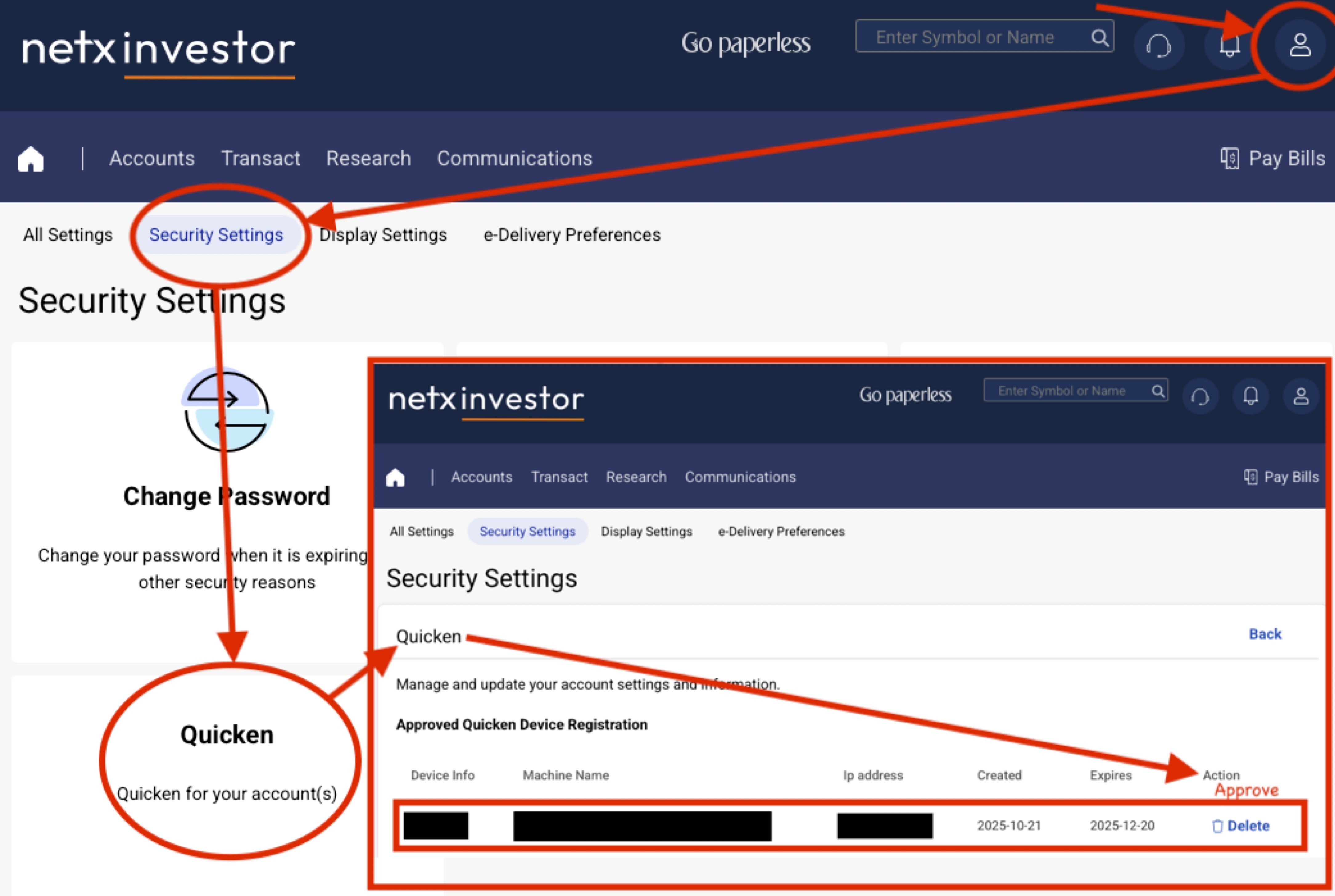
I hope you've been able to resolve the Pershing issue by now. If not, here is specifically what solved the issue for me. I found that there was a "Quicken" security setting in my Pershing web profile that I had to "approve" only once after I had configured the Pershing account in Quicken. It looks like the approval expires in three months and will need to be reapproved then. The steps I took are illustrated in the annotated screen grabs below. (I now see that one of my arrows passes through Change Password—ignore that because you don't need to change your password.)
 1
1 -
Hello @darinu71,
Thank you for that information, and I am sorry for the delayed response.
Please try what worked for @xingeranium and let me know how it goes.
Thank you for sharing what worked for you with the other users in this thread
Your contribution is appreciated!
Quicken Alyssa
Make sure to sign up for the email digest to see a round up of your top posts.
0 -
I am Citi Personal Wealth Management (CPWM) client and while the color scheme is slightly different from what's shown here, CPWM uses a re-branded version of Pershing's netx investor system to service its clients, causing the same exact issue for me as everyone else had here. These instructions fixed it for me. I found that when I deleted and reconnected my CPWM account, at the screen where Quicken pops up the window to ask I what verification method I would like (SMS), after I pressed okay on that screen (i.e., after a text was sent but before I entered the one time passcode from the text), I come back to the page shown in the screenshot on Pershing's netx investor site, and that is when I discovered a pending Quicken approval. That solved it for me. Thank you!
1 -
Excellent! Thanks for describing the additional steps needed to get the Approval to show. It had been too long ago for me to recall these.
0 -
@QknUser942820948 & @xingeranium,
Thank you both for updating the thread with what worked for you.
If you need more help, don't hesitate to reach out.
Thanks again!
Quicken Alyssa
Make sure to sign up for the email digest to see a round up of your top posts.
0 -
Hello, @xingeranium and @QknUser942820948
The suggested did not work and I am still not able to Set Up my Pershing accounts.
0 -
Hello @darinu71,
Thank you for adding to this discussion, though I am sorry what worked for others did not work for you.
Please give Pershing a call to see if they can assist you with this. I would suggest asking to speak with someone in online banking. If you are unable to get anywhere with the bank, you can call Quicken Support to see if there is anything we can do from our end.
Hope this helps!
Quicken Alyssa
Make sure to sign up for the email digest to see a round up of your top posts.
0 -
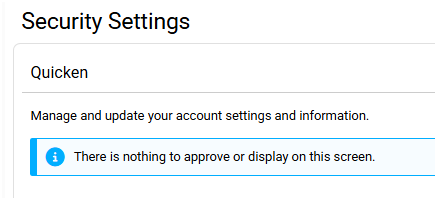
My issue still exists and none of the suggestions in this thread helped. I have tried to call Pershing to no avail. They had no clue and said they would call me back two weeks ago. My brother has the same advisors, same quicken and same pershing. His works great and he has never had to go to Pershing settings or click on anything. My Pershing settings has nothing there. "Nothing to approve or authorize"
 0
0 -
Hello @kaetlir,
Thank you for adding to this discussion.
Due to the nature of this issue, it is recommended that you contact Quicken Support directly for further assistance, as they can walk you through troubleshooting steps in real-time and escalate the situation as needed.
The Quicken Support phone number can be found through this link here. Phone support is available from 5:00 am PT to 5:00 pm PT, Monday through Friday. Chat support is available at the same times, seven days a week.
I apologize that I could not be of more assistance!
Quicken Alyssa
Make sure to sign up for the email digest to see a round up of your top posts.
0


