Never get OTP from Quicken

I am trying to update my bank transaction, and Quicken tells me to enter the OTP sent to my mobile number…but I never get a text….with the bank app itself this feature works.
Answers
-
What bank? Seems like this might be some error with Quicken that's specific to that bank.
0 -
SSantander…
0 -
This is Santander Bank in the US, not the Spanish Santander Group, correct?
I think this is something that probably should be addressed by Official Quicken Support since it might be a problem at the bank's end and Support could contact the bank to figure out why it's not working.
Is this "new behavior" in that it used to work, but now doesn't?
0 -
For what it's worth, this problem just started happening for me as well, same symptoms you are experiencing. I tried a Reset as well as Deactivating transactions and setting them up again, but that had the same problem. I've been linked to Santander "for ever" with no problems but somewhere around 11/5/2025 transactions stopped getting downloaded and I get that OTP prompt no, but never see an OTP code on my devices or emails.
1 -
Hello All,
Thank you for sharing your experiences.
These multi-factor authentication prompts/one-time passcodes come from the financial institution. If you are not receiving the code, you will need to contact the bank.
I would suggest asking to speak with someone in online banking. If you are unable to get anywhere with the bank, please contact Quicken Support directly, as we may be able to help escalate this from our end.
Hope this helps!
Quicken Alyssa
Make sure to sign up for the email digest to see a round up of your top posts.
1 -
I am having the same problem with Santander. They said it is an issue that Intuit/Quicken has to resolve. They do not require an OTP to access the accounts. This also started happening to me last week.
1 -
I am having the same issue…..Santander was able to override the request for the OTP the first time a few days ago, and then it happened again today….on chat support with quicken and tried a bunch of things but no luck…they are escalating..
1 -
I'm having the same issue, just re-linked all my accounts, but no luck :-(
This is a huge issue for me…
1 -
Hello All,
Thank you to those of you who have added to this discussion.
I see your recent interaction with support and the escalation they were able to process for you. Thank you for reaching out to them!
Thank you for reaching out to the bank, though I am sorry they were unable to help.
Can I have you and @John Porcello, contact Quicken Support directly so they can gather the necessary information from you, and process an escalation if needed?
Let me know how it goes!
Quicken Alyssa
Make sure to sign up for the email digest to see a round up of your top posts.
0 -
I'm having the same issue. I do not have OTP enabled. I can't find anywhere in Santander to even set it up, and yet Quicken recently started asking me for it so I can't sync with Quicken because I never receive a text.
0 -
HAving same issues with Santander. This has been going on for a couple of weeks. DO we have a resolution yet?
0 -
Hello All,
Thank you all for sharing your experience with this issue.
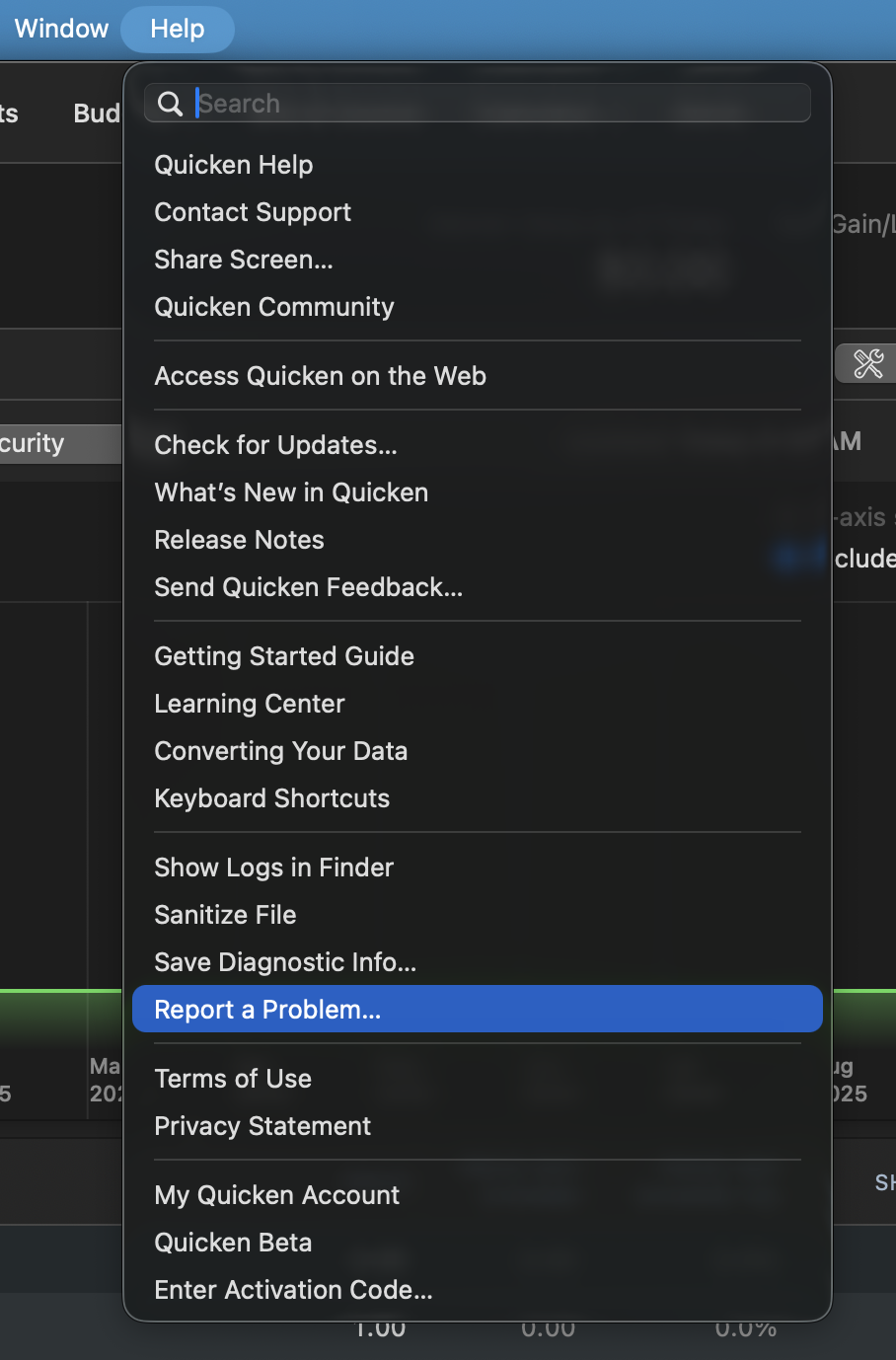
I will be forwarding this issue to the proper channels to have this further investigated. However, we request that you please navigate to Help > Report a problem > Send to Quicken from within your Quicken program and submit a problem report with log files and screenshots attached in order to contribute to the investigation.

Once you have submitted them, let me know so I can add them to the ticket.
Thank you!
[CBT-925]
Quicken Alyssa
Make sure to sign up for the email digest to see a round up of your top posts.
0 -
Watching this post as I have the same issue. As above, Santander/Sovereign has worked forever. Found a somewhat lousy temp fix….. (make sure you have good backups!)
try to download Santander til it asks for the OTP that never comes - leave it at that stage. Then if I try to log in to Santander directly from my PC, it now sometimes says it needs an OTP to continue and actually sends it to my mobile. I enter that code in Quicken and am able to putter forward. Sometimes I have to switch to a dif browser (from Chrome to firefox or edge) to get the OTP prompt. Yes, I know it is totally kludgy. Almost seems like the PC version only needs the OTP because Quicken does for some reason. Hopefully quicken support will figure out what changed in November and get a real fix…
0 -
Getting this error too…also a Santander account.
0 -
I was working with Quicken support and seem to have found a solution - log in to your Santander account, go to "alert delivery options" and activate them (disabled by default). You'll get an OTP, and after entering it Quicken will download transactions correctly.
At least it has so far….
0 -
Hello All,
Thank you all for adding to this discussion.
Thank you to those of you who have shared possible fixes for this issue as well.
If the fixes don't work for some of you or the issue returns, please send over log files and let me know once you have, so I can add you to this ticket.
Thanks again.
Quicken Alyssa
Make sure to sign up for the email digest to see a round up of your top posts.
0 -
Not sure why I can't edit my post above, but anyway wanted to provide an update: I have tired one step update probably 10 times since enabling alerts on the Santander site, and it has worked flawlessly, so this looks like the solution.
0 -
I had my alerts enabled except the marketing ones and like everyone else it developed this OTP issue. I folled the suggestion of enabling those as well and now it works. Clearly a change at Santander end
1 -
To follow up, I too had the OTP issue but when I checked my alerts on my Santander account (from a web browser), I ALREADY had the alerts enabled.
So I agree SOMETHING changed at SANTANDER end, since now no more OTPs…at least until someone changes something else either at Santander or Quicken.
0 -
For what it's worth, I resolved it by clicking cancel when the OTP dialog opens and transactions download properly.
0 -
FYI, this problem has reappeard. I am no longer able to download transactions from Santander - it gets stuck waiting for an OTP that never comes.
And Devan, a question: do you actually get downloaded transactions by clicking cancel to the OTP request, or does it just continue? When I do that, it seems to complete but if I look at the One Step Update results I see that the completed update is in the past, not the one I just preformed.
0 -
Same issue here, not receiving transaction updates, receive them sporadically, or partially for awhile now with Santander. Also have tried resetting the account and deactivate/reactivate multiple times with no success. Have run into the OTP that never comes issue too, sometime hangs forever and have to crash Quicken, also have clicked through it and says it's connected, but no downloads.
What alerts exactly are you enabling in Santander? I am working with a credit card account, it has never worked consistently.
Thank you
0 -
Hello All,
Thank you for adding to this discussion.
For anyone who is still experiencing this issue, please navigate to Help > Report a problem > Send to Quicken from within your Quicken program and submit a problem report with log files attached.
Once you have submitted them, let me know so I can add them to the ticket.
Thank you!
[CBT-925]
Quicken Alyssa
Make sure to sign up for the email digest to see a round up of your top posts.
0 -
To pauli on 11/24 - I am using a checking account, and I think what made it work for a while was enabling "text alerts" in the "manage alerts" screen. But it no longer works, so I think that was a red herring….
Update: I looked at my Santander account again, and the "text alerts" option under "manage alerts → security alerts" was off again, not sure how that happend, so I re-enabled it and now Quicken updates correctly again.
0 -
@G.2,
Thank you for adding to the discussion with your findings. Hopefully, it will be helpful to others.
Thanks again.
Quicken Alyssa
Make sure to sign up for the email digest to see a round up of your top posts.
0 -
I have been having the same problem with Quicken and Santander. Sometimes the account will download with no problem but more often than not I run into the OTP issue.
0 -
Not working for me again, no matter what I have the alerts set to, so now I'm thinking that assuming that solved it was an error on my part. Bottom line is Santander transaction downloads do not work reliably, and I'm hoping Quicken will work with Santander to get this sorted out; there seems to be nothing end users can do to resolve it, and I've sent the details to Quicken support a couple of times all ready. I also contacted Santander, but still no resolution.
0 -
When trying to download transactions from Santander Bank, I consistently am asked to enter the OTP sent to my mobile number which never comes. I have to continually reset the account which works for 3 or 4 days and then goes back to asking for the one time password. Any ideas what is causing this.
0 -
Seems to be a problem for several folks:
I guess Quicken is working on it but you might want to send files to Quicken Support as suggested.
0 -
Hello All,
Thank you all for reporting this issue.
Can I please have you all go to Help>Report a problem, from within your Quicken software, and Send to Quicken?
Mac:
Windows:
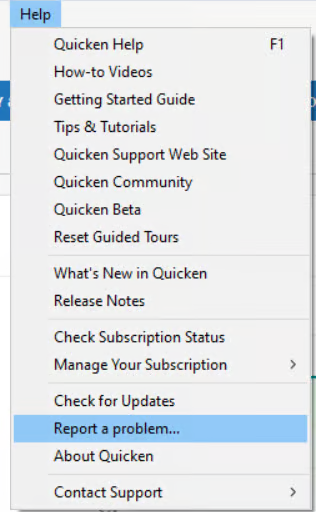
This issue has been reported, and your log files will help the investigation. Once you have sent them over, let me know so I can add them to the ticket.
Thank you!
[CBT-925]
Quicken Alyssa
Make sure to sign up for the email digest to see a round up of your top posts.
0

