Problem updating Quicken: quickenPatch.exe needs administrative privileges

I am apparently very far behind in updating Quicken (I'm on 62.16, and it says current version is 64.35. I tried to update, and I got an error message saying that quickenPatch.exe needs administrative priveledges. First of all, I do have administrative priviledges. Second, there is no prompt. Third, I found quickenPatch.exe in the Quicken folder, but when I try to run it, I get another error. Now what?
Answers
-
oh, I posted this in the wrong category - can't figure out how to delete it or change the category. I'm on Windows, not MAC.
0 -
Well, I recommend that your next step should be posting over in the Windows forum:
0 -
Hello @lliefveld,
Thanks for the details—I went ahead and moved your post to the proper Windows category.
As for the update issue, have you tried uninstalling and reinstalling Quicken? You can follow the instructions in these support articles for uninstalling and reinstalling.
Before reinstalling, please open File Explorer and navigate to:
This PC > C: Drive > Program Files (x86)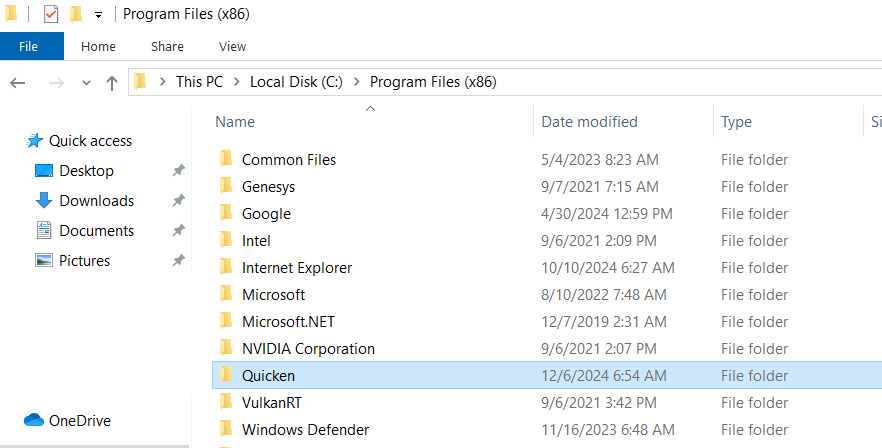
Then, delete the folder titled "Quicken"—doing so will not affect your data files.Once that folder has been deleted, proceed with reinstalling Quicken. The reinstallation should install the latest version automatically.
Let us know how it goes!
-Quicken Anja
Make sure to sign up for the email digest to see a round up of your top posts.0 -
[Removed - Unhelpful]
0 -
[Removed - Violation of Community Guidelines]
0 -
In case you are interested, I apparently am having a similar issue. Every time Quicken is opened, I get a popup regarding Quicken checking for an update. This has been happening for weeks. I opened a thread on community, no solution. I reported it to Quicken through the application and included a link to the Community post; no solution provided, no update in the Community thread. Thread is : https://community.quicken.com/discussion/comment/20518690#Comment_20518690
As of today, I am on the same release / version that I have been on since the problem begin.
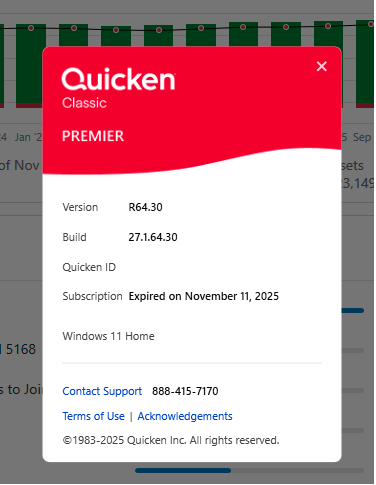
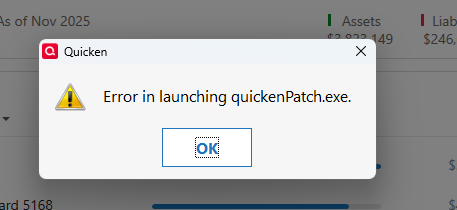
When I attempt to manually update, an error is reported.
My subscription auto-renewed earlier this week and that update is NOT reflected in the About Quicken display but is acknowledged in "Check application status".
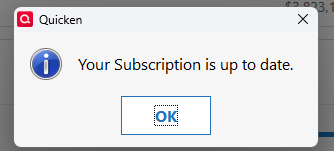
If I understand the earlier directions in this post, the recommendation to resolve the lack of update problem is to uninstall and then re-install Quicken. IS the root cause being investigated?
[Edited - Removed Personal Information]
0 -
Hello @Knitgirl,
Thanks for providing these details.
To clarify, the troubleshooting instructions provided are part of investigating the root cause. Before anything can be escalated, we need to rule out potential local issues, such as installation problems or corrupted program files. That’s why I’m starting with the uninstall/reinstall steps: they help determine whether the issue is caused by the local system or something else.
Once these steps are completed, we’ll have the information needed to decide whether further troubleshooting or escalation is necessary. Escalating before exploring these troubleshooting avenues wouldn’t give us the full picture and could slow down the resolution.
Hope this helps!
-Quicken Anja
Make sure to sign up for the email digest to see a round up of your top posts.0 -
@lliefveld and @Knitgirl ,
Installation problems are not that uncommon because Windows or an Antivirus sometimes block a certain component during the process for a variety of reasons.
Uninstalling and reinstalling Quicken is simple and quick and resolves some problems. I suggest to follow @Quicken Anja 's earlier instructions to do so. When I decide to update, my preferred method is to use this Quicken patch site instead of allowing the program to perform an update. Hope this resolves your issues.
- Q Win Deluxe user since 2010, US Subscription
- I don't use Cloud Sync, Mobile & Web, Bill Pay1 -
I gave in and did the uninstall/reinstall. This did result in the Quicken version being the latest (R64.35), it has not resolved the problem reported in my original thread; every time quicken is opened, the "do you want to allow this app to change…" popup displays. Please look at that thread for further information if interested. The certificate for QuickenPatch still says it ended in August. UAC changes had no impacts. Restarting the laptop has not changed the behavior.
I am not going to update this thread further and instead will only update in the other thread.
Windows Quicken user for decades, Premier for 21 years and counting.
0 -
Kind of a similar issue. I have to manually download and install patches, as I'm running on a machine that I have pseudo admin privs. I have to run the patch from a folder with elevated permissions, so I can't just let the desktop app do it's normal thing. Quicken has not updated the manual patch link since Oct and it has the wrong patch level still. It should be .35, but is still linked to .30. It's mid-November. Can you all fix this?!
[Edited - Enabled Link]
0 -
Hello @dougwilliams227,
Thanks for chiming in!
A request has been submitted to the proper channel to have the Manual Patch article updated, though we do not have an ETA on when that will be completed.
Thank you!
-Quicken Anja
Make sure to sign up for the email digest to see a round up of your top posts.0




Categories
- All Categories
- 6 Product Ideas
- 34 Announcements
- 249 Alerts, Online Banking & Known Product Issues
- 19 Product Alerts
- 266 Welcome to the Community!
- 297 Before you Buy
- 1.5K Product Ideas
- 55.8K Quicken Classic for Windows
- 16.9K Quicken Classic for Mac
- 1K Quicken Mobile
- 834 Quicken on the Web
- 129 Quicken LifeHub