Morgan Stanley Download Quicken for Mac

I am running the latest Quicken for Mac on my Mac Air. I transferred my data from Quicken Windows . I ran Q Windows for 20 plus years .
On one of my Morgan Stanley accounts I have an annuity. I had in Q windows I would update the value weekly by adding or removing shares based on total value. When I use the auto update feature it never picked up a duplicate security
On Q for Mac when I update it shows two accounts Elite Access Brokerage one and two. I tried deleting the original transaction which dates back to 2016 on the one I want to delete. Value of portfolio is correct and shows just the one annuity.
When I update it duplicates the security . Q for Windows did not duplicate . Is there a way to amend and not show duplicate annuities ?
Answers
-
Hello @jjrichards,
Thank you for reaching out! If you have issues with the security getting duplicated every time you update your accounts in your Quicken, I recommend that you try merging the duplicate security with the original security. Doing that should help Quicken recognize that the security is already in your file. For information on merging securities, please see this help article:
I hope this helps!
Quicken Kristina
Make sure to sign up for the email digest to see a round up of your top posts.
0 -
Hi Kristina:
I am not sure this is the best solution . I previously ran Q for Windows and this security is an annuity , since annuities do not have daily prices only value, I each week used the add / remove shares to show the current value .
In Q for Windows you had the ability to "NOT have a certain security update". I was not able to find that command in Q. for Mac . Is there a way to not trigger one security to update ?
0 -
Thank you for your reply,
In Quicken for Mac, you can tell Quicken not to update the security by navigating to Window>Securities.
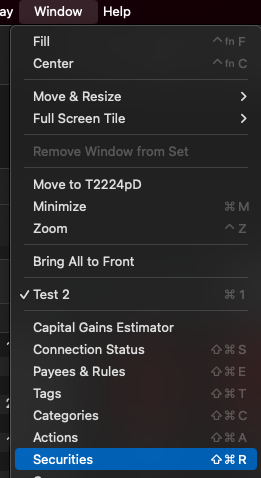
Then, in the Securities window that comes up, uncheck the checkbox for that security in the Download Quotes column.

I hope this helps!
Quicken Kristina
Make sure to sign up for the email digest to see a round up of your top posts.
0 -
Hi Kristina:
I initially looked for this option in Securities . I am running Quicken Classic for Mac which I downloaded a week ago. The screen I am looking at only has the following options " Currently Held " and 'Watchlist"
Is there another version which will provide " Download Quotes " ?
0 -
Hi Kristina:
I was doing some research on line and I found was one additional step. When you uncheck the box from having securities update automatically , it asks you if you want to confirm and manually control quote downloads. The a new column will appear " Download Quotes will appear
I was fearful on following the additional step since I did not want all my securities " not to upload current prices".
Can you confirm that if I confirm in step 3 to manually control , step 4 will not " deselect my securities from updating automatically ?
Thank you
Navigate toWindow > Securitiesto open the Securities window.Uncheck the box labeled "Download quotes only for Watchlist, indexes & securities held".Confirm that you want to manually control quote downloads by clicking"Yes, I'll do it"in the dialog box that appears.A new column calledDownload Quoteswill appear. Uncheck the box next to the specific stock you want to exclude from automatic updates.Optionally, re-check the "Download quotes only for Watchlist, indexes & securities held" box if you want automatic updates for your other stocks and watchlist items.
0 -
Thank you for your reply,
When I test in my Quicken, selecting "Yes, I'll do it" does not automatically cause every security to be deselected. The ones that Quicken had been updating will still be selected.
Thank you!
Quicken Kristina
Make sure to sign up for the email digest to see a round up of your top posts.
0 -
Hi Kristina:
I did try this solution . I did uncheck the box " download quotes " for the one security I update myself , however the green box " security held " still shows and I cannot delete . Thus the security value still doubles in Quicken .
Any other suggestions ?
0 -
Kristina:
I unchecked the box from the security I wanted to download automatically . I then " rechecked " the box where you want Quicken to download quotes for " Securities Held and Watchlist " .
I think this may be the issue since I " rechecked " . I am concerned that if I exit out all my securities held updated stock prices will not be downloaded ?
Your thoughts ?
Jeff
0 -
Thank you for your reply,
If you recheck the box to have Quicken download quotes for Securities Held and Watchlist, then it should revert to the securities that Quicken updates by default (which is typically any security that you hold or is in your watchlist and has a valid ticker).
Thank you!
Quicken Kristina
Make sure to sign up for the email digest to see a round up of your top posts.
0 -
Kristina:
I tried your solution , unfortunately the one annuity I do own and does not have a " symbol " is still doubling since Quicken shows owned .
Any other solutions ?
0 -
Kristina:
I was researching on line and for Q for Mac there is NOT a procedure from selecting " one stock" from automatically updating . You would only have the option to disable for ALL INVESTMENTS . Can you let me know your thoughts ?
To deselect an individual stock from automatic updates in Quicken for Mac, go to the Quicken settings and deselect the "Automatically update investment quotes" option. There is no way to turn off auto-updates for a single stock; you must disable the feature for all investments.Go to settings: Choose Quicken > Settings from the menu bar.Go to Connected Services: Click the Connected Services tab.Turn off auto-updates: Deselect the checkbox for Automatically update investment quotes every 60 minutes (the time may vary).
0 -
Thank you for your reply,
I suspect that merging the original and duplicate security will resolve the issue. I recommend that you backup your file and try merging the securities.
I recall that you declined to do that earlier. If you still do not believe it will help, then please contact Quicken Support directly for further assistance, as they have access to tools we can't access on the Community and they're able to escalate the issue as needed. The Quicken Support phone number can be found through this link here. Phone support is available from 5:00 am PT to 5:00 pm PT, Monday through Friday.
Thank you!
Quicken Kristina
Make sure to sign up for the email digest to see a round up of your top posts.
0 -
Hi Kristina;
Thank you for your response . In Q for Mac how do I merge the securities?
0 -
Thank you for your reply,
To merge securities, follow these steps from our article on merging securities:
- In Quicken for Mac, choose Window > Securities. Your security list is displayed.
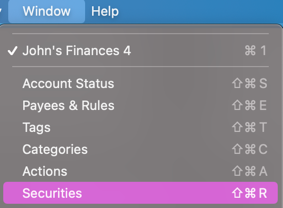
- Select the two securities that you'd like to merge. To select two securities, select the first security, then hold down the Command (⌘) key and select the second security.
- Click the Merge Securities button.
- On the Merge Securities window, click Merge to complete the action.
- If the securities you are merging have different details (such as a different spelling or capitalization of the security name or a different ticker), you will be prompted to select the preferred details before the merge.
Note - Some securities of different types cannot be merged (a bond and a stock, for example). When attempting to correct an error where the wrong security type was applied to a transaction, we recommend that you correct the transaction itself by editing and choosing the correct security, instead of merging.
I hope this helps!
Quicken Kristina
Make sure to sign up for the email digest to see a round up of your top posts.
0 - In Quicken for Mac, choose Window > Securities. Your security list is displayed.
-
Hi Kristina
I do not think merging will work for me . I am running Q for Mac and Q for Windows on another computer . Q for Windows DOES allow you to select a stock/ position from updating . In my case it's an annuity . I pasted below
I was reading on line that Q for Mac does not have the same feature as Q for Windows . In Windows this annuity only changes the value when I update " Manually "
To deselect an individual stock from automatic updates in Quicken for Mac, go to the Quicken settings and deselect the "Automatically update investment quotes" option. There is no way to turn off auto-updates for a single stock; you must disable the feature for all investments.Go to settings: Choose Quicken > Settings from the menu bar.Go to Connected Services: Click the Connected Services tab.Turn off auto-updates: Deselect the checkbox for Automatically update investment quotes every 60 minutes (the time may vary).
0 -
Thank you for your reply,
I recommend that you contact Quicken Support directly for further assistance, as they have access to tools we can't access on the Community and they're able to escalate the issue as needed. The Quicken Support phone number can be found through this link here. Phone support is available from 5:00 am PT to 5:00 pm PT, Monday through Friday.
I apologize that I could not be of more assistance!
Quicken Kristina
Make sure to sign up for the email digest to see a round up of your top posts.
0
