Still unable to connect Fidelity CMA account

Comments
-
This is NOT fixed yet (as of 11/17/2025). when reauthorizing the CMA account, I still only get options "Brokerage", "IRA or Keogh Plan" and "529 Plan". None of these allow me to link to the existing CMA account in my Quicken Windows app.
I first experienced the issue on 10/10/2025, and chatted with Quicken Support:
08:09 AM | Me: when performing a one step update, getting message that Fidelity Investments (I have 9 accounts with them) is transitioning to a different connection method. i tried the 'Reauthorize' process, but one of the accounts (Cash Management Checking) does not appear in the 'link to account' dropdown list. i chatted with Diego yesterday, i shared my screen and he determined that Fidelity may not have been sending the correct account type for the checking acct. it wanted to assign the 'Brokerage' type, which somehow didn't work with quicken. we ended up with Diego stating "we need to get in touch with a Higher support team that will help us to do more research on this and find out what can be done to fix this". i didn't have time yesterday to continue, so i'm back today
08:12 AM | Hosten from Quicken Classic: I am sorry about the inconvenience you’re passing for. Fidelity is currently implementing some changes on their end. From our understanding, they are still in the process. Is a known problem that has affected many users recently due to changes in how Fidelity data is imported into Quicken. Let me take a moment to double check if we have updated information related to these Fidelity changes. Just give me a moment please.
08:15 AM | Hosten from Quicken Classic: Thank you so much for your patience and for holding. I apologize for the extended wait. It looks like Fidelity is still experiencing some connection issues due to recent changes. I’m truly sorry for any inconvenience this may have caused. Please know that the Quicken team is actively working on a solution. These changes were made by the financial institution and Quicken is following their guidelines. We really appreciate your understanding and patience during this time.
08:17 AM |
Me: ok, so i should wait to try the transition process again until i hear back from you?
08:17 AM | Hosten from Quicken Classic: Yes please, I am sorry about the inconvenience you’re passing for. We appreciate your patience.
i did a follow up chat with Quicken Support on 11/5/2025 and verified that the issue was still unresolved.
I've just tried to re-authorize the CMA account today, same result
0 -
Hello @utexex79@,
Thank you for letting us know you're seeing this issue. It sounds like you're already working with Quicken Support to resolve this issue. Did you have the ticket number handy from your contact with them?
Does your existing CMA account in Quicken have the linked checking account option enabled? You can check this by navigating to Tools>Account List, clicking the Edit button next to the account, and looking on the General tab.
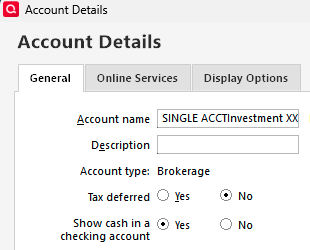
If you do have the option to show cash in a checking account enabled, backup your Quicken file, then try turning it off by selecting No and then clicking the OK button. Note - It may take a little while for Quicken to reconsolidate cash transactions with the investment account.
Once that is done, try reauthorizing your CMA account again, and see if the issue is resolved. If the issue is resolved, you can re-enable the linked checking account once the account is once again linked in your Quicken.
I hope this helps!
Quicken Kristina
Make sure to sign up for the email digest to see a round up of your top posts.
0 -
I also had trouble connection to my Fidelity CMA, but resolved this morning through a number of steps: (1) clear out approved Quicken access in the Fidelity account, then (2) disable the corresponding accounts in Quicken, to be re-activated through the Quicken 'Add Account' routine. I tried first (many times) to simply add the CMA —unsuccessfully, getting a "failed" error message.
I assume many are familiar with disabling and adding accounts in Quicken, BUT clearing out the Fidelity end is pretty obtuse. So some detail follows:
- Got to "Profile" on the Fidelity login home, upper right link
- Select Security Center/Data & Privacy, then "Your data sharing" / "View our dashboard"
- Click "Manage Access" link
- Select "Remove all Quicken access"
That last set is a little scary, but keep in mind you add back access from Quicken with the 'Add Account' process —in my case I added back ALL accounts, pairing with existing data as needed, and adding the new CMA.
Hope this is helpful.
0 -
Hello @Bob@61,
Thank you for sharing your experience! Hopefully it helps others encountering this issue.
Thank you!
Quicken Kristina
Make sure to sign up for the email digest to see a round up of your top posts.
0

