No longer can set up Online Sync with American Express for Quicken Classic (R64.35)

A few weeks ago I received an error when running one step update for American Express. I received the following error -
Your account has been locked due to too many unsuccessful attempts. To log in, please reset your password or retrieve your User ID.
I deleted the online sync for American Express and tried to set up again and got the same error as above. I did try to reset my password three different times and still continued to get the same error. I am unable to set up One-Step Updates for American Express. I even tried to delete my AMEX account and that didn't help. So I rolled back to a previous day's data.
Answers
-
I deleted the online sync for American Express
Does that mean you deactivated the AmEx account in Quicken (Edit Account Details, Online Services, Deactivate)?
If you have more than one AmEx account register, repeat deactivation for all of them.
Wait at least 24 hours for the Intuit download server to stop trying to download.
Now, using the "+" icon in the Account Sidebar header (or Tools / Add Account) activate the accounts again. Follow the exact procedure, making sure that you LINK your existing Quicken registers to the correct accounts found at AmEx.
If you don't link correctly, you may end up with transactions downloading into wrong accounts … :-(0 -
according to Quicken Support today 11.17.25, it looks like nobody on a Mac at least can connect to American Express to download transactions. This has been going on for several months. When are you gonna fix this!!! same with citibank :-((((
0 -
Hello @ppoole3,
Thank you for letting us know you're seeing this issue. To clarify, what is the exact error message/code that you are seeing when attempting to add or update your American Express account(s)?
There is a known issue impacting some people. See the Community Alert linked below for more information:
When I check our internal tools for the issue connecting with Citi that you mentioned, I can see you are getting a CC-505 error when attempting to update your Citi account(s) today. That error is usually a temporary error caused by things like server maintenance. To troubleshoot, please wait 24 hours. If the error persists after 24 hours, please follow these steps from our article on CC-505 errors:
If waiting one day does not resolve the issue
Try refreshing your online account information:
1. From your account register, select the Actions gear icon at the very top right of your register (Ctrl + Shift + N).
2. Select Update Now.
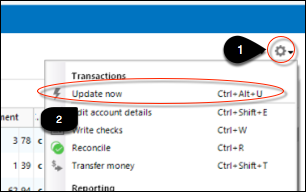
3. Follow the on-screen instructions to complete the update.
4. Repeat these steps for each financial institution experiencing this error.
I look forward to your response!
Quicken Kristina
Make sure to sign up for the email digest to see a round up of your top posts.
0

