shop your way - can't update credentials now

Citicard shop your way recently underwent some changes and the old login for quicken didn't work. I got a new password on the "new" syw card but when I try to update the credentials on quicken it takes me to a "sears legacy" log in and the exact credentials that work on their website don't work on quicken. I also tried adding it as a new account and quicken told me that it is already registered. Thank you
Answers
-
Hello @pamela77,
Thank you for letting us know that this issue is happening in Quicken for Mac also. Have you contacted the financial institution about this issue? Do you still use the same URL (web address) to login to your account directly through the financial institution website, or has that URL changed?
I look forward to your response!
Quicken Kristina
Make sure to sign up for the email digest to see a round up of your top posts.
0 -
The URL looks like it is the same citiretailservices.citibankonline.com. Yet if I use the old link in 1password that says that it doesn't work. It DOES work if I look up thank you Citi card log in on my browser, so I think there is more to it and maybe that is what quicken is missing. If I search thank you Citi card log in, it takes to citiretailservices.citibankonline.com and I can log in. But if I myself enter citiretailservices.citibankonline.com it doesn't work. When I search and it takes me to the correct log on, if I click on citiretailservices.citibankonline at the top of the page other greyed out print appears /RSauth/signon? and more, so I think there is more to the URL than meets the eye. In Quicken Mac it says it is taking me to sears and shop your way legacy log in, but it doesn't work.
0 -
Thank you for confirming,
I forwarded this issue to the proper channels for further investigation and resolution. I can see that you already sent logs. Thank you for sending them; while you will not receive a response through this submission, these reports will help our teams in further investigating the issue.
If anyone else is also encountering this issue, please navigate to Help>Report a Problem and send a problem report with log files attached.
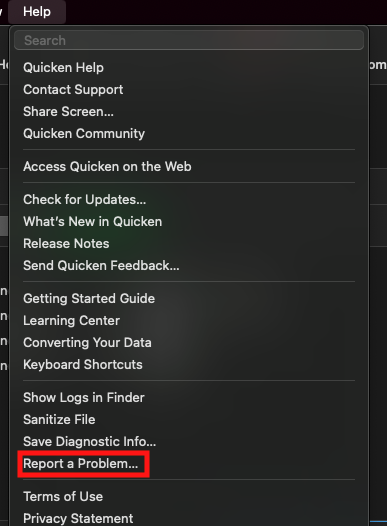
Thank you!
(CBT-927)
Quicken Kristina
Make sure to sign up for the email digest to see a round up of your top posts.
0
