Transaction matching

Has Quicken removed the ability to manually match transactions? I often have multiple transactions with the same amount. When I download the transactions from the financial institution, Quicken frequently matches the downloaded transaction incorrectly.
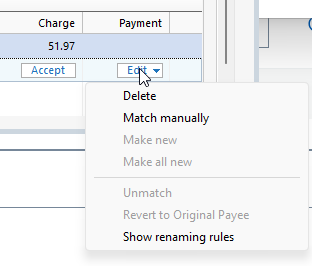
As far as I can tell, there is no way to tell Quicken the correct transaction to match (what used to be called match manually). The only two options are to accept or unmatch. If you unmatch, the transaction then becomes "New" and again there is no way to match it to the correct transaction. It needs to be deleted and the register then manually updated to show the transaction is cleared.
So every transaction I download I need to manually unmatch, manually delete, and then manually update the register. So it's far more work to dowload transactions than just to manually update the register.
Comments
-
Manual matching is still available. Select the transaction to re-match in Downloaded Transactions area, click on "Edit" and then "Match manually"
-splasher using Q continuously since 1996
- Subscription Quicken - Win11 and QW2013 - Win11
-Questions? Check out the Quicken Windows FAQ list0 -
Those options aren't presented to me—just Delete
0 -
What release of Quicken are you using? Help→About Quicken
What type of account?
-splasher using Q continuously since 1996
- Subscription Quicken - Win11 and QW2013 - Win11
-Questions? Check out the Quicken Windows FAQ list0 -
Also what type of account is this - Banking? Investing? Investing with "Show cash in a checking account" option selected, i.e. a linked checking account?
I think the options are different for investing accounts.
QWin Premier subscription0 -
I'm using Quicken Classic Deluxe for Windows version R64.35. The account is an investment account for a Schwab Donor Advised Fund. It doesn't have a linked checking account since cash is only held ephemerally. Unfortunately, due to the nature of the account, many transactions are for the same amount. Making things more complicated are that the downloaded transactions from Schwab don't show the payee—just the check number.
0 -
Making things more complicated are that the downloaded transactions from Schwab don't show the payee—just the check number.
Are you manually recording transactions into the investment register for each check that you write before these checks clear the bank and appear in a download?
Are the check numbers presented in the Payee Name field as well as in the Check# field?Since you appear to be writing many checks from this account, using a "linked Cash/Checking account register" might be advisable, for ease of use when recording checks. This also includes the use of Scheduled Reminders when making regular payments of always the same amount.
0 -
Yep I manually record the transactions when I recommend the grant. I don't actually write a check—That's done by Schwab (and most of the time they do an electronic transfer so it's just some kind of internal notation). I suggested to Schwab that they download the name of the payee rather than their internal number, but that went into a black hole. I'd guess this Quicken issue will join it there.
Moving forward, I'm just going to make sure each transaction amount is unique by adding $1, $2 etc onto all the duplicates.
1



Categories
- All Categories
- 6 Product Ideas
- 34 Announcements
- 249 Alerts, Online Banking & Known Product Issues
- 19 Product Alerts
- 266 Welcome to the Community!
- 301 Before you Buy
- 1.5K Product Ideas
- 55.8K Quicken Classic for Windows
- 16.9K Quicken Classic for Mac
- 1K Quicken Mobile
- 834 Quicken on the Web
- 129 Quicken LifeHub