Tax Return's State Payment display in reports

Is there a way to keep Tax Return's "State Payment" under the Income section of reports w/o removing the Tax Line Item?
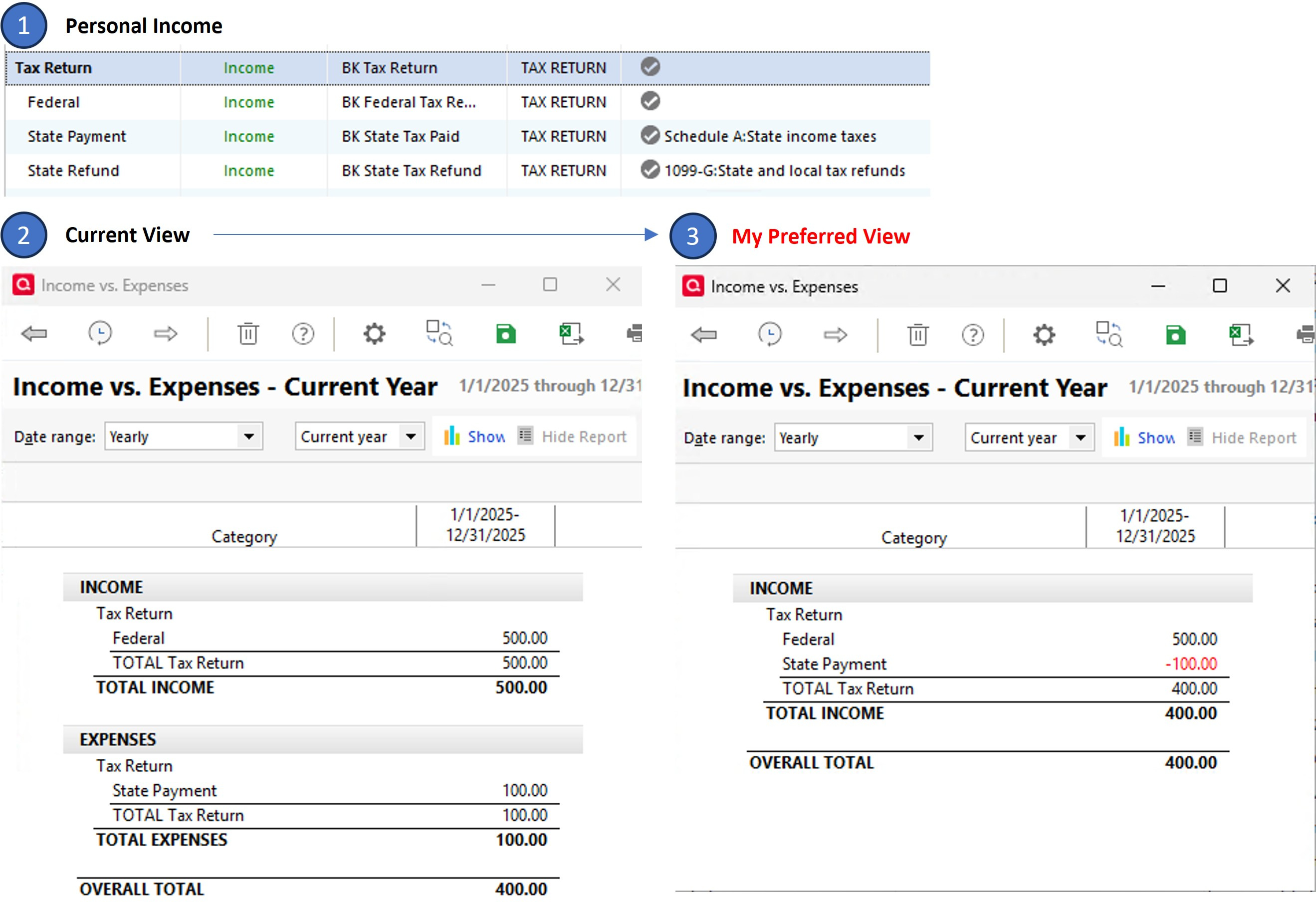
I have added my Tax Return category and sub-categories under the Personal Income section of the Category List (image-1). When I assign the Tax Line Item of Schedule A:State income taxes to the "State Payment" sub-category and run a report, the transaction shows up under the Expense section of Reports (image-2). I realize that it is an expense. But I prefer a unified view where it remains under the Income section of the report with a negative value (image-3), such that it is consistent with its category.
The only way I can accomplish my preferred view is by removing the assigned TLI, which unfortunately removes it from the tax planner as well (I am still considering this since I can manually enter it into the Tax planner). Long shot but I am curious if there is a hack to keep it under the Income section of reports without removing the TLI. Thank you.
- Q Win Deluxe user since 2010, US Subscription
- I don't use Cloud Sync, Mobile & Web, Bill Pay
Best Answer
-
Hello @BK,
Thank you for reaching out! When I tested it in my Quicken, I found that Comparison reports will put it in the Income section as negative income. Other types of reports move it to the expenses section.
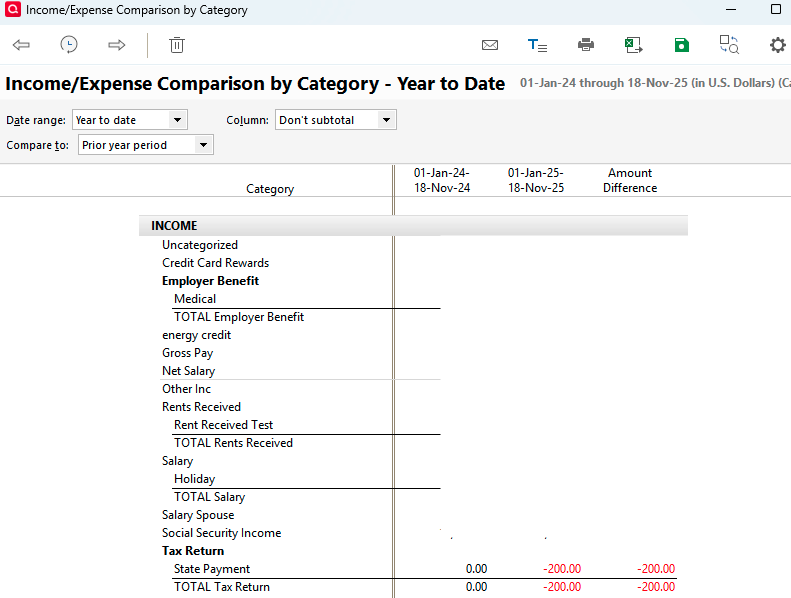
I hope this helps!
Quicken Kristina
Make sure to sign up for the email digest to see a round up of your top posts.
1

Answers
-
Hello @BK,
Thank you for reaching out! When I tested it in my Quicken, I found that Comparison reports will put it in the Income section as negative income. Other types of reports move it to the expenses section.
I hope this helps!
Quicken Kristina
Make sure to sign up for the email digest to see a round up of your top posts.
1 -
@Quicken Kristina , THANK YOU! Don't know how I missed that. That is very close to what I want to accomplish. Cheers.
- Q Win Deluxe user since 2010, US Subscription
- I don't use Cloud Sync, Mobile & Web, Bill Pay0 -
You're welcome!
I also reported this to the proper channels for further investigation and resolution, since it shouldn't be showing as an expense in those reports.
Thank you!
(CBT-929)
Quicken Kristina
Make sure to sign up for the email digest to see a round up of your top posts.
1 -
Yeah I was not sure if this behavior was by design or an anomaly, but the inconsistency should be reviewed. I just assumed that since it is a "Schedule A" TLI, it just automatically reverts to an Expense. Then again, it is inconsistent between various reports, where in Income v Expense report it goes under the Expense section, and then in Inc/Exp Comparison it goes under the Income section!
- Q Win Deluxe user since 2010, US Subscription
- I don't use Cloud Sync, Mobile & Web, Bill Pay1 -
Thank you for your reply,
The reports that show it as an expense seem to be influenced by which tax line item is selected. I tested with 1099-R: Total pension gross distrib., and that one did show under income. Tax line items associated with expenses seem to trigger this behavior, even though they're assigned to an income category/subcategory.
Thank you!
Quicken Kristina
Make sure to sign up for the email digest to see a round up of your top posts.
1 -
The reports that show it as an expense seem to be influenced by which tax line item is selected
Apparently so.
Out of curiosity, should the Inc/Exp Comparison by category report be identical to the Dashboard's Income vs Expense? Which in this particular case they differ by the TLI. End Totals are the same of course.
I found another difference between the two that is less obvious which I need to do some testing before bringing it up to your attention.- Q Win Deluxe user since 2010, US Subscription
- I don't use Cloud Sync, Mobile & Web, Bill Pay0 -
I'll retract my prior statement of "I found another difference between the two reports" as I couldn't nail it down.
The only inconsistency between the two reports (that I know of so far) is what we already discussed and agreed, that how certain tax line items may influence where a transactions is positioned and it is inconsistent between the two reports. Preferably they should remain in their respective Income category section in this case.
Thank you for reporting it to the teams and I hope they review it and arrive at a resolution one way or another. Naturally this is very minor. With regards.
- Q Win Deluxe user since 2010, US Subscription
- I don't use Cloud Sync, Mobile & Web, Bill Pay0 -
Thank you for your replies,
The dashboard tile looks like it's based on the Income/Expense report. Provided that all settings are set the same (timeframe, accounts, etc.), I would expect it should match the report, aside from possibly the tax line item issue.
Thank you!
Quicken Kristina
Make sure to sign up for the email digest to see a round up of your top posts.
0