Duplicates Again (in Fidelity account)

For two consecutive days Quicken wants to add 70 items to my register in my Fidelity cash management account that are already in my register. A few items showed a match but over 70 are shown as new and are not. Am I expected to review each one? This cannot be right.
Comments
-
Adding a Fidelity datapoint - my accounts haven't updated in two weeks. Perhaps, related?
0 -
Hello @es114,
Thank you for letting us know you're seeing this issue. To help troubleshoot, please provide more information. Are these duplicate transactions downloading every time you update your account, or only after connecting/reconnecting your account in Quicken?
Hello @Sparksnorthern,
Thank you for letting us know you're seeing this issue. If new transactions haven't downloaded, and you can see on the financial institution website that there are new posted transactions that should be downloading, please start troubleshooting by following these steps from our article on missing transactions/transactions not downloading:
Be sure to follow these steps in order:
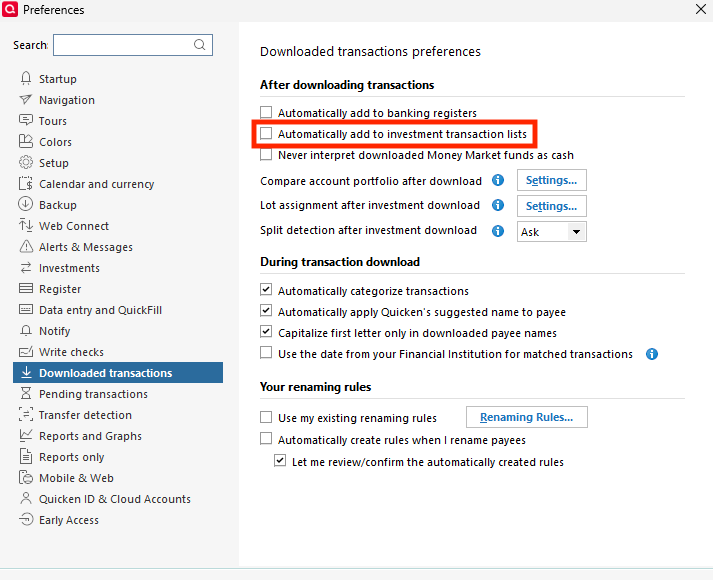
1. Go to Edit > Preferences > Downloaded Transactions. The option Automatically add to investment transaction lists needs to be unchecked.
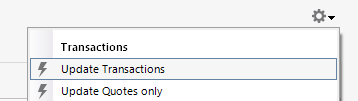
2. Refresh your online account information by clicking the Actions Gear Icon on the upper right of the register, and select Update Transactions. Follow the on-screen instructions to complete the update.
3. Confirm that the Sort Order in your account is by Date; just click the top of the Date column in your account register. It's possible the transactions are in your register, but not where you thought they'd be.

4. Try refreshing your login session: To do this, go to Help > Refresh Sign in. After completing the log-in process, trying running a One Step Update again.
5. Go to Tools > Account List and check Show Hidden Accounts at the bottom left. Confirm the missing transactions haven't been added to a hidden account by clicking on the name of any account that appears with a check mark in the Hidden column.

I look forward to your response!
Quicken Kristina
Make sure to sign up for the email digest to see a round up of your top posts.
0 -
Kristina,
The duplicate transactions occurred on Monday and Tuesday. I have transitioned to EWC+ 2 weeks ago. I contacted Fidelity support and had them look at my screen. I was told this never happened before, to accept the 79 transactions and manually delete each one. Ridiculous.
0 -
Thank you for your reply,
Has the issue persisted, or did it happen on Monday and Tuesday, then stop?
There is a way to bulk delete investment transactions. To do it, you would first backup your file (just in case something you needed to keep gets deleted). Then, in your investment account register, click the gear icon near the upper right. Select Edit Multiple Transactions.
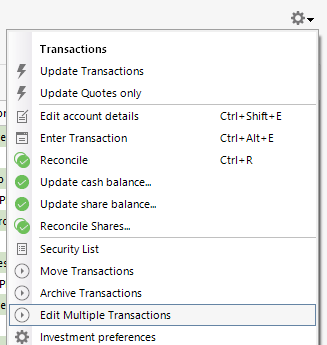
Once that window comes up, you can select the transactions you want to Delete and click the Delete button near the bottom of the window.
I hope this helps!
Quicken Kristina
Make sure to sign up for the email digest to see a round up of your top posts.
0
