Data not flushing


Answers
-
Haven't seen that before. It sounds like either your disk is full or is inaccessible. Is your data file on the C drive or do you have it stored somewhere else?
Quicken Windows user since 1993.
0 -
I have also not experienced this issue in 15+ years of using Quicken.
It is on another drive with 255GB of free space. The file was updated, and the size increased by 80KB, which seems about right. I have been experiencing this problem for the past several days. I was hoping Quicken had done some maintenance, and it would clear up in a day or so.
Strange.
0 -
Does "DB" stand for Database? If you know.
0 -
Yes, generally "DB" would mean database.
I wonder if you are having intermittent drive access issues while Quicken is trying to write to the file. It could just happen very briefly and then Quicken tries again momonts later and is successful. Just a thought.
Quicken Windows user since 1993.
0 -
Where are you storing your data file?
If something like a cloud folder service or a backup program locked your data file, this might be the result.
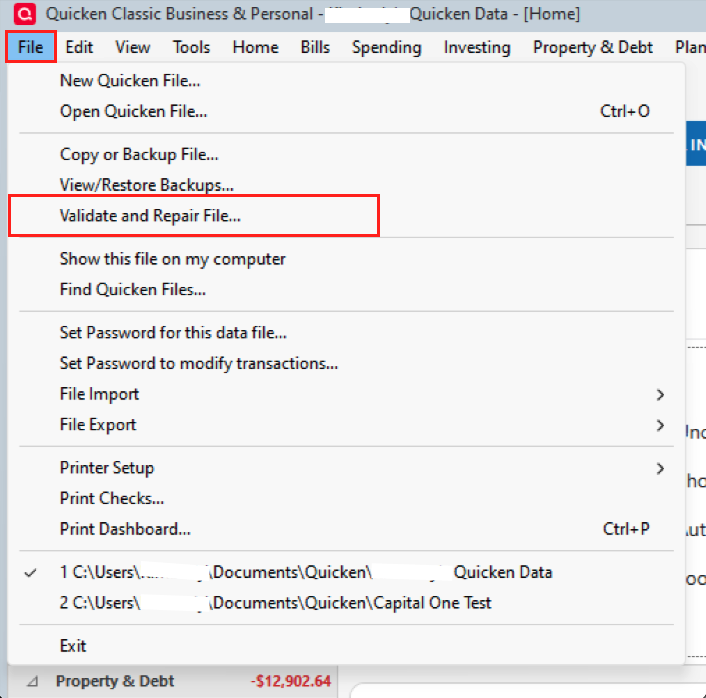
I would also run Validate and Repair. There might be something corrupted in your data file.
0 -
Hello @Jerry Pederson,
Thank you for sharing your experience.
This is my first time seeing this one as well. I would also assume DB stands for Database.
I would like to suggest moving your file off the external drive. Accessing/using your active data file while it is stored externally can cause data file damage. The default location is C:>Users>username>Documents>Quicken, and this is where we recommend keeping the file you are actively working in.
That being said, it's fine to store/save backups to external drives or cloud services.
After moving the file, I would then do the validation, as @Chris_QPW suggested, and check to see if you still get the error.
Hope this helps!
Quicken Alyssa
Make sure to sign up for the email digest to see a round up of your top posts.
0 -
I'm sorry I missed where you said it was an external drive. I agree with @Quicken Alyssa the first step would be to move the data file. Note, is this actually an external drive like connected by USB or internal?
I would caution though about the path
C:>Users>username>Documents>Quicken.A lot of people use OneDrive for backing up folders like Documents, and so if you just put the data file in Documents\Quicken you are actually putting it in: "C:\Users\Username\OneDrive\Documents\Quicken".
This might not be obvious that there is a difference between these two paths.
I personally use C:\Quicken for my data files. And pin it in Windows File Explorer so that I can access it quickly.
0 -
I restored a 2-day-old file. I no longer get this odd message. What is hard to understand is why, in the first place, I got this message.
1 -
Thank you for letting us know what steps you took to resolve the issue. Glad you were able to get rid of the message.
My best guess as to why this happened is the file location. As I briefly mentioned before, using your file while it is stored externally can cause damage to the file.
If you need more help, you know where to find us.
Quicken Alyssa
Make sure to sign up for the email digest to see a round up of your top posts.
0

