Numerical Precision for Shares of Investments

I have been manually correcting the number of shares for about 20 of my investment positions for 3 years ever since the problem appeared in November, 2022. On numerous occasions, I have sought help from quicken support and the final answer has always been that this problem will not be fixed.
I am at the point where I am exploring a work-around that would involve downloading transactions directly from my brokerage and writing a program to produce a file of the correct updates to be fed into quicken much like the web-connect downloads. Has anyone tried such an approach?
Comments
-
Why do you have to correct the number of shares on your securities?
Typically, these days, stock shares and mutual funds are traded with 3 decimal places,When manually entering a Buy, Sell or other type investment transaction, you should enter
- the actual number of shares traded,
- the final transaction amount and
- the Commission.
Do not enter the price per share. This leads to rounding errors. Let Quicken calculate the price per share to as many decimal places as it sees fit.
0 -
The direct connect download has the precision to 4 decimal places (eg, 0.2304), but when quicken accepts the transaction, it has only two decimal places (eg, 0.23). To keep quicken shares in sync with the broker, I need to update to 4 decimal places. (All this after translating the difference between Quicken's $100 bond face value standards and the way most brokerage firms report bond face values.)
0 -
In case anyone is wondering, I have my preferences for investment transaction precision set to 8 decimal places.
0 -
Direct Connect doesn’t specify the precision.
This whole subject has many twists and turns.
The first is to understand is that there is no standard on what the financial institution has to use. On top of that I have seen cases where they use one precision on their website and use a different one (usually lower) to Quicken. The logs are the place to see what Quicken gets. Help → Contact Support → Log files. OFX for Direct Connect and Cloud Sync for Express Web Connect +.
Past that one has to realize that like most programs Quicken doesn’t store numbers like that internally. They are stored in a binary format and as such there are some decimal numbers that just can’t be stored precisely, so there is almost always some rounding used. There is also a limit to precision of that storage even in binary, I will skip over that because for this use case it should be enough. And then depending on where you are looking there might be rounding errors in calculations.
Note the selection for 8 digits is telling Quicken what to round to.
So, let’s start at the most obvious, if the financial institution isn’t sending the digits there is nothing Quicken can do.
As for rounding if you can manually correct the values clearly Quicken isn’t rounding at that point.
That would only leave rounding in the code that reads from what it downloaded to when it stores it into the register.
Going only by what I have read in the forum, the 8 digits support was put in a while back and immediately caused problems for some people. Because even without selecting this option some of the rounding in the program changed and they were left tiny fractional shares they had to clean up. But then that mostly passed and they were left people that requested the feature were mostly happy except for the lack of pricing and downloads for crypto currency in some cases. Then not too long ago people were reporting that the 8 digit precision wasn’t working properly. I don’t know the details on that complaint.
0 -
Quicken support has had several opportunities to provide feedback; they've scoured the logs and tried every trick they know. I have also asked the brokerage to review my procedure for reconciling accounts. The brokerage claims they are providing the transaction download according to specs. Since there is no accepted problem by any party, I am left to find a solution. I have been manually updating the downloaded transactions for three years. I would like an automated option. I can write code, but the downloaded quicken transaction are in a proprietary format. The brokerage will give me the transactions in excel format which are easily converted to csv. From there a program could create an ofx file, but I don't know if Quicken would accept it. That is why I am asking if anyone has been down this path.
0 -
Take a look at ImportQIF.
0 -
I agree with djrfree. I have to edit the Vanguard ETF shares sold every time I close out my position and sell all shares. Otherwise, Quicken shows either negative or positive remaining fractional share instead of 0.
0 -
I would be really interested in seeing what the share numbers are in the log files. That would certainly help pin down exactly where the problem is. With Direct Connect the logs are the exact conversation between Quicken and the financial institution's OFX server. Quicken sends a request for the transactions and the OFX server sends the result. Note the Web Connect/QFX file is basically this "result" part of the conversation. The Direct Connect conversation and the QFX file should agree on what is sent.
I haven't had a Vanguard account in several years, but I doubt Direct Connect has changed in all these years and I have some old QFX files.
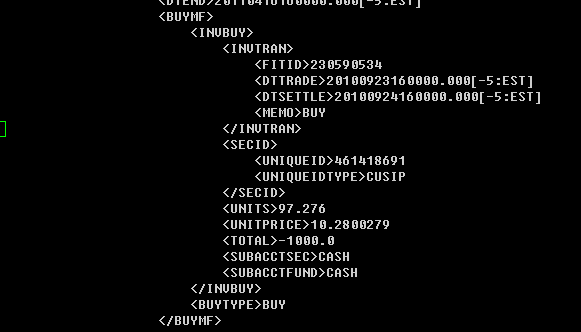
Here is a "pretty formatted of one such transaction" (normally Vanguard QFX transactions have no line breaks or indenting). The UNITS are the number of shares, and in no case do I see them exceeding three digits after the decimal point. The share price on the other hand has much more digits but really doesn't count since it will quickly be replaced. I think Quicken just does its own math based on the total/fees and the number of shares.
 0
0 -
You are correct that the OXF feed from the brokerage contains the correct number of decimal places. That is how I know haw to correct the posted transactions in Quicken. In the example I gave earlier, where I had to correct the posted number of shares from 0.23 to 0.2304. The OXF file has the number of shares as 23.04. Part of the problem is that Quicken records "shares" of bonds in terms of 1 share = $100 in bond face value. The brokerage accounts for bonds in $1.00 of face value, a 100 to 1 ratio. so when Quicken imports and posts the downloaded transaction, it divided the 23.04 by 100 and truncates the result to 2 decimal places, giving 0.23 shares. (In my experience, it always truncates.) The program code needs to keep more digits during arithmetic operations.
 0
0 -
Instead of having the "type" of an investment as "bond"; perhaps it should be a "mutual fund". That might help with your rounding issues. I am not certain how this would impact your past transactions, and I would suggest you try it on an investment that only has a few transactions to see how this would impact various reports and such.
1 -
Thanks. I may need to experiment with using the mutual fund designation. Ever sine this problem started with release 45 in November of 2022, I have been told that it was a problem with the code in that release and that it would be fixed, but it wasn't a priority: Quicken Case # 9953048 on R46.9 as of 10 Jan 2023. Since it has now been 3 years, and I haven't checked back with support for almost two years, I have been thinking about work-arounds. Perhaps the mutual fund approach will work. At least given me another alternative. Thanks.
0 -
Interesting! The latest drop R65.17 has this "What's New" message:
"new Import investing transactions"
"You can now import investing transactions from a CSV file that you create in any spreadsheet program."
Perhaps that will prove a work-around, but I'd still rather have a fix to the truncation problem0 -
The CSV import option was snuck in a couple weeks ago, they just got around to announce it from what I have seen.
The CSV file has to be pretty much in the exact format that Quicken expects or it won’t work. It isn’t a generic conversion feature. And unless they have fixed it, it has problems:
0




Categories
- All Categories
- 6 Product Ideas
- 34 Announcements
- 248 Alerts, Online Banking & Known Product Issues
- 19 Product Alerts
- 265 Welcome to the Community!
- 301 Before you Buy
- 1.5K Product Ideas
- 55.8K Quicken Classic for Windows
- 16.9K Quicken Classic for Mac
- 1K Quicken Mobile
- 834 Quicken on the Web
- 129 Quicken LifeHub