Cant' Connect Walmart OnePay Cash Rewards Synchrony Bank With Quicken
Answers
-
I have added my Walmart Synchrony OnePay complaint (same as everyone else's) as a Quicken problem report. I'm hoping they will have a fix soon. I can't try the workarounds that some others have used because I don't have any other Synchrony accounts.
1 -
Thank you for sending in your logs and letting me know you had done so.
I have added you to the ticket.
Thanks again!
Quicken Alyssa
Make sure to sign up for the email digest to see a round up of your top posts.
0 -
I was able to access mine by logging into one of my other Synchrony accounts in Quicken. Now my transactions are loading.
1 -
All,
I was able to follow a similar path. I have a Sam’s Club card, which is also issued by synchrony. The Walmart one pay card showed up on the same site for the Sam’s Club card. I found a different thread to get the Sam’s Club card added to quicken (it’s finally supported after so many years of not working!). When I added the Sam’s Club card, it had the Walmart one pay card listed and I was able to link it.
Thanks to all for your helpful suggestions.
-Jason1 -
Thank you both for sharing what is working for you, as this may be useful information for other users.
You're contribution is appreciated.
Thanks again!
Quicken Alyssa
Make sure to sign up for the email digest to see a round up of your top posts.
0 -
I too am trying to add my Walmart OnePay card, but I don't have any other synchrony cards to use for the workaround. Can I please be added to the ticket here?
0 -
Hello @fitzannae,
Thank you for adding to this discussion.
Yes, you can absolutely be added to the ticket. Based on the email you have used for your Community profile, I see that you have a Quicken Simplifi subscription. If you also have Quicken Classic, maybe under a different email, please send us your log files by going to Help>Report a problem>Send to Quicken, from within your Quicken software.
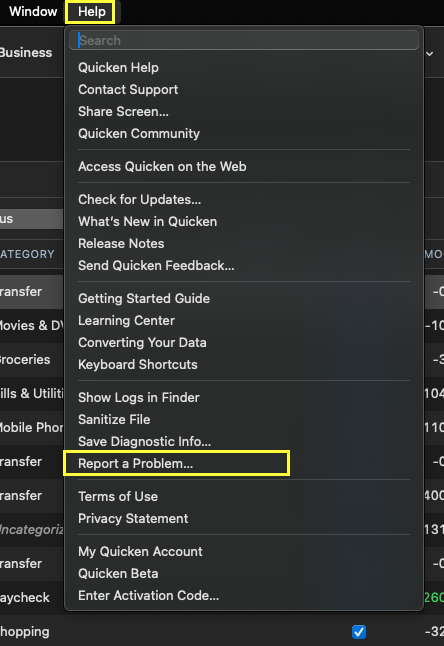
Once you have sent them over, let me know, and I will add you.
If you only have Quicken Simplifi, please visit the Simplifi Community to report the issues you are having.
Thank you.
Quicken Alyssa
Make sure to sign up for the email digest to see a round up of your top posts.
0 -
I was able to get mine working by going to the web interface for my CareCredit card. I had to sign up for the new sign-in thing. When I did, my OnePay card showed up. In Quicken, I added a new account with the Guitar Center card and both OnePay and Care Credit showed up.
1 -
This is what Synchrony told me. At this time, Synchrony does not currently support real time linking of accounts or access of billing information by Quicken because we are in the process of assessing the security protocols of this website. Please be assured that our Bank and our client Onepay are working with Quicken and other companies to complete this assessment and determine whether such access to your billing information can be securely restored. Also please note that you may continue to view electronic statements and electronic payment options at no cost on our credit website. Thus, you may sure export your statement activities online manually for the last 3 months via the programs that the system currently allows.
0 -
Thank you both for updating the thread with your findings.
This information will be useful the other users.
Thanks again!
Quicken Alyssa
Make sure to sign up for the email digest to see a round up of your top posts.
0 -
For everyone's info, I just closed my OnePay card, not only because of its inability to link with Quicken, but also the inability to download transactions as a csv or Excel file. The final straw was that, at the conclusion of the chat with customer service to close my card and account, I was unable to download the chat itself.
OnePay's interface is simple, but its lack of functionality makes it very user unfriendly to users who actually want to see and use the data.
3 -
I contacted OnePay today, since I made my first purchase, and wanted to add the account to my Q credit card section. I have multiple cash and other credit cards with Synchrony, but OnePay does not appear as an option.
I was advised that this feature will be added in early 2026. In the meantime, I set the card up manually as an offline account. This way, I can keep track of my spending. This action will require double-checking directly (online) with OnePay.
0 -
Hello @Mark Torpey & @PAUser,
Thank you both for updating the discussion with your most recent decisions and findings.
We appreciate it.
Quicken Alyssa
Make sure to sign up for the email digest to see a round up of your top posts.
0 -
This is disappointing and I have considered closing my OnePay account. I am now in the middle of my first full month with OnePay (after about a 3/4 month where I entered every charge manually). I am painfully forcing myself to not enter anything this month and I will do so when I receive the statement. We'll see how painful that is when the time comes. I often shop online and add/subtract items before it's actually time for delivery/shipping/pick-up. If it is a huge waste of time, I may close it and just use my Citi double cash back card, even though I hate to throw money away. I mainly wrote this post hopiong that I'll be notified of additional posts? Sorry you had to read it (if you did).
1 -
I am in the same boat. Signed up for Walmart Synchrony OnePay and was planning on using this for all my Walmart purchases. Since finding out about the inability to download transactions, I will probably be closing the card.
Please add me to the ticket.
2 -
Hello @ChelseaDrive & @jbp7000,
Thank you both for adding to this discussion.
@ChelseaDrive, If you bookmark this thread, you can track its progress.

I do get notifications on threads that I have responded to or commented on. If you will, depends on your notification settings in your profile.
In order to be added to the ticket, please go to Help>Report a problem>Send to Quicken and send over your log files. Let me know once you have, and I will get them added.
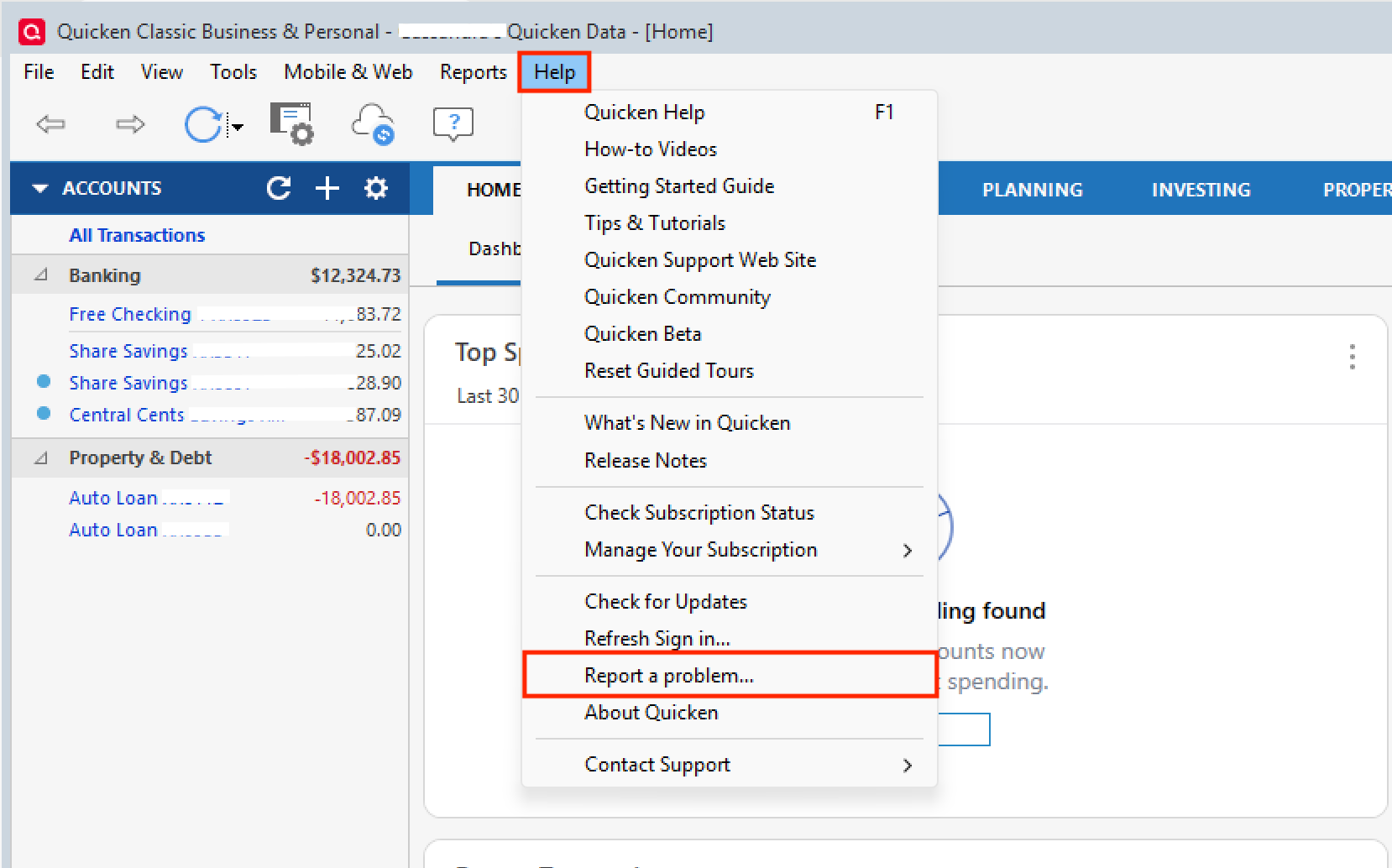
Thank you both!
Quicken Alyssa
Make sure to sign up for the email digest to see a round up of your top posts.
0 -
Its very frustrating quicken can not fix this, the one pay card works on every other budgeting app
2 -
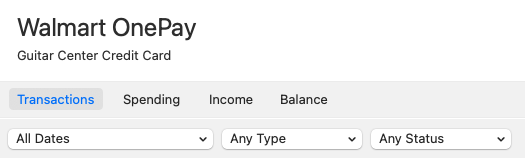
I just got mine to work using the Guitar Center CC as well. I just happened to have a GC account, and it just brought in both accounts. Don't know if you have to have both accounts for it to work, though. Good luck!
(It says "Guitar Center Credit Card" in Quicken…but it works.)
 1
1 -
Same issue as others. Was able to get around it by using my Synchrony Bank Lowe's Credit Card login information after adding the OnePay Credit Card using the "Add Synchrony Account To Manager" link on the Synchrony Bank Lowe's Credit Card webpage. It is still a hot mess on the Synchrony end as they tell me there is no way to consolidate all the credit cards into one login page or manager. So, it still means a login for Lowes, a separate one for Amazon Prime Store Card, etc.
2 -
Hello All,
Thank you to those who have added to this discussion with what worked for you.
Hopefully, others find it to be useful information as well.
Thanks again.
Quicken Alyssa
Make sure to sign up for the email digest to see a round up of your top posts.
0 -
I was able to log in to Synchrony's version of OnePay using this link You just need to sign up using your OnePay card's info. But there's no account in Quicken that uses the link Maybe they can add a generic synchrony with all of the store specific ones.
0 -
I tried this and successfully created a link to the account on the Synchrony side. When I attempted to add this to Quicken, I saw no other links other than Banking or a Lowe's credit card I have. I selected banking and entered the ID and PW used to access my just set up OnePay account. I received an error stating that my account could not be found and that I should verify and try again. On the second attempt, I was offered Synchrony Credit Cards as an option. I selected this, re-entered my information, but still received the same error message. So, still no joy here. I'll keep my records manually on Quicken and hope that they add a link in the near future, or someone finds another back door.
1 -
I have both Lowes and OnePay Synchrony cards but when I try to add the OnePay card to the Synchrony manager, it just says it can't find the account. I'm just using the OnePay card number as the "account number" as I don't know of any other account number.
How did you link them?
0 -
Hello All,
Thank you for adding to this discussion.
It might be worth trying to add your OnePay card using the Lowe's instance, since you already have that established.
For anyone who hasn't already done so, please go to Help>Report a problem>Send to Quicken and send over your log files.
Attaching a sanitized data file can be helpful too, but it is not required. Let me know once you have sent it, and I will get it added to the escalation ticket.
Thank you!
Quicken Alyssa
Make sure to sign up for the email digest to see a round up of your top posts.
0 -
I recently signed up for the OnePay card, largely for the cash back at Walmart as others have stated. But I have been unsuccessful in getting it to connect trying all the tricks mentioned. OnePay is a strange bird in that it is the virtual space between Walmart and Synchrony using a virtual card number, etc. I was able to set up a Synchrony account at (https://www.synchrony.com/accounts) using the credit card number.
I see that there is a site called . My guess is that this is the one that will eventually get added to the Quicken dropdown. However, I have not been able to establish my account there because, as someone else stated, I really don't know what my actual account number is. I'm going to wait and see if that shows up on my first statement.
I'll stick it out for a few months with manual transactions, using it only at Walmart for now, and see what happens in 2026. I find it hard to believe that Synchrony and Quicken would support cards such as Value City Furniture, Lowe's, Amazon, Guitar Center and not eventually support Walmart.
0 -
Hello All,
Can I please have you all try using the Wal-Mart Credit Card instance in Quicken to connect these accounts?
Before doing this, you will want to make sure the account is disconnected.
- Select the Tools menu and select Account List.
- In the Account List, select the account you want to deactivate, and then click Edit.
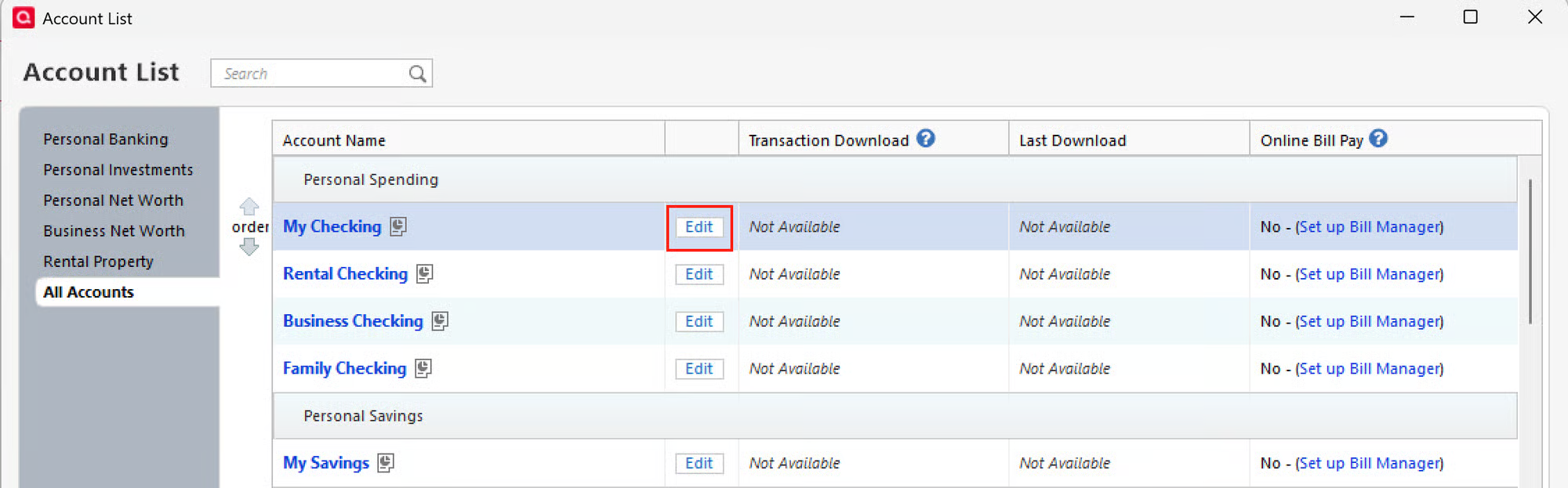
- In the Account Details window, click the Online Services tab.
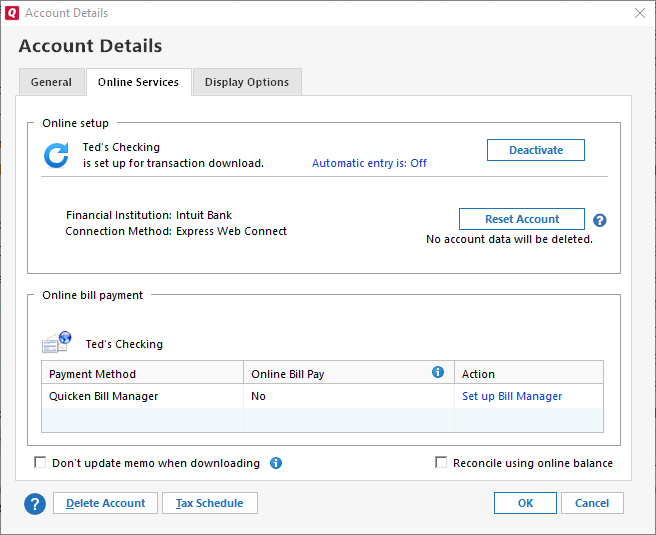
- Click Deactivate next to the service you want to disable.
- Click Yes to the message confirming if you want to disable this service. Note: If you do not receive this message, additional information is available below.
Then you can reconnect it using the "Wal-Mart Credit Card" option.
- Go to Tools > Add Account.
- Type in "Wal-Mart Credit Card".
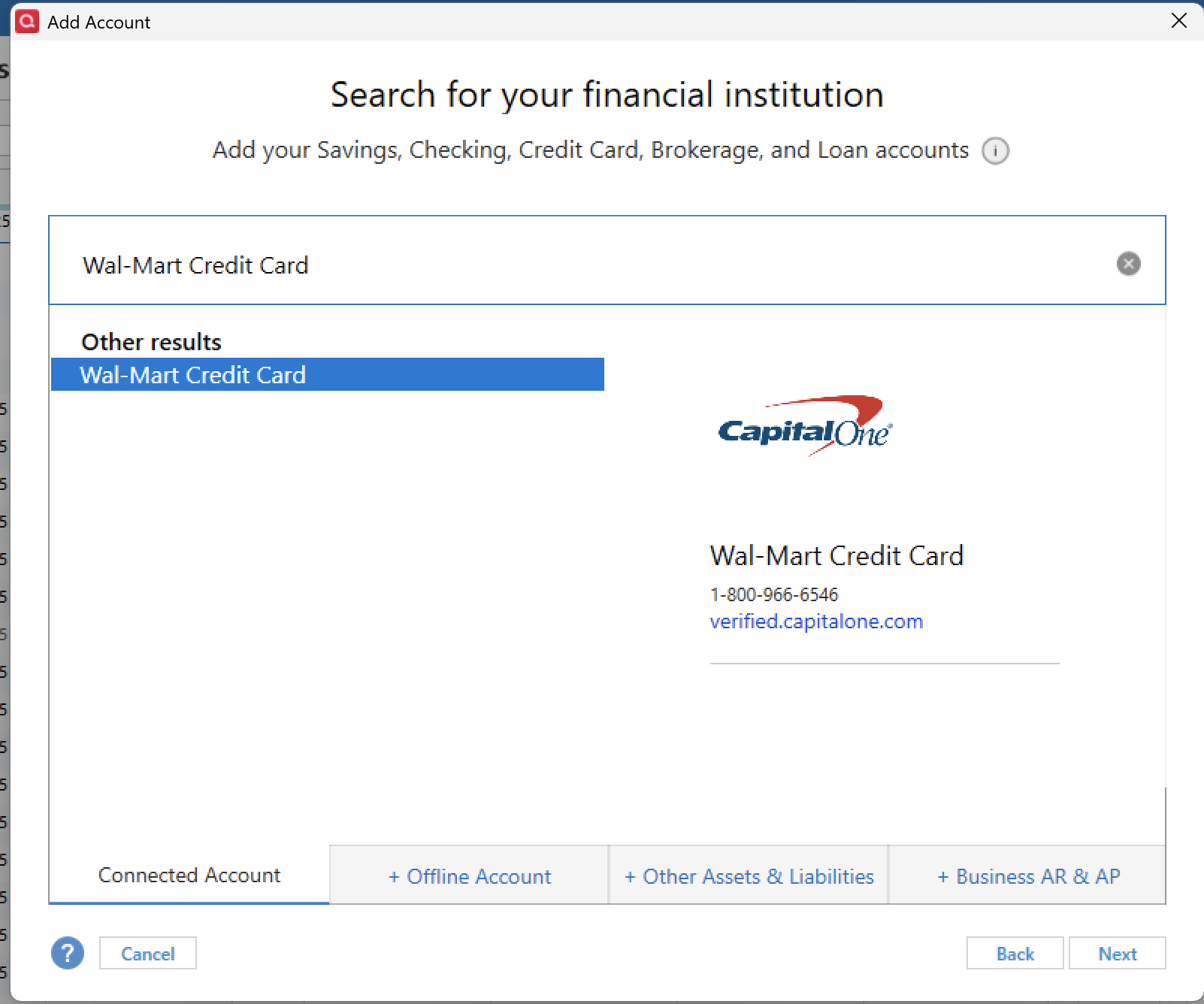
- Enter your credentials and click Connect.
- When the list of located accounts appears, choose LINK next to each account you want to reactivate.
- Click Next, then Done on the last prompt.
Let us know how it goes!
Quicken Alyssa
Make sure to sign up for the email digest to see a round up of your top posts.
-1 -
This doesn't work for me. Selecting "Wal-Mart Credit Card" takes me to the CapitalOne financial institution. I don't have a CapitalOne credit card. My OnePay login credentials have nothing to do with CapitalOne, so there is no way I can log in there.
[Removed-Rant]
0 -
I attempted the process you suggested. Doing so connects me to Capital One Bank (you can see this in your example) when the issuing bank is Synchrony. I tried to use my Synchrony login and was locked out of Capital One.
0 -
Hello @Mark Torpey & @griesheimer,
Thank you both for trying.
I will relay the results to the team handling this issue.
Thanks again!
Quicken Alyssa
Make sure to sign up for the email digest to see a round up of your top posts.
0 -
Same. Walmart used to use Capital One. I'm not sure if they still do or not. But all new cards are via Synchrony.
2

