TD Bank Downloads Fail

Since mid-November, all of my TD Bank accounts have failed to download in Quicken 2025 (W11). I have tried to deactivate and reactivate, as well as resetting accounts with no success.
After being a customer for over 15 years, I am beginning to question the accuracy and utility of this program that I pay annually for!
Also, for a long time now, when you reactivate an account, the account starting balance is some absurd number. Should this be corrected??
Comments
-
Same issue here. TD Bank "download" completes almostly instantly but no transactions are downloaded. I have reset my online connection and removed/restablished it multiple times and the same issue persists.
0 -
It has now been 10 days and my TD Bank accounts have not updated and there is no response from Quicken support!
0 -
Hello @knute97 & @John Rocke,
Thank you for letting us know you're seeing an issue with transactions not downloading. To troubleshoot, please follow these steps from our article on missing transactions/transactions not downloading:
Be sure to follow these steps in order:
1. Go to Edit > Preferences > Downloaded Transactions. The option Automatically add to banking registers needs to be unchecked.
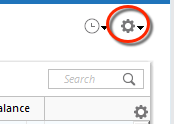
2. Refresh your online account information by clicking the Actions Gear Icon on the upper right of the register, and select Update Now. Follow the on-screen instructions to complete the update.
3. Confirm that the Sort Order in your account is by Date; just click the top of the Date column in your account register. It's possible the transactions are in your register, but not where you thought they'd be.

4. Click the Reset button at the top of the register. This will confirm that there's no filtering in your account register.
5. Try refreshing your login session: To do this, go to Help > Refresh Sign in. After completing the log-in process, trying running a One Step Update again.
6. Go to Actions (Gear Icon) > Register Columns > Check Downloaded Payee in the account register. This allows you to search by Payee to confirm the transactions haven't been renamed unexpectedly.
7. Go to Tools > Account List and check Show Hidden Accounts at the bottom left. Confirm the missing transactions haven't been added to a hidden account by clicking on the name of any account that appears with a check mark in the Hidden column.

The issue you mention with the opening balance changing is a known issue. For more information, please see this article:
If you haven't already done so, putting the correct opening balance in the memo column can make it easier to spot and correct the issue when it happens.
You also mentioned you haven't heard back from Support. Did you reach out via phone or chat? I can see that you sent a problem report, however, you will not receive a direct response when you send a problem report.

I hope this helps!
Quicken Kristina
Make sure to sign up for the email digest to see a round up of your top posts.
0 -
I have done all those steps and they did not help. I will report a problem.
0 -
Tried all the above and still get no downloads. Becoming quite disenchanted with Quicken since my main financial accounts are dead in the water since mid-November!
0 -
Thank you for your replies,
If the troubleshooting did not resolve the issue, then I recommend that you contact Quicken Support directly for further assistance, as they have access to tools we can't access on the Community and they're able to escalate the issue as needed. The Quicken Support phone number can be found through this link here. Phone support is available from 5:00 am PT to 5:00 pm PT, Monday through Friday.
I apologize that I could not be of more assistance!
Quicken Kristina
Make sure to sign up for the email digest to see a round up of your top posts.
0
